







Question: ASSEMBLY LANGUAGE X86 INTEL THE FOLLOWING IS THE CODE FOR CLEAR SCREEN CLRSCR PROCEDURE clrscr PROC ;clear screen = scroll the whole screen window. ;use
ASSEMBLY LANGUAGE X86 INTEL
THE FOLLOWING IS THE CODE FOR CLEAR SCREEN CLRSCR PROCEDURE
clrscr PROC
;clear screen = scroll the whole screen window.
;use coordinates 0,0 to 24,79
;BIOS INT 10h function 06h
mov ah, 06h ; scroll up
mov al, 0 ; entire window
mov ch, 0 ; upper left row
mov cl, 0 ; upper left col
mov dh, 24 ; lower right row
mov dl, 79 ; lower right col
mov bh, 7 ; attribute for blanked area
int 10h ; white: RGB=111=7
ret
clrscr ENDP --------------------------------------------------------------------
Initial Outline Code
main proc
.data
TestString01 BYTE "***********************************",0dh,0ah,
"* PROGRAM 5 TESTING PROCEDURE *",0dh,0ah,
"***********************************",0dh,0ah,0
TestString02 BYTE "WriteBin: Printing a binary number....: ",0
TestString03 BYTE "ReadChar: Type an ASCII character.....: ",0
TestString04 BYTE "Writechar: That character was.........: ",0
TestString05 BYTE "ReadString: Type an ASCII String......: " ,0
TestString06 BYTE "WriteString...........................: ",0
TestString07 BYTE "ReadDec: Type a 16bit Decimal number..: ",0
TestString08 BYTE "WriteDec: The Number was..............: ",0
TestString09 BYTE "ReadHex: Type a 16bit Hex number......: ",0
TestString10 BYTE "WriteHex:The Number was...............: ",0
TestString11 BYTE "WriteDec: Number of Characters Typed..: ",0
Buffer BYTE 10 DUP ('!')
.code
mov ax ,@data
mov ds,ax
call clrscr ;Clear the Screen
mov dx, offset TestString01 ;First Large Prompt/Header
call writestring
call crlf
;;;;;;;;;;;;;;;;;;;;;;;;;;;;;;;;;;;;;;;;;;;;;;;;;;;;;;;;;;;;;;;;;;;;;;;
call crlf
mov dx, offset TestString03 ;Prompt to Test ReadChar
call WriteString;
call Readchar ; Reads Filtered Char into AL
call crlf
mov dx, offset TestString04 ;Prompt for WriteChar
call WriteString
call Writechar ; Writes ASCII char in AL to Screen
call crlf
;;;;;;;;;;;;;;;;;;;;;;;;;;;;;;;;;;;;;;;;;;;;;;;;;;;;;;;;;;;;;;;;;;;;;
call crlf
mov dx, offset TestString05 ;Prompt for ReadString
call WriteString;
mov dx, offset buffer ; Where to store the read-in-String
mov cx, 9
call ReadString ;Stores typed string to where DX points
call crlf
mov dx, offset TestString11 ; Prompt for WriteDec, which will
call WriteString ; print out the number of characters typed
Call WriteDec
Call Crlf
mov dx, offset TestString06 ; Print out the string that was entered
call WriteString; ; uses DX register for source
mov dx, offset buffer
call writeString
call crlf
;;;;;;;;;;;;;;;;;;;;;;;;;;;;;;;;;;;;;;;;;;;;;;;;;;;;;;;;;;;;;;;;;;;;;;
call crlf
mov dx, offset TestString07 ;Prompt for ReadDec Test
call WriteString;
call ReadDec ; puts value in AX
call crlf
mov dx, offset TestString08 ; Prompt for WriteDec Test
call WriteString;
call WriteDec ; Print AX register in Decimal
call crlf
mov dx, offset TestString02 ; Prompt for WriteBin test
call WriteString;
call writebin ; Prints AX register in Binary
call crlf
;;;;;;;;;;;;;;;;;;;;;;;;;;;;;;;;;;;;;;;;;;;;;;;;;;;;;;;;;;;;;;;;;;;;;;;
call crlf
mov dx, offset TestString09 ; Prompt for READHEX
call WriteString;
call ReadHex
call crlf
mov dx, offset TestString10 ; Prompt for WRITEHEX
call WriteString;
call WriteHex ; Prints AX register in Hexidecimal
mov ax, 4c00h
int 21h
main endp
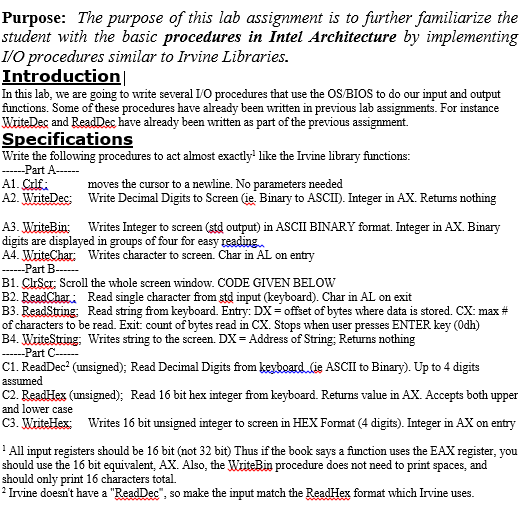
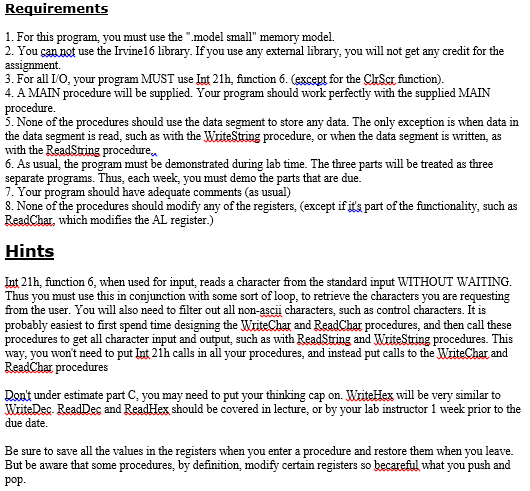
Purpose: The purpose of this lab assignment is to further familiarize the student with the basic procedures in Intel Architecture by implementing IO procedures similar to Irvine Libraries. Introduction In this lab, we are going to write several Lo procedures that use the OS/BIOS to do our input and output functions. Some of these procedures have already been written in previous lab assignments. For instance WriteDec and ReadDec have already been written as part of previous assignment. the Specifications Write the following procedures to act almost exactly like the Irvine library functions Part A moves the cursor to a newline. No parameters needed A2. WriteDec: Write Decimal Digits to Screen Ge. Binary to ASCID. Integer in AX. Retums nothing A3. WiteBin: Writes Integer to screen (std output in ASCII BINARY format. Integer in AX. Binary digits are displayed in groups of four for easy reading A4 Writes character to screen. Char in AL on entry Part B B1. CIrScr: Scroll the whole screen window. CODE GIVEN BELOW B2. ReadChari Read single character from Std input (keyboard). Char in AL on exit B3. Read String Read string from keyboard. Entry: DX offset of bytes where data is stored. CX: max of characters to be read. Exit: count of bytes read in CX. Stops when user presses ENTER key (Odh) B4. Write String, Writes string to the screen. DX Address of String. Returns nothing Part C- C1. Read Dec (unsigned); Read Decimal Digits from keyboard ie ASCII to Binary Up to 4 digits assumed C2. Read Hex (unsigned), Read 16 bit hex integer from keyboard. Retums value in AX. Accepts both upper and lower case C3. WriteHex Writes 16 bit unsigned integer to screen in HEX Format 4 digits. Integer in AX on entry All in registers should be 16 bit (not 32 bit Thus if the book says a function uses the EAX register, you should use the 16 bit equivalent, AX. Also, the WriteBin procedure does not need to print spaces, and should only print 16 characters total. Irvine doesn't have a "ReadDec so make the input match the ReadHex format which Irvine uses Purpose: The purpose of this lab assignment is to further familiarize the student with the basic procedures in Intel Architecture by implementing IO procedures similar to Irvine Libraries. Introduction In this lab, we are going to write several Lo procedures that use the OS/BIOS to do our input and output functions. Some of these procedures have already been written in previous lab assignments. For instance WriteDec and ReadDec have already been written as part of previous assignment. the Specifications Write the following procedures to act almost exactly like the Irvine library functions Part A moves the cursor to a newline. No parameters needed A2. WriteDec: Write Decimal Digits to Screen Ge. Binary to ASCID. Integer in AX. Retums nothing A3. WiteBin: Writes Integer to screen (std output in ASCII BINARY format. Integer in AX. Binary digits are displayed in groups of four for easy reading A4 Writes character to screen. Char in AL on entry Part B B1. CIrScr: Scroll the whole screen window. CODE GIVEN BELOW B2. ReadChari Read single character from Std input (keyboard). Char in AL on exit B3. Read String Read string from keyboard. Entry: DX offset of bytes where data is stored. CX: max of characters to be read. Exit: count of bytes read in CX. Stops when user presses ENTER key (Odh) B4. Write String, Writes string to the screen. DX Address of String. Returns nothing Part C- C1. Read Dec (unsigned); Read Decimal Digits from keyboard ie ASCII to Binary Up to 4 digits assumed C2. Read Hex (unsigned), Read 16 bit hex integer from keyboard. Retums value in AX. Accepts both upper and lower case C3. WriteHex Writes 16 bit unsigned integer to screen in HEX Format 4 digits. Integer in AX on entry All in registers should be 16 bit (not 32 bit Thus if the book says a function uses the EAX register, you should use the 16 bit equivalent, AX. Also, the WriteBin procedure does not need to print spaces, and should only print 16 characters total. Irvine doesn't have a "ReadDec so make the input match the ReadHex format which Irvine uses
Step by Step Solution
There are 3 Steps involved in it

Get step-by-step solutions from verified subject matter experts
 Study Help