







Question: Assemby Problem Program Template: Include Irvine32.inc A_grade = 90 ;the minimum score to get an A (can be changed according to the grading scale used)
Assemby Problem
Program Template:
Include Irvine32.inc
A_grade = 90 ;the minimum score to get an A (can be changed according to the grading scale used)
B_grade = 80 ;the minimum score to get a B (can be changed according to the grading scale used)
C_grade = 70 ;the minimum score to get a C (can be changed according to the grading scale used)
D_grade = 60 ;the minimum score to get a D (can be changed according to the grading scale used)
.data
prompt1 BYTE "Enter the output filename: ", 0
prompt2 BYTE "Enter the number of inputs (must be at least 1): ", 0
prompt3 BYTE "Enter a score (must be 0 - 100): ", 0
filename BYTE 50 dup(?) ;stores the filename entered by the user
score BYTE 10 dup (?) ; scores entered by the user are read in as strings. For example,
; 100 is read in as the string "100".
; The function ParseInteger32 needs to be used to convert the string
; to the equivalent 32-bit number (DWORD)
; The string is used to write the number to the output file
num_of_digits DWORD ? ; for each number, we need to know the number of digits in that number
; so it can be written to the file correctly
letter_grade BYTE ? ; stores the letter grade ('A', 'B', 'C', 'D', or 'F')
msg_score BYTE "Score: ", 0
msg_grade BYTE " Letter grade: ", 0
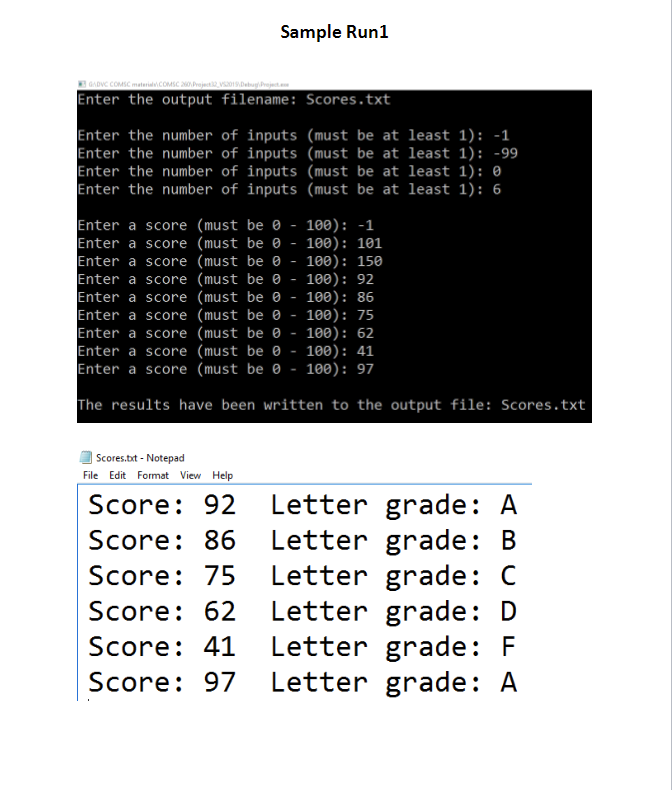
msg_end BYTE "The results have been written to the output file: ", 0
line_return BYTE 0Dh, 0Ah, 0
file_handle DWORD ?
.code
main proc
;IMPLEMENT MAIN
;IMPLEMENT MAIN
;IMPLEMENT MAIN
invoke ExitProcess, 0
main endp
get_filename proc
mov edx, OFFSET prompt1 ; get ready to call WriteString
call WriteString
mov edx, OFFSET filename
mov ecx, LENGTHOF filename ; get ready to call ReadString
call ReadString
ret
get_filename endp
get_num_of_inputs proc
mov edx, OFFSET prompt2 ; get ready to call WriteString
L1: call WriteString
call ReadInt ; the user's input is in eax
cmp eax, 1 ; if the users input is less than 1, jump back to label L1 and prompt the user again
jl L1 ; this is a do-while loop in assembly
; jl means "jump is the destination is less than the source"
mov ecx, eax ;setup ecx to prepare for the loop in main
; the result is returned to main through ecx
ret
get_num_of_inputs endp
get_score proc
;IMPLEMENT GET_SCORE
;IMPLEMENT GET_SCORE
;IMPLEMENT GET_SCORE
get_score endp
calculate_grade proc
;IMPLEMENT CALCULATE_GRADE
;IMPLEMENT CALCULATE_GRADE
;IMPLEMENT CALCULATE_GRADE
calculate_grade endp
write_file proc
;IMPLEMENT WRITE_FILE
;IMPLEMENT WRITE_FILE
;IMPLEMENT WRITE_FILE
write_file endp
display_output proc
;IMPLEMENT DISPLAY_OUTPUT
;IMPLEMENT DISPLAY_OUTPUT
;IMPLEMENT DISPLAY_OUTPUT
display_output endp
end main
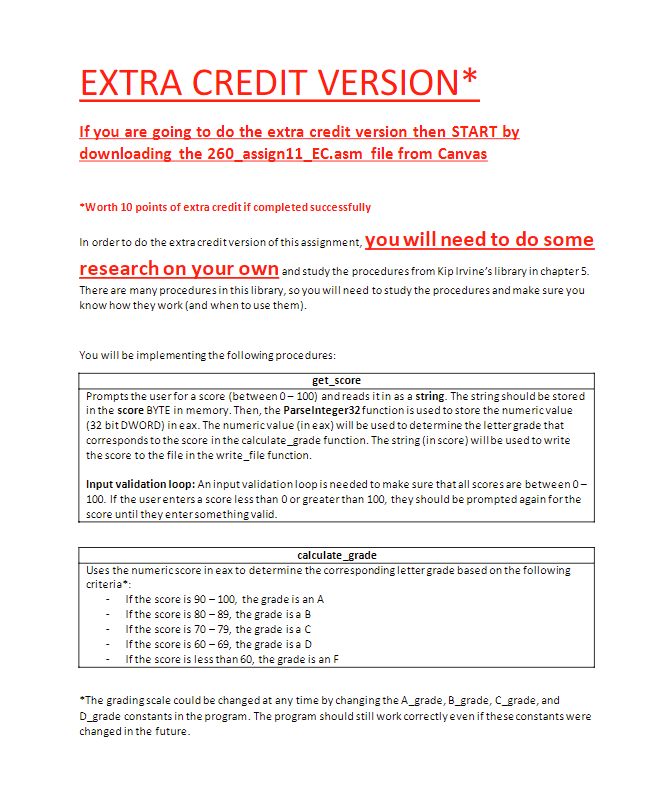
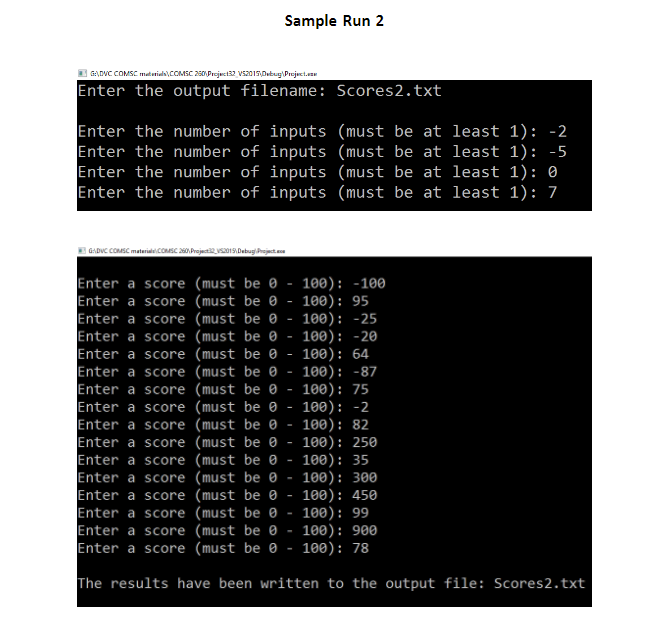
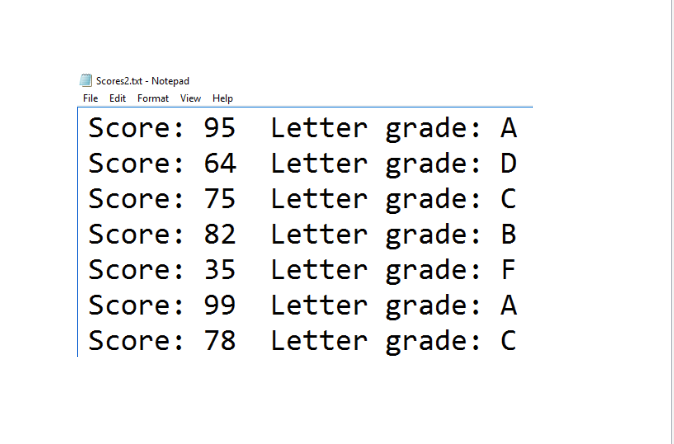
EXTRA CREDIT VERSION* ou are going to do the extra credit version then START b downloading the 260_assign11_EC.asm file from Canvas Worth 10 points of extra credit if completed successfully In orderto do the extra creditversion of this assignment, you will need to do some research on your own and study the procedures from Kip Irvine's library in chapter5. There are many proceduresin this library, so you will need to study the procedures and make sure you know how they work (and when to use them) You will be implementing the following procedures: get_score Prompts the userfor a score (between0 100) and reads itin as a string. The string should be stored in the score BYTE in memory. Then, the Parselnteger32 function is used to store the numericvalue (32 bit DWORD) in eax. The numericvalue in eax) will be used to determine the lettergrade that corresponds to the score in the calculate_grade function. The string (in score) will be used to write the score to the file in the write_file function. Input validation loop: An inputvalidationloop is needed to make sure thatall scores are between0- 100. If the userenters a score less than 0 or greaterthan 100, they should be prompted againforthe score until they entersomething valid calculate grade Uses the numericscore in eax to determine the corresponding lettergrade based on the following criteria - Ifthe score is 90 100, the grade is an A - Ifthe score is 80 89, the grade isa B - Ifthe score is 70 79, the grade isa C - Ifthe score is 60 - 69, the grade isa D - If the score is less than 60, the grade is an F The grading scale could be changed at any time by changing the A_grade, B_grade, C_grade, and D grade constants in the program. The program should still work correctly even if these constants were changed in the future EXTRA CREDIT VERSION* ou are going to do the extra credit version then START b downloading the 260_assign11_EC.asm file from Canvas Worth 10 points of extra credit if completed successfully In orderto do the extra creditversion of this assignment, you will need to do some research on your own and study the procedures from Kip Irvine's library in chapter5. There are many proceduresin this library, so you will need to study the procedures and make sure you know how they work (and when to use them) You will be implementing the following procedures: get_score Prompts the userfor a score (between0 100) and reads itin as a string. The string should be stored in the score BYTE in memory. Then, the Parselnteger32 function is used to store the numericvalue (32 bit DWORD) in eax. The numericvalue in eax) will be used to determine the lettergrade that corresponds to the score in the calculate_grade function. The string (in score) will be used to write the score to the file in the write_file function. Input validation loop: An inputvalidationloop is needed to make sure thatall scores are between0- 100. If the userenters a score less than 0 or greaterthan 100, they should be prompted againforthe score until they entersomething valid calculate grade Uses the numericscore in eax to determine the corresponding lettergrade based on the following criteria - Ifthe score is 90 100, the grade is an A - Ifthe score is 80 89, the grade isa B - Ifthe score is 70 79, the grade isa C - Ifthe score is 60 - 69, the grade isa D - If the score is less than 60, the grade is an F The grading scale could be changed at any time by changing the A_grade, B_grade, C_grade, and D grade constants in the program. The program should still work correctly even if these constants were changed in the future
Step by Step Solution
There are 3 Steps involved in it

Get step-by-step solutions from verified subject matter experts
 Study Help