







Question: Assignment 1 : Set up the Home page For this assignment, youll create the Home page for the Sports app. This Home page includes a
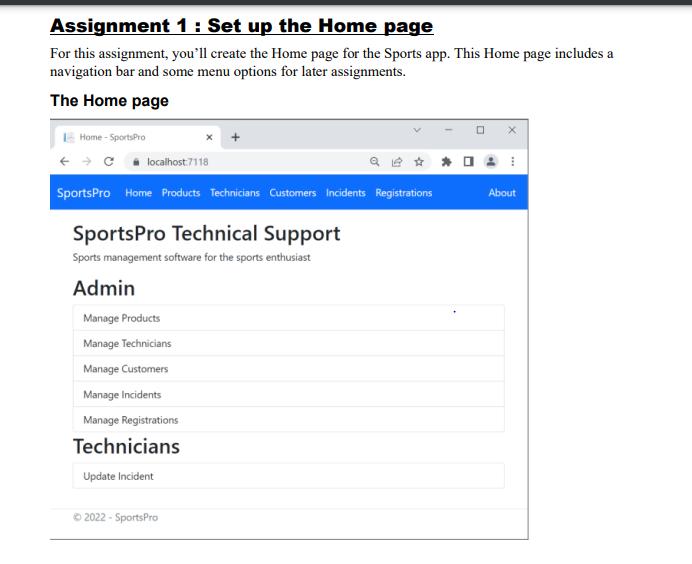
Assignment 1 : Set up the Home page For this assignment, you’ll create the Home page for the Sports app. This Home page includes a navigation bar and some menu options for later assignments. The Home page Specifications • Create an app that’s based on the Model-View-Controller template. Then, edit the code that’s provided by that template to create a Home page like the one shown above. • Use a Razor layout to store elements that are common to all pages, such as the navigation bar and the footer. • Use Bootstrap classes to format the HTML elements and to create the navigation bar. • Mark all navigation bar items as active. Please check the submission policy in the Getting Started module to see what all you need to submit.
Write the code using ASP.NET MVC Applications please
Assignment 1 : Set up the Home page For this assignment, you'll create the Home page for the Sports app. This Home page includes a navigation bar and some menu options for later assignments. The Home page Home - SportsPro Clocalhost:7118 SportsPro Home Products Technicians Customers Incidents Registrations SportsPro Technical Support Sports management software for the sports enthusiast Admin Manage Products Manage Technicians Manage Customers Manage Incidents Manage Registrations Technicians Update Incident 2022 - SportsPro About
Step by Step Solution
There are 3 Steps involved in it

Get step-by-step solutions from verified subject matter experts
 Study Help