







Question: Assignment #10: Marginal Tax Rates In this assignment we will modify the TaxManager class to allow different tax rates based on income Inputs: Enter Employee
Assignment #10: Marginal Tax Rates In this assignment we will modify the TaxManager class to allow different tax rates based on income Inputs: Enter Employee Id: 123456 Enter Employee first name: Larry Enter Employee last name: Schoeneman Enter # of hours worked this week: 50 Enter hourly rate of pay: $10.00 Output: Employee Id : 123456 Last Name: Schoeneman First Name: Larry Week of 6/11/2020 (use current date) Hours Worked: 50 Hourly Rate: $10.00 Regular Pay: 40 hours at $10/hr: $400.00 Overtime Pay: 10 hours at $15/hr: 150 Gross Total: $650.00 Would you like to enter another employee? (Y/N) Payroll Summary Report Total # of Employees : n (where n is the number of employees entered Total Gross Salary : $XXXx.xx Total Normal Time Gross: $xxx.xx Total Overtime Gross: $xxx.xx Total Federal Taxes: $xxxx.xx Total State Taxes: $xxxx.xx Total FICA: $xxxx.xx Specification: In this version of the application, we want to implement incremental tax rates as follows based on 26 pay periods per year multiplied out: 1. Federal Tax Rate: a. $0 $10,000 ANNUALIZED salary based on gross - 10% Tax Rate b. $10,001 - $25,000 ANNUALIZED salary based on gross 15% Tax Rate c. $25,000 - $50,000 ANNUALIZED salary based on gross - 20% Tax Rate d. $50,000 and up ANNUALIZED salary based on gross 25% Tax Rate Example: Employee Makes $1,442.31 PER WEEK Annual Salary: $74,948.12 Tax Computation: 10% - 10,000 = $1000 = $19.23/wk 15% - ($15000 * .15) = $2250 = $43.29/wk 20% - ($25000*.20) = $5000 = $96.15/wk 25% = ($74,948.12 - $50,000)*.25 = $6237.03 = $119.94/wk Federal Tax: $14,487.03 = $278.59/wk Remember you need to then divide these out per pay period! (week) 2. State: 5% of gross for Illinois, 3% for Wisconsin 3. FICA: 7.65% of gross You should implement this in the Tax manager class. Be careful here. Make sure to divide totals back out into weekly totals.
Write a Java code for this assignment.
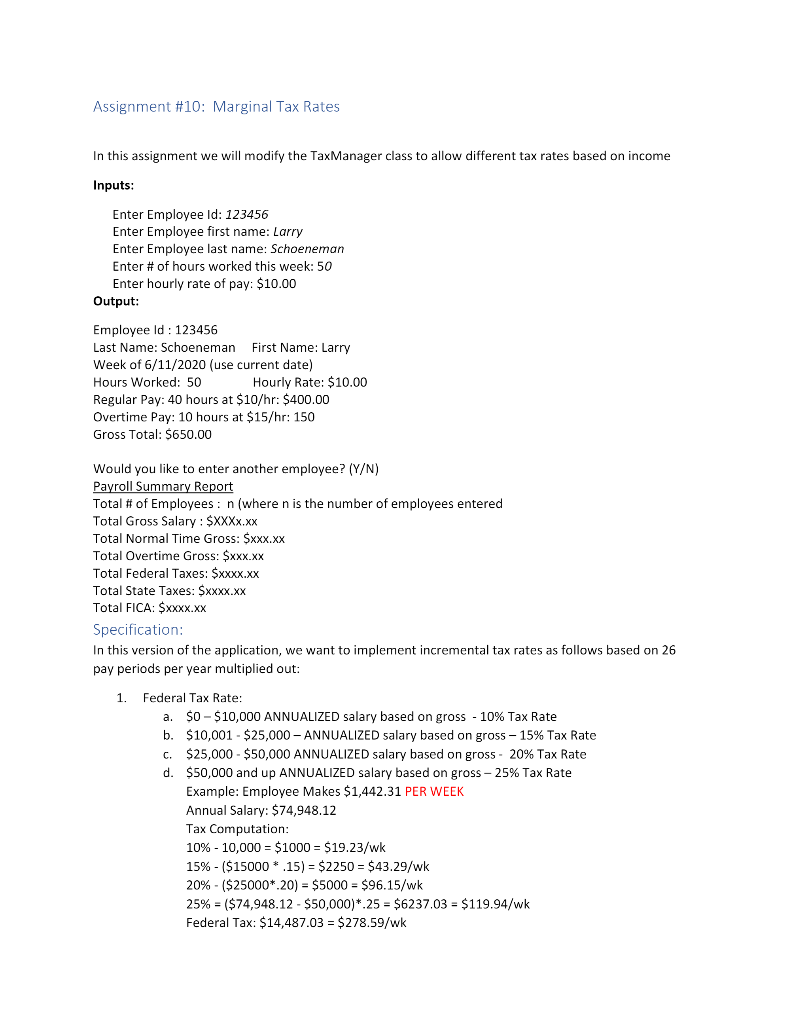

Assignment #10: Marginal Tax Rates In this assignment we will modify the TaxManager class to allow different tax rates based on income Inputs: Enter Employee Id: 123456 Enter Employee first name: Larry Enter Employee last name: Schoeneman Enter # of hours worked this week: 50 Enter hourly rate of pay: $10.00 Output: Employee Id : 123456 Last Name: Schoeneman First Name: Larry Week of 6/11/2020 (use current date) Hours Worked: 50 Hourly Rate: $10.00 Regular Pay: 40 hours at $10/hr: $400.00 Overtime Pay: 10 hours at $15/hr: 150 Gross Total: $650.00 Would you like to enter another employee? (Y/N) Payroll Summary Report Total # of Employees: n (where n is the number of employees entered Total Gross Salary: $XXXX.XX Total Normal Time Gross: $XXX.XX Total Overtime Gross: $XXX.XX Total Federal Taxes: $xxxx.xx Total State Taxes: $XXXX.XX Total FICA: $XXXX.XX Specification: In this version of the application, we want to implement incremental tax rates as follows based on 26 pay periods per year multiplied out: 1. Federal Tax Rate: a. $0 - $10,000 ANNUALIZED salary based on gross - 10% Tax Rate b. $10,001 - $25,000 -ANNUALIZED salary based on gross 15% Tax Rate C. $25,000 - $50,000 ANNUALIZED salary based on gross - 20% Tax Rate d. $50,000 and up ANNUALIZED salary based on gross -25% Tax Rate Example: Employee Makes $1,442.31 PER WEEK Annual Salary: $74,948.12 Tax Computation: 10% - 10,000 = $1000 = $19.23/wk 15% - ($15000 * .15) = $2250 = $43.29/wk 20% - ($25000*20) = $5000 - $96.15/wk 25% = ($74,948.12 - $50,000)*.25 = $6237.03 = $119.94/wk Federal Tax: $14,487.03 = $278.59/wk Remember you need to then divide these out per pay period! (week) 2. State: 5% of gross for Illinois, 3% for Wisconsin 3. FICA: 7.65% of gross You should implement this in the Tax manager class. Be careful here. Make sure to divide totals back out into weekly totals
Step by Step Solution
There are 3 Steps involved in it

Get step-by-step solutions from verified subject matter experts
 Study Help