







Question: Assignment 12: Adding dynamic content to the website using JavaScript In this assignment, you are asked to design a module to your previous work. To
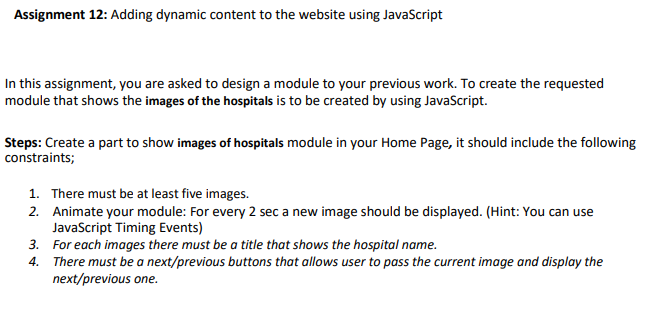
Assignment 12: Adding dynamic content to the website using JavaScript In this assignment, you are asked to design a module to your previous work. To create the requested module that shows the images of the hospitals is to be created by using JavaScript. Steps: Create a part to show images of hospitals module in your Home Page, it should include the following constraints; 1. There must be at least five images. 2. Animate your module: For every 2 sec a new image should be displayed. (Hint: You can use JavaScript Timing Events) 3. For each images there must be a title that shows the hospital name. 4. There must be a next/previous buttons that allows user to pass the current image and display the next/previous one. Assignment 12: Adding dynamic content to the website using JavaScript In this assignment, you are asked to design a module to your previous work. To create the requested module that shows the images of the hospitals is to be created by using JavaScript. Steps: Create a part to show images of hospitals module in your Home Page, it should include the following constraints; 1. There must be at least five images. 2. Animate your module: For every 2 sec a new image should be displayed. (Hint: You can use JavaScript Timing Events) 3. For each images there must be a title that shows the hospital name. 4. There must be a next/previous buttons that allows user to pass the current image and display the next/previous one
Step by Step Solution
There are 3 Steps involved in it

Get step-by-step solutions from verified subject matter experts
 Study Help