







Question: Assignment 2 & 3 Submission Date: 1 5 - 0 9 - 2 0 2 4 You are given the CAD Model ( SolidWorks Part
Assignment &
Submission Date:
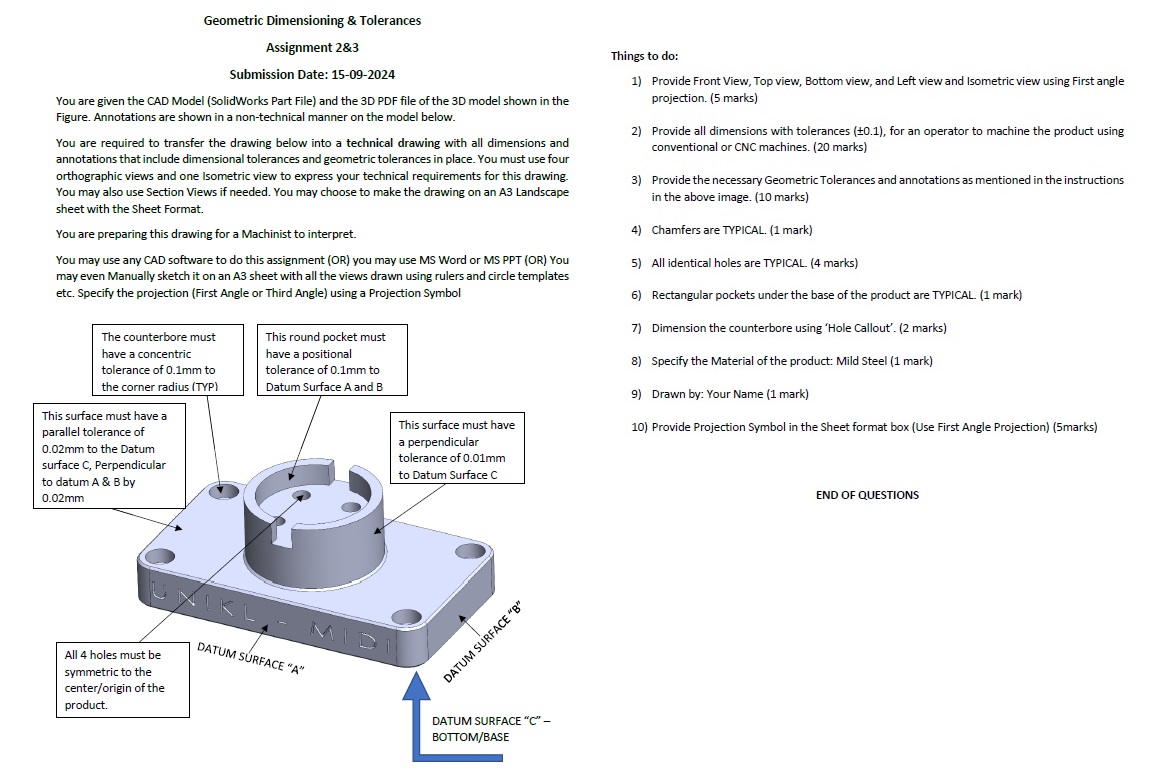
You are given the CAD Model SolidWorks Part File and the D PDF file of the D model shown in the
Figure. Annotations are shown in a nontechnical manner on the model below.
You are required to transfer the drawing below into a technical drawing with all dimensions and
annotations that include dimensional tolerances and geometric tolerances in place. You must use four
orthographic views and one Isometric view to express your technical requirements for this drawing.
You may also use Section Views if needed. You may choose to make the drawing on an A Landscape
sheet with the Sheet Format.
You are preparing this drawing for a Machinist to interpret.
You may use any CAD software to do this assignment OR you may use MS Word or MS PPT OR You
may even Manually sketch it on an A sheet with all the views drawn using rulers and circle templates
etc. Specify the projection First Angle or Third Angle using a Projection Symbol
Things to do:
Provide Front View, Top view, Bottom view, and Left view and Isometric view using First angle
projection. marks
Provide all dimensions with tolerances for an operator to machine the product using
conventional or CNC machines. marks
Provide the necessary Geometric Tolerances and annotations as mentioned in the instructions
in the above image. marks
Chamfers are TYPICAL. mark
All identical holes are TYPICAL. marks
Rectangular pockets under the base of the product are TYPICAL. mark
Dimension the counterbore using 'Hole Callout'. marks
Specify the Material of the product: Mild Steel mark
Drawn by: Your Name mark
Provide Projection Symbol in the Sheet format box Use First Angle Projectionmarks
END OF QUESTIONS
Step by Step Solution
There are 3 Steps involved in it
1 Expert Approved Answer
Step: 1 Unlock

Question Has Been Solved by an Expert!
Get step-by-step solutions from verified subject matter experts
Step: 2 Unlock
Step: 3 Unlock
 Study Help