





Question: Assignment 2 - breaking down instructions General guidelines Make sure your assembly file will run on SPIM. 1. A MIPS assembly file. Should have a
 Assignment 2 - breaking down instructions General guidelines Make sure your

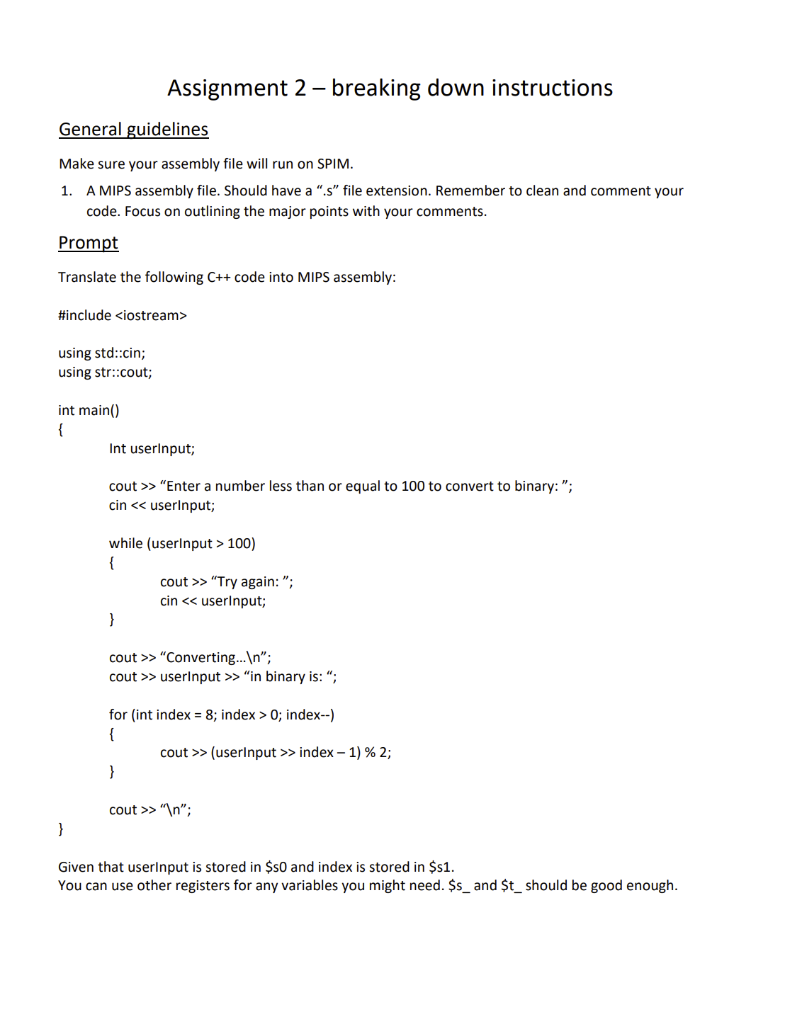
Assignment 2 - breaking down instructions General guidelines Make sure your assembly file will run on SPIM. 1. A MIPS assembly file. Should have a "s" file extension. Remember to clean and comment your code. Focus on outlining the major points with your comments. Prompt Translate the following C++ code into MIPS assembly: #include using std::cin; using str::cout; int main() { Int userInput; cout >> "Enter a number less than or equal to 100 to convert to binary: "; cin 100) { cout >> "Try again: "; cin > "Converting... "; cout >> userInput >> "in binary is: "; for (int index = 8; index > 0; index--) { cout >> (userinput >> index - 1)%2; } cout >> " "; } Given that userinput is stored in $50 and index is stored in $s1. You can use other registers for any variables you might need. $s_ and $t_ should be good enough

Step by Step Solution

There are 3 Steps involved in it

1 Expert Approved Answer
Step: 1 Unlock blur-text-image
Question Has Been Solved by an Expert!

Get step-by-step solutions from verified subject matter experts

Step: 2 Unlock
Step: 3 Unlock

Students Have Also Explored These Related Databases Questions!