Question: Assignment 2 Due February 7 Overview In this assignment, you will store more information for the game board. Instead of just a money value, each
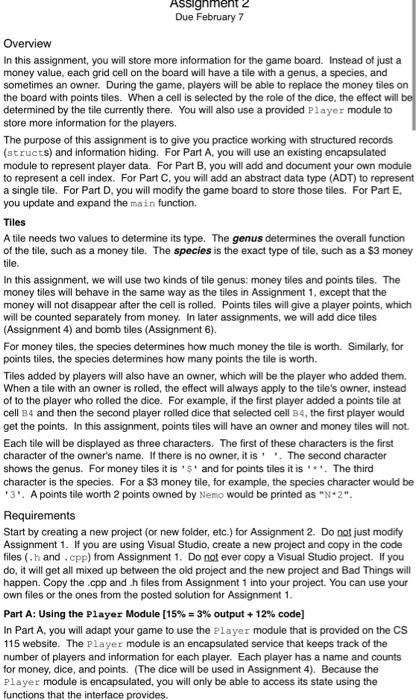
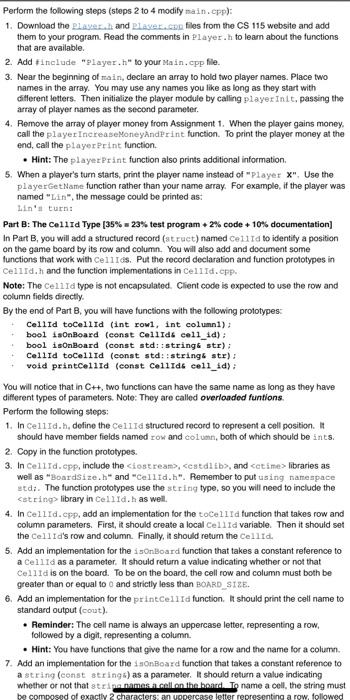
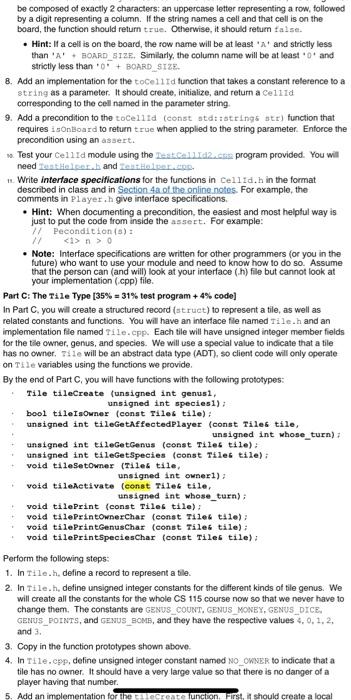
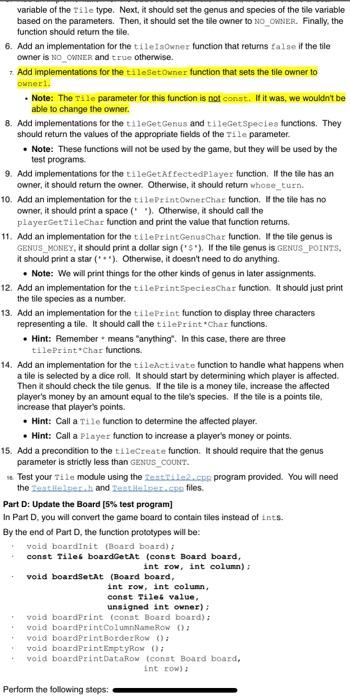
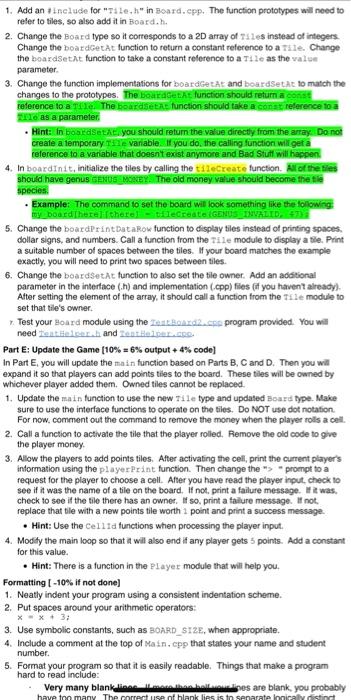
Assignment 2 Due February 7 Overview In this assignment, you will store more information for the game board. Instead of just a money value, each grid cell on the board will have a tile with a genus, a species, and sometimes an owner. During the game, players will be able to replace the money tiles on the board with points tiles. When a cell is selected by the role of the dice, the effect will be determined by the tile currently there. You will also use a provided Player module to store more information for the players. The purpose of this assignment is to give you practice working with structured records (structs) and information hiding. For Part A. you will use an existing encapsulated module to represent player data. For Part B. you will add and document your own module to represent a cell index. For Part C. you will add an abstract data type (ADT) to represent a single tile. For Part D. you will modify the game board to store those tiles. For Part E. you update and expand the main function. Tiles A tile needs two values to determine its type. The genus determines the overall function of the tile, such as a money tile. The species is the exact type of tile, such as a $3 money tile. In this assignment, we will use two kinds of tile genus: money tiles and points tiles. The money tiles will behave in the same way as the tiles in Assignment 1, except that the money will not disappear after the cell is rolled. Points tiles will give a player points, which will be counted separately from money. In later assignments, we will add dice tiles (Assignment 4) and bomb tiles (Assignment 6). For money tiles, the species determines how much money the tile is worth. Similarly, for points tiles, the species determines how many points the tile is worth. Tiles added by players will also have an owner, which will be the player who added them. When a tile with an owner is rolled, the effect will always apply to the tile's owner, instead of to the player who rolled the dice. For example, if the first player added a points tile at cell B4 and then the second player rolled dice that selected cell B4, the first player would get the points. In this assignment, points tiles will have an owner and money tiles will not Each tile will be displayed as three characters. The first of these characters is the first character of the owner's name. If there is no owner, it is the second character shows the genus. For money tiles it is 5 and for points tiles it is '*'. The third character is the species. For a $3 money tile, for example, the species character would be *3'. A points tile worth 2 points owned by Nemo would be printed as "N*2". Requirements Start by creating a new project (or new folder, etc.) for Assignment 2. Do not just modify Assignment 1. If you are using Visual Studio, create a new project and copy in the code files (.h and.cpp) from Assignment 1. Do not ever copy a Visual Studio project. If you do, it will get all mixed up between the old project and the new project and Bad Things will happen. Copy the .cpp and h files from Assignment 1 into your project. You can use your own files or the ones from the posted solution for Assignment 1. Part A: Using the Player Module (15% = 3% output + 12% code] In Part A, you will adapt your game to use the Player module that is provided on the CS 115 website. The Player module is an encapsulated service that keeps track of the number of players and information for each player. Each player has a name and counts for money, dice, and points. (The dice will be used in Assignment 4). Because the Player module is encapsulated, you will only be able to access its state using the functions that the interface provides Perform the following steps (steps 2 to 4 modify main.cpp): 1. Download the player and player.no files from the CS 115 website and add them to your program. Read the comments in Player.h to learn about the functions that are available. 2. Add include "Player.h" to your Main.cpp file. 3. Near the beginning of main, declare an array to hold two player names. Place two names in the array. You may use any names you like as long as they start with different letters. Then initialize the player module by calling player Init, passing the array of player names as the second parameter. 4. Remove the array of player money from Assignment 1. When the player gains money, call the player IncreaseMoneyAndPrint function. To print the player money at the end, call the player Print function. Hint: The player Print function also prints additional information 5. When a player's turn starts print the player name instead of "Player X". Use the player GetName function rather than your name array. For example, if the player was named "Lin", the message could be printed as: Lin's turn: Part B: The Cellid Type (35% 23% test program 2% code +10% documentation] In Part B, you will add a structured record (struct) named cell Id to identify a position on the game board by its row and column. You will also add and document some functions that work with Cellos. Put the record declaration and function prototypes in Cellid.h and the function implementations in Cellid.cpp. Note: The Cell Id type is not encapsulated. Client code is expected to use the row and column fields directly By the end of Part B, you will have functions with the following prototypes: Cellid toCellid (int rowl, int columnl): bool isOnBoard (const Cellid call_1d): bool isOnBoard (const std::string str): Cellid toCellid (const std::string str): void printcellid (const CellIds cell_id): You will notice that in C++, two functions can have the same name as long as they have different types of parameters. Note: They are called overloaded funtions Perform the following steps: 1. In cellid., define the cella structured record to represent a cell position. It should have member fields named row and column, both of which should be ints. 2. Copy in the function prototypes. 3. In Cellid.cpp, include the Ciostream>, cestdlib>, and cetime> libraries as well as BoardSize.h" and "Cellid.h". Remember to put using namespace stdi. The function prototypes use the string type, so you will need to include the library in Cellld.h as well 4. In Cellid.cpp, add an implementation for the tocellra function that takes row and column parameters. First, R should create a local cellid variable. Then it should set the Cell Id's row and column. Finally, it should return the Cellid. 5. Add an implementation for the isonBoard function that takes a constant reference to a Cellid as a parameter. It should return a value indicating whether or not that Cellid is on the board. To be on the board, the cell row and column must both be greater than or equal too and strictly less than BOARD_SIZE. 6. Add an implementation for the printcellid function. It should print the cell name to standard output (cout). Reminder: The cell name is always an uppercase letter, representing a row. followed by a digit, representing a column. Hint: You have functions that give the name for a row and the name for a column 7. Add an implementation for the OnBoard function that takes a constant reference to a string (const strings) as a parameter. It should return a value indicating whether or not that strip names in all on the board. To name a cell, the string must be composed of exactly 2 characters: an uppercase letter representing a row, followed be composed of exactly 2 characters: an uppercase letter representing a row, followed by a digit representing a column. If the string names a cell and that cell is on the board, the function should return true. Otherwise, it should return false. Hint: If a cellis on the board, the row name will be at least 'A' and strictly less than 'A' BOARD_SIZE. Similarly, the column name will be at least and Strictly less than 0 + BOARD SIZE. 8. Add an implementation for the tocellid function that takes a constant reference to a string as a parameter. It should create, initialize, and return a Cellid corresponding to the cell named in the parameter string 9. Add a precondition to the tocellid (const std::strings ste) function that requires isOntoard to return true when applied to the string parameter. Enforce the precondition using an assert. Test your Cell Id module using the rest.cmd2.com program provided. You will need an Holper and Cont .. 1. Write Interface specifications for the functions in Cellid.h in the format described in class and in Section 4a of the online notes. For example, the comments in Player.h give interface specifications Hint: When documenting a precondition, the easiest and most helpful way is just to put the code from inside the assert. For example: 77 Pecondition (): n> Note: Interface specifications are written for other programmers (or you in the future) who want to use your module and need to know how to do so. Assume that the person can (and will look at your interface (h) file but cannot look at your implementation (pp) file. Part C: The Tile Type [35% = 31% test program + 4% code] In Part C. you will create a structured record (struct) to represent a tile, as well as related constants and functions. You will have an interface file named Tile.h and an implementation file named Tile.cpp. Each tile will have unsigned integer member fields for the tile owner, genus, and species. We will use a special value to indicate that a tile has no owner. Tile will be an abstract data type (ADT), so client code will only operate on Tile variables using the functions we provide By the end of Part C, you will have functions with the following prototypes: Tile tileCreate (unsigned int genusi, unsigned int species1); bool tileIsOwner (const Tilet tile): unsigned int tileGetAffectedPlayer (const Tiles tile, unsigned int whose_turn) unsigned int tileGetGenus (const Tiles tile): unsigned int tileGetSpecies (const Tiles tile); void tileSetowner (Tileg tile, unsigned int ownerl); void tileActivate (const Tilet tile, unsigned int whose_turn); void tilePrint (const Tiles tile): void tilePrintOwnerChar (const Tilet tile); void tilePrintGenusChar (const Tiles tile); void tilePrintSpeciesChar (const Tiles tile); Perform the following steps: 1. In Tile.h detine a record to represent a bille 2 In Tile.h, detine unsigned integer constants for the different kinds of tile genus. We will create all the constants for the whole CS 115 course now so that we never have to change them. The constants are GENUS_COUNT, GENUS_MONEY, GENUS_DICE. GENUS_POINTS, and GENUS BOMB, and they have the respective values 4.0.1.2, and 3. 3. Copy in the function prototypes shown above. 4. In Tile.cpp, define unsigned integer constant named NO OWNER to indicate that a tile has no owner. It should have a very large value so that there is no danger of a player having that number 5. Add an implementation for the recreate function. First, it should create a local . variable of the Tile type. Next, it should set the genus and species of the tile variable based on the parameters. Then, it should set the tile owner to NO OWNER. Finally, the function should return the tile 6. Add an implementation for the tilesOwner function that returns false if the tile owner is NO OWNER and true otherwise. Add implementations for the talesetOwner function that sets the tile owner to owner Note: The Tile parameter for this function is not const. If it was, we wouldn't be able to change the owner. 8. Add implementations for the tileGet Genus and tileGetSpecies functions. They should return the values of the appropriate fields of the Tile parameter. Note: These functions will not be used by the game, but they will be used by the test programs 9. Add implementations for the tileGetAffectedPlayer function. If the file has an owner, it should return the owner. Otherwise, it should return whose_turn. 10. Add an implementation for the tilePrint Owner Char function. the tile has no owner, it should print a space (" "). Otherwise, it should call the player GettileChar function and print the value that function returns. 11. Add an implementation for the tilePrintGenusChar function. If the tile genus is GENUS_MONEY, it should print a dollar sign ($). If the tile genus is GENUS_POINTS, it should print a star (**). Otherwise, it doesn't need to do anything . Note: We will print things for the other kinds of genus in later assignments. 12. Add an implementation for the tilePrintSpeciesChar function. It should just print the tile species as a number. 13. Add an implementation for the tileprint function to display three characters representing a tile. It should call the tilePrint*Char functions. Hint: Remember means "anything". In this case, there are three tilePrint"Char functions. 14. Add an implementation for the tileActivate function to handle what happens when a tile is selected by a dice roll. It should start by determining which player is affected Then it should check the tile genus. If the file is a money tile, increase the affected player's money by an amount equal to the tile's species. If the tile is a points tile, increase that player's points. Hint: Call a Tile function to determine the affected player. Hint: Call a Player function to increase a player's money or points. 15. Add a precondition to the tileCreate function. It should require that the genus parameter is strictly less than GENUS_COUNT. Test your Tile module using the Testride.co program provided. You will need the Leatities and seller.com files. Part D: Update the Board [5% test program] In Part D. you will convert the game board to contain tiles instead of Ints. By the end of Part D. the function prototypes will be void boardinit (Board board): const Tiles boardGetAt (const Board board, int row, int column) void boardsetAt (Board board int row, int column const Tiles value, unsigned int owner); void boardprint (const Board board); void boardprintColumnNameRow(); void boardprint Border Row(); void board Print EmptyRow () void boardprintDatakow (const Board board, int row) Perform the following steps: 1. Add an include for "File.h" in Board.cpp. The function prototypes will need to refer to tiles, so also add it in Board.h. 2. Change the Board type so it corresponds to a 2D array of Tiles instead of integers Change the boardGetAt function to return a constant reference to a ste. Change the boardSetAt function to take a constant reference to a Tile as the value parameter 3. Change the function implementations for boardGetAt and boardSetAt to match the changes to the prototypes. The boardext function should return a con reference to a The boards function should take a const reference to a 16. as a parameter Hint: In boardset you should return the value directly from the array Do not create a temporary Tate variable. If you do the calling function will get a reference to a variable that doesn't exist anymore and Bad Stuff will happen. 4. In boardinit, initialize the tiles by calling the tileCreate function. All of the files should have genus GENUSE MONEY. The old money value should become the file species . Example: The command to set the board will look something like the following: my boardThere there - tecreateEGENDS TUVALID, 5. Change the boardprintDataRow function to display tiles instead of printing spaces dollar signs, and numbers. Call a function from the Tile module to display a tile. Print a suitable number of spaces between the tiles. If your board matches the example exactly, you will need to print two spaces between tiles. 6. Change the boardsetat function to also set the tile owner. Add an additional parameter in the interface () and implementation.cpp) files if you haven't already). After setting the element of the array, it should call a function from the Tile module to set that tile's owner. Test your Hoard module using the Lost Bond2.cre program provided. You will need etter and eat LED Part E: Update the Game (10% = 6% output + 4% code] In Part E. you will update the main function based on Parts B, C and D. Then you will expand it so that players can add points tiles to the board. These tiles will be owned by whichever player added them. Owned tiles cannot be replaced. 1. Update the main function to use the new Tile type and updated Board type. Make sure to use the interface functions to operate on the tiles. Do NOT use dot notation For now, comment out the command to remove the money when the player rolls a cell 2. Call a function to activate the tile that the player rollied. Remove the old code to give the player money 3. Allow the players to add points tiles. After activating the cell, print the current player's information using the playerPrint function. Then change the prompt to a request for the player to choose a cell. After you have read the player input check to see if it was the name of a tile on the board. If not, print a failure message. it was. check to see if the tile there has an owner. If so, print a failure message. not. replace that tle with a new points tile worth point and print a success message. Hint: Use the cellia functions when processing the player input 4. Modify the main loop so that it will also end if any player gets 5 points. Add a constant for this value Hint: There is a function in the player module that will help you. Formatting (-10% if not done) 1. Neatly indent your program using a consistent indentation scheme. 2. Put spaces around your arithmetic operators: XX. 37 3. Use symbolic constants, such as BOARD_SIZE, when appropriate. 4. Include a comment at the top of Main.cpp that states your name and student number 5. Format your program so that it is easily readable. Things that make a program hard to read include: Very many blankes are blank, you probably have too many The correct use of blank lies is to senarata laicaly distinct Hint: Use the ceilid functions when processing the player input 4. Modify the main loop so that it will also end it any player gets 5 points. Add a constant for this value. Hint: There is a function in the player module that will help you. Formatting (-10% if not done] 1. Neatly indent your program using a consistent indentation scheme. 2. Put spaces around your arithmetic operators: X=X+ 3; 3. Use symbolic constants, such as BOARD_SIZE, when appropriate. 4. Include a comment at the top of Main.cpp that states your name and student number. 5. Format your program so that it is easily readable. Things that make a program hard to read include: Very many blank lines. If more than half your lines are blank, you probably have too many. The correct use of blank lies is to separate logically distinct Multiple commands on the same line. In general, don't do this. You can it it makes the program clearer than if the same commands were on separate lines. Uninformative variable names. For a local variable that is only used for a few lines, it doesn't really matter. But a variable that is used over a larger area (including all global variables and field names) should have a name that documents its purpose. Similarly, parameters should have self-documenting names because the function will be called elsewhere in the program. Submission Submit a complete copy of your source code. You should have the following files with exactly these names: 1. BoardSize.h 2. BoardSize.cpp 3. Board.h 4. Board.cpp 5. Cellid.h 6. Cellid. CPP 7. Dice.h 8. Dice.CPP 9. Main.cpp 10. Tile.h 11. Tile.cpp Note: A Visual Studio .sin file does NOT contain the source code; it is just a text file. You do not need to submit it. Make sure you submit the .cpp files and .h files. Note: You do not need to submit the test programs or the Player.h and Player.cpp files. The marker has those already. If possible, convert all your files to a single archive (.zip file) before handing them in Do NOT submit a compiled version Do NOT submit intermediate files, such as: Debug folder o Release folder ipch folder 0.o files O'.ncb, .sd, or .db files Do NOT submit a screenshot Assignment 2 Due February 7 Overview In this assignment, you will store more information for the game board. Instead of just a money value, each grid cell on the board will have a tile with a genus, a species, and sometimes an owner. During the game, players will be able to replace the money tiles on the board with points tiles. When a cell is selected by the role of the dice, the effect will be determined by the tile currently there. You will also use a provided Player module to store more information for the players. The purpose of this assignment is to give you practice working with structured records (structs) and information hiding. For Part A. you will use an existing encapsulated module to represent player data. For Part B. you will add and document your own module to represent a cell index. For Part C. you will add an abstract data type (ADT) to represent a single tile. For Part D. you will modify the game board to store those tiles. For Part E. you update and expand the main function. Tiles A tile needs two values to determine its type. The genus determines the overall function of the tile, such as a money tile. The species is the exact type of tile, such as a $3 money tile. In this assignment, we will use two kinds of tile genus: money tiles and points tiles. The money tiles will behave in the same way as the tiles in Assignment 1, except that the money will not disappear after the cell is rolled. Points tiles will give a player points, which will be counted separately from money. In later assignments, we will add dice tiles (Assignment 4) and bomb tiles (Assignment 6). For money tiles, the species determines how much money the tile is worth. Similarly, for points tiles, the species determines how many points the tile is worth. Tiles added by players will also have an owner, which will be the player who added them. When a tile with an owner is rolled, the effect will always apply to the tile's owner, instead of to the player who rolled the dice. For example, if the first player added a points tile at cell B4 and then the second player rolled dice that selected cell B4, the first player would get the points. In this assignment, points tiles will have an owner and money tiles will not Each tile will be displayed as three characters. The first of these characters is the first character of the owner's name. If there is no owner, it is the second character shows the genus. For money tiles it is 5 and for points tiles it is '*'. The third character is the species. For a $3 money tile, for example, the species character would be *3'. A points tile worth 2 points owned by Nemo would be printed as "N*2". Requirements Start by creating a new project (or new folder, etc.) for Assignment 2. Do not just modify Assignment 1. If you are using Visual Studio, create a new project and copy in the code files (.h and.cpp) from Assignment 1. Do not ever copy a Visual Studio project. If you do, it will get all mixed up between the old project and the new project and Bad Things will happen. Copy the .cpp and h files from Assignment 1 into your project. You can use your own files or the ones from the posted solution for Assignment 1. Part A: Using the Player Module (15% = 3% output + 12% code] In Part A, you will adapt your game to use the Player module that is provided on the CS 115 website. The Player module is an encapsulated service that keeps track of the number of players and information for each player. Each player has a name and counts for money, dice, and points. (The dice will be used in Assignment 4). Because the Player module is encapsulated, you will only be able to access its state using the functions that the interface provides Perform the following steps (steps 2 to 4 modify main.cpp): 1. Download the player and player.no files from the CS 115 website and add them to your program. Read the comments in Player.h to learn about the functions that are available. 2. Add include "Player.h" to your Main.cpp file. 3. Near the beginning of main, declare an array to hold two player names. Place two names in the array. You may use any names you like as long as they start with different letters. Then initialize the player module by calling player Init, passing the array of player names as the second parameter. 4. Remove the array of player money from Assignment 1. When the player gains money, call the player IncreaseMoneyAndPrint function. To print the player money at the end, call the player Print function. Hint: The player Print function also prints additional information 5. When a player's turn starts print the player name instead of "Player X". Use the player GetName function rather than your name array. For example, if the player was named "Lin", the message could be printed as: Lin's turn: Part B: The Cellid Type (35% 23% test program 2% code +10% documentation] In Part B, you will add a structured record (struct) named cell Id to identify a position on the game board by its row and column. You will also add and document some functions that work with Cellos. Put the record declaration and function prototypes in Cellid.h and the function implementations in Cellid.cpp. Note: The Cell Id type is not encapsulated. Client code is expected to use the row and column fields directly By the end of Part B, you will have functions with the following prototypes: Cellid toCellid (int rowl, int columnl): bool isOnBoard (const Cellid call_1d): bool isOnBoard (const std::string str): Cellid toCellid (const std::string str): void printcellid (const CellIds cell_id): You will notice that in C++, two functions can have the same name as long as they have different types of parameters. Note: They are called overloaded funtions Perform the following steps: 1. In cellid., define the cella structured record to represent a cell position. It should have member fields named row and column, both of which should be ints. 2. Copy in the function prototypes. 3. In Cellid.cpp, include the Ciostream>, cestdlib>, and cetime> libraries as well as BoardSize.h" and "Cellid.h". Remember to put using namespace stdi. The function prototypes use the string type, so you will need to include the library in Cellld.h as well 4. In Cellid.cpp, add an implementation for the tocellra function that takes row and column parameters. First, R should create a local cellid variable. Then it should set the Cell Id's row and column. Finally, it should return the Cellid. 5. Add an implementation for the isonBoard function that takes a constant reference to a Cellid as a parameter. It should return a value indicating whether or not that Cellid is on the board. To be on the board, the cell row and column must both be greater than or equal too and strictly less than BOARD_SIZE. 6. Add an implementation for the printcellid function. It should print the cell name to standard output (cout). Reminder: The cell name is always an uppercase letter, representing a row. followed by a digit, representing a column. Hint: You have functions that give the name for a row and the name for a column 7. Add an implementation for the OnBoard function that takes a constant reference to a string (const strings) as a parameter. It should return a value indicating whether or not that strip names in all on the board. To name a cell, the string must be composed of exactly 2 characters: an uppercase letter representing a row, followed be composed of exactly 2 characters: an uppercase letter representing a row, followed by a digit representing a column. If the string names a cell and that cell is on the board, the function should return true. Otherwise, it should return false. Hint: If a cellis on the board, the row name will be at least 'A' and strictly less than 'A' BOARD_SIZE. Similarly, the column name will be at least and Strictly less than 0 + BOARD SIZE. 8. Add an implementation for the tocellid function that takes a constant reference to a string as a parameter. It should create, initialize, and return a Cellid corresponding to the cell named in the parameter string 9. Add a precondition to the tocellid (const std::strings ste) function that requires isOntoard to return true when applied to the string parameter. Enforce the precondition using an assert. Test your Cell Id module using the rest.cmd2.com program provided. You will need an Holper and Cont .. 1. Write Interface specifications for the functions in Cellid.h in the format described in class and in Section 4a of the online notes. For example, the comments in Player.h give interface specifications Hint: When documenting a precondition, the easiest and most helpful way is just to put the code from inside the assert. For example: 77 Pecondition (): n> Note: Interface specifications are written for other programmers (or you in the future) who want to use your module and need to know how to do so. Assume that the person can (and will look at your interface (h) file but cannot look at your implementation (pp) file. Part C: The Tile Type [35% = 31% test program + 4% code] In Part C. you will create a structured record (struct) to represent a tile, as well as related constants and functions. You will have an interface file named Tile.h and an implementation file named Tile.cpp. Each tile will have unsigned integer member fields for the tile owner, genus, and species. We will use a special value to indicate that a tile has no owner. Tile will be an abstract data type (ADT), so client code will only operate on Tile variables using the functions we provide By the end of Part C, you will have functions with the following prototypes: Tile tileCreate (unsigned int genusi, unsigned int species1); bool tileIsOwner (const Tilet tile): unsigned int tileGetAffectedPlayer (const Tiles tile, unsigned int whose_turn) unsigned int tileGetGenus (const Tiles tile): unsigned int tileGetSpecies (const Tiles tile); void tileSetowner (Tileg tile, unsigned int ownerl); void tileActivate (const Tilet tile, unsigned int whose_turn); void tilePrint (const Tiles tile): void tilePrintOwnerChar (const Tilet tile); void tilePrintGenusChar (const Tiles tile); void tilePrintSpeciesChar (const Tiles tile); Perform the following steps: 1. In Tile.h detine a record to represent a bille 2 In Tile.h, detine unsigned integer constants for the different kinds of tile genus. We will create all the constants for the whole CS 115 course now so that we never have to change them. The constants are GENUS_COUNT, GENUS_MONEY, GENUS_DICE. GENUS_POINTS, and GENUS BOMB, and they have the respective values 4.0.1.2, and 3. 3. Copy in the function prototypes shown above. 4. In Tile.cpp, define unsigned integer constant named NO OWNER to indicate that a tile has no owner. It should have a very large value so that there is no danger of a player having that number 5. Add an implementation for the recreate function. First, it should create a local . variable of the Tile type. Next, it should set the genus and species of the tile variable based on the parameters. Then, it should set the tile owner to NO OWNER. Finally, the function should return the tile 6. Add an implementation for the tilesOwner function that returns false if the tile owner is NO OWNER and true otherwise. Add implementations for the talesetOwner function that sets the tile owner to owner Note: The Tile parameter for this function is not const. If it was, we wouldn't be able to change the owner. 8. Add implementations for the tileGet Genus and tileGetSpecies functions. They should return the values of the appropriate fields of the Tile parameter. Note: These functions will not be used by the game, but they will be used by the test programs 9. Add implementations for the tileGetAffectedPlayer function. If the file has an owner, it should return the owner. Otherwise, it should return whose_turn. 10. Add an implementation for the tilePrint Owner Char function. the tile has no owner, it should print a space (" "). Otherwise, it should call the player GettileChar function and print the value that function returns. 11. Add an implementation for the tilePrintGenusChar function. If the tile genus is GENUS_MONEY, it should print a dollar sign ($). If the tile genus is GENUS_POINTS, it should print a star (**). Otherwise, it doesn't need to do anything . Note: We will print things for the other kinds of genus in later assignments. 12. Add an implementation for the tilePrintSpeciesChar function. It should just print the tile species as a number. 13. Add an implementation for the tileprint function to display three characters representing a tile. It should call the tilePrint*Char functions. Hint: Remember means "anything". In this case, there are three tilePrint"Char functions. 14. Add an implementation for the tileActivate function to handle what happens when a tile is selected by a dice roll. It should start by determining which player is affected Then it should check the tile genus. If the file is a money tile, increase the affected player's money by an amount equal to the tile's species. If the tile is a points tile, increase that player's points. Hint: Call a Tile function to determine the affected player. Hint: Call a Player function to increase a player's money or points. 15. Add a precondition to the tileCreate function. It should require that the genus parameter is strictly less than GENUS_COUNT. Test your Tile module using the Testride.co program provided. You will need the Leatities and seller.com files. Part D: Update the Board [5% test program] In Part D. you will convert the game board to contain tiles instead of Ints. By the end of Part D. the function prototypes will be void boardinit (Board board): const Tiles boardGetAt (const Board board, int row, int column) void boardsetAt (Board board int row, int column const Tiles value, unsigned int owner); void boardprint (const Board board); void boardprintColumnNameRow(); void boardprint Border Row(); void board Print EmptyRow () void boardprintDatakow (const Board board, int row) Perform the following steps: 1. Add an include for "File.h" in Board.cpp. The function prototypes will need to refer to tiles, so also add it in Board.h. 2. Change the Board type so it corresponds to a 2D array of Tiles instead of integers Change the boardGetAt function to return a constant reference to a ste. Change the boardSetAt function to take a constant reference to a Tile as the value parameter 3. Change the function implementations for boardGetAt and boardSetAt to match the changes to the prototypes. The boardext function should return a con reference to a The boards function should take a const reference to a 16. as a parameter Hint: In boardset you should return the value directly from the array Do not create a temporary Tate variable. If you do the calling function will get a reference to a variable that doesn't exist anymore and Bad Stuff will happen. 4. In boardinit, initialize the tiles by calling the tileCreate function. All of the files should have genus GENUSE MONEY. The old money value should become the file species . Example: The command to set the board will look something like the following: my boardThere there - tecreateEGENDS TUVALID, 5. Change the boardprintDataRow function to display tiles instead of printing spaces dollar signs, and numbers. Call a function from the Tile module to display a tile. Print a suitable number of spaces between the tiles. If your board matches the example exactly, you will need to print two spaces between tiles. 6. Change the boardsetat function to also set the tile owner. Add an additional parameter in the interface () and implementation.cpp) files if you haven't already). After setting the element of the array, it should call a function from the Tile module to set that tile's owner. Test your Hoard module using the Lost Bond2.cre program provided. You will need etter and eat LED Part E: Update the Game (10% = 6% output + 4% code] In Part E. you will update the main function based on Parts B, C and D. Then you will expand it so that players can add points tiles to the board. These tiles will be owned by whichever player added them. Owned tiles cannot be replaced. 1. Update the main function to use the new Tile type and updated Board type. Make sure to use the interface functions to operate on the tiles. Do NOT use dot notation For now, comment out the command to remove the money when the player rolls a cell 2. Call a function to activate the tile that the player rollied. Remove the old code to give the player money 3. Allow the players to add points tiles. After activating the cell, print the current player's information using the playerPrint function. Then change the prompt to a request for the player to choose a cell. After you have read the player input check to see if it was the name of a tile on the board. If not, print a failure message. it was. check to see if the tile there has an owner. If so, print a failure message. not. replace that tle with a new points tile worth point and print a success message. Hint: Use the cellia functions when processing the player input 4. Modify the main loop so that it will also end if any player gets 5 points. Add a constant for this value Hint: There is a function in the player module that will help you. Formatting (-10% if not done) 1. Neatly indent your program using a consistent indentation scheme. 2. Put spaces around your arithmetic operators: XX. 37 3. Use symbolic constants, such as BOARD_SIZE, when appropriate. 4. Include a comment at the top of Main.cpp that states your name and student number 5. Format your program so that it is easily readable. Things that make a program hard to read include: Very many blankes are blank, you probably have too many The correct use of blank lies is to senarata laicaly distinct Hint: Use the ceilid functions when processing the player input 4. Modify the main loop so that it will also end it any player gets 5 points. Add a constant for this value. Hint: There is a function in the player module that will help you. Formatting (-10% if not done] 1. Neatly indent your program using a consistent indentation scheme. 2. Put spaces around your arithmetic operators: X=X+ 3; 3. Use symbolic constants, such as BOARD_SIZE, when appropriate. 4. Include a comment at the top of Main.cpp that states your name and student number. 5. Format your program so that it is easily readable. Things that make a program hard to read include: Very many blank lines. If more than half your lines are blank, you probably have too many. The correct use of blank lies is to separate logically distinct Multiple commands on the same line. In general, don't do this. You can it it makes the program clearer than if the same commands were on separate lines. Uninformative variable names. For a local variable that is only used for a few lines, it doesn't really matter. But a variable that is used over a larger area (including all global variables and field names) should have a name that documents its purpose. Similarly, parameters should have self-documenting names because the function will be called elsewhere in the program. Submission Submit a complete copy of your source code. You should have the following files with exactly these names: 1. BoardSize.h 2. BoardSize.cpp 3. Board.h 4. Board.cpp 5. Cellid.h 6. Cellid. CPP 7. Dice.h 8. Dice.CPP 9. Main.cpp 10. Tile.h 11. Tile.cpp Note: A Visual Studio .sin file does NOT contain the source code; it is just a text file. You do not need to submit it. Make sure you submit the .cpp files and .h files. Note: You do not need to submit the test programs or the Player.h and Player.cpp files. The marker has those already. If possible, convert all your files to a single archive (.zip file) before handing them in Do NOT submit a compiled version Do NOT submit intermediate files, such as: Debug folder o Release folder ipch folder 0.o files O'.ncb, .sd, or .db files Do NOT submit a screenshot









 Study Help