







Question: ASSIGNMENT 2 Write a program that reads from a file (with variable number of records) student names and the grades for 2 tests (the points
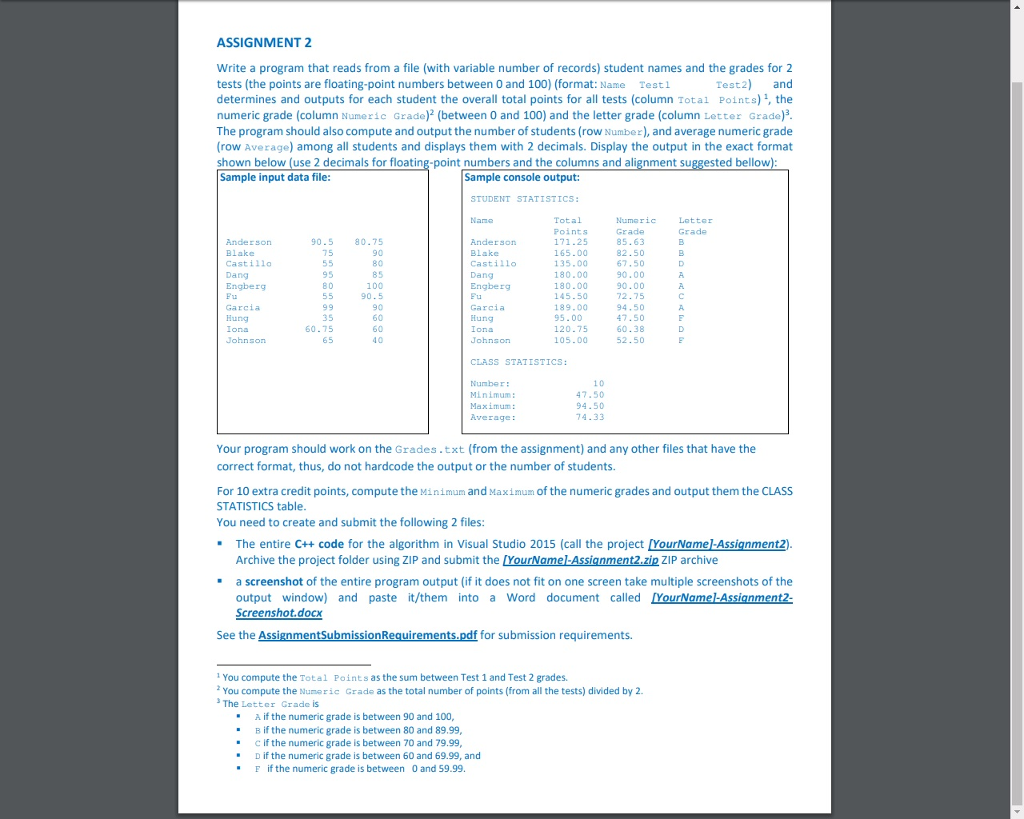
ASSIGNMENT 2 Write a program that reads from a file (with variable number of records) student names and the grades for 2 tests (the points are floating-point numbers between 0 and 100) (format: Name Testl determines and outputs for each student the overall total points for all tests (column Total Points) , the numeric grade (column Numeric Grade) (between 0 and 100) and the letter grade (column Letter Grade) The program should also compute and output the number of students (row Number), and average numeric grade row Average) among all students and displays them with 2 decimals. Display the output in the exact format shown below (use 2 decimals for floating-point numbers and the columns and alignment suggested bellow Sample input data file est2 and Sample console output: STUDENT STATISTICS: Total Points 171.25 165.00 135.00 180.00 180.00 145.50 189.00 95.00 120.75 105.00 Numeric Grade 85.63 82.50 67.50 90.00 90.00 72.75 4.50 47.50 60.38 52.50 Letter Grade Name 90.5 80.75 90 80 85 100 90.5 90 60 60 40 Anderson Blake Castil1o Dang Engberg Fu Garcia Hung Iona Anderson Blake Castill0 Dang Engberg 95 8 0 Garcia Hung Iona Johnson 35 60.75 65 CLASS STATISTICS: Nunber: Minimum: Maximum Average: 1 0 47.50 94.50 74.33 Your program should work on the Grades.txt (from the assignment) and any other files that have the correct format, thus, do not hardcode the output or the number of students. For 10 extra credit points, compute the Minimum and Maximum of the numeric grades and output them the CLASS STATISTICS table You need to create and submit the following 2 files: " The entire C++ code for the algorithm in Visual Studio 2015 (call the project [YourNamel-Assignment2) Archive the project folder using ZIP and submit the [YourNamel-Assignment2.zip ZIP archive a screenshot of the entire program output (if it does not fit on one screen take multiple screenshots of the output window) and paste it/them into a Word document called creenshot.docx See the AssignmentSubmissionRequirements.pdf for submission requirements. You compute the Total Points as the sum between Test 1 and Test 2 grades. You compute the Numeric Grade as the total number of points (from all the tests) divided by 2 ?The Letter Grade is A if the numeric grade is between 90 and 100, ? if the numeric grade is between 80 and 89.99 c if the numeric grade is between 70 and 79.99 D if the numeric grade is between 60 and 69.99, and " " "F if the numeric grade is between 0 and 59.99
Step by Step Solution
There are 3 Steps involved in it

Get step-by-step solutions from verified subject matter experts
 Study Help