







Question: Assignment 3 C: Create your own image! Most images are saved in binary format - this means they are not human readable without special software
Assignment C: Create your own image!
Most images are saved in binary format this means they are not human readable
without special software like a hex editor. However, a few are saved in ASCII mode, and
you can read and edit them with just a text editor. One such type is the monochrome
Portable Bitmap image format. For this assignment, you will create a program that
generates the contents of a PBM file for a square image well learn how to actually
save a file in CSE
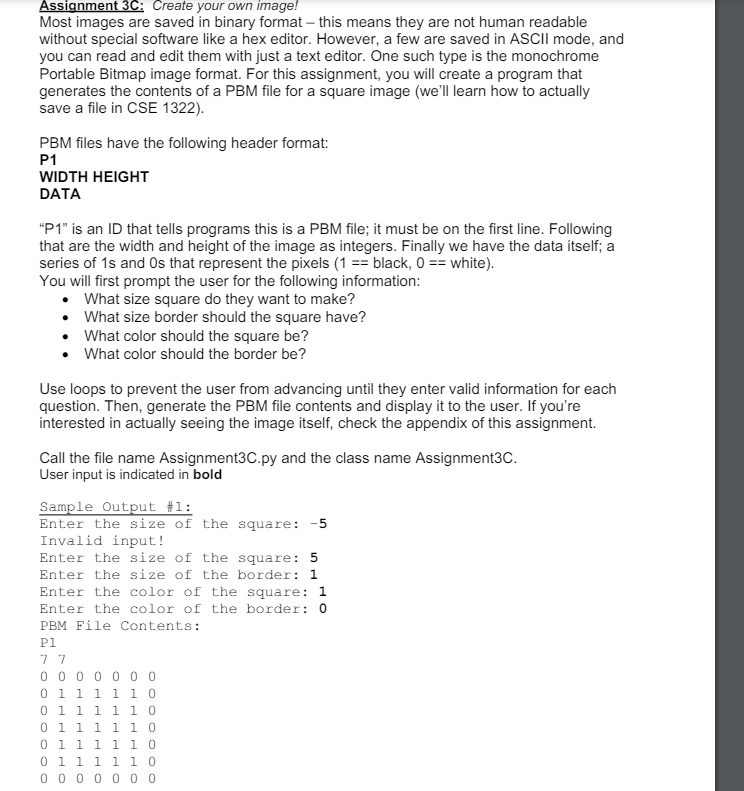
PBM files have the following header format:
P
WIDTH HEIGHT
DATA
P is an ID that tells programs this is a PBM file; it must be on the first line. Following
that are the width and height of the image as integers. Finally we have the data itself; a
series of and that represent the pixels black, white
You will first prompt the user for the following information:
What size square do they want to make?
What size border should the square have?
What color should the square be
What color should the border be
Use loops to prevent the user from advancing until they enter valid information for each
question. Then, generate the PBM file contents and display it to the user. If you're
interested in actually seeing the image itself, check the appendix of this assignment.
Call the file name
AssignmentCpy and the class name AssignmentC
User input is indicated in bold
Please match the input exactly with only using s and s
Code in Python please
Step by Step Solution
There are 3 Steps involved in it
1 Expert Approved Answer
Step: 1 Unlock

Question Has Been Solved by an Expert!
Get step-by-step solutions from verified subject matter experts
Step: 2 Unlock
Step: 3 Unlock
 Study Help