







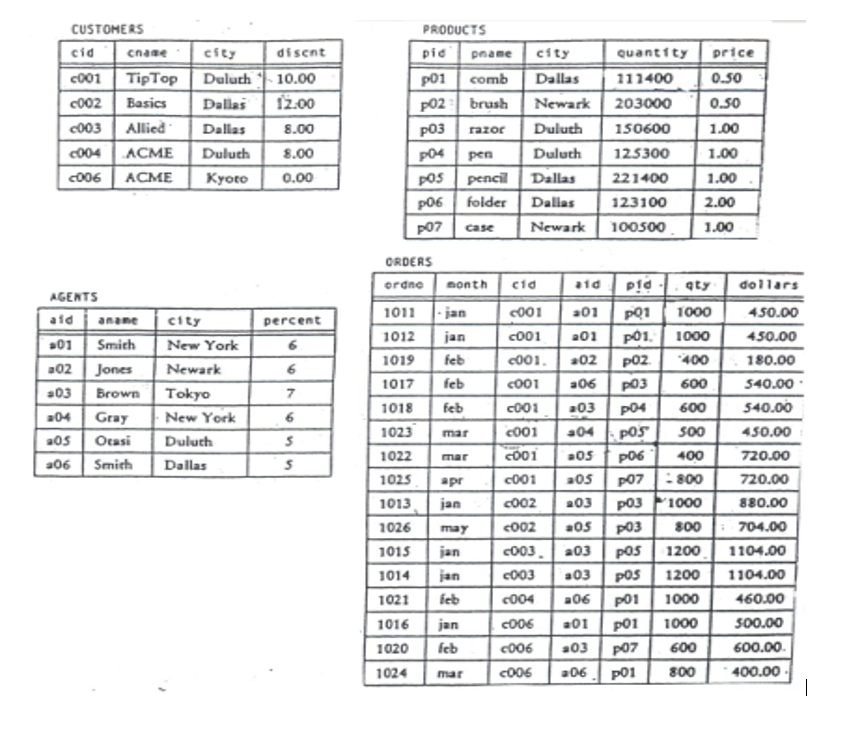
Question: Assignment # 4 - Advanced Interactive SQL ( use same table as assignment 3 ) 1 ) List all the orders in descending order by
Assignment # Advanced Interactive SQL use same table as assignment
List all the orders in descending order by dollar ORDER BY
The price of the most expensive product Functions
Name of customers that ordered product pSQL Query with JOIN
Find all cid aid, pid triples for a customer, agent, product combinations that are all in the same city. Nothing about orders is involved in this selection Join
Find all cid aid, pid triples for customer, agent, product combinations that are not all in the same city any two may beJoin
Get cities of agents booking an order from customer cJoin Projection and Restriction
Get pids of products ordered through any agent who makes at least one order for a customer in Kyoto. NOTE: this is not the same as asking for pids of products ordered by a customer in Kyoto hint: Customers Table once and Orders table twice
Find cids of customers who did not place an order through ahint: use NOT EXISTS or NOT IN; May also see adbc, Misconceptions: do not use NOT
Name of products that were not ordered through agents ahint: use NOT EXISTS or NOT IN; May also see adbc, Misconceptions: do not use NOT
Find cids of customers who have the largest discount and those who have the smallest discount. Must be only one query. Hint: Use UNION
Find aids and anames of agents with aname beginning with the letter J or B who do not place orders for a Product located in New York Hint: Use LIKE clause or and
List the cname and the sum of dollars that each customer ordered. Functions GROUP BY
List the cname and the sum of dollars for each customer that has ordered more than US HAVING
List the customers with the two smallest discounts Hint: use NOT EXISTS
List customers that didn' t have any orders Hint: use NOT IN
List the name each customers and the total amount ordered by the customers
If the customers didnt place an order, list them also. see Functions, Group By and Outer Join
List name of customers that ordered all the products. Animating SQL through Procedural Code Basic, Division
List all pair of products that are in the same city Join with table
List the three most expensive products Use NOT EXISTS or rownum
Increase by the price of all products located in DallasData Definition Language and Data Manipulation Language
Make cid the primary key of customers ALTER TABLE command. See Book or Web for SYNTAX
Make cid the foreign key of orders ALTER TABLE command. See Book or Web for SYNTAX
delete all rows from the agents table. Data Definition Language and Data Manipulation Language
List the agent table with no rows
Rollback the agent tables just type in ROLLBACK;
List the agents again
a Create a table called SWCustomers with the same structure as the Customers table.
b With one sql command Insert all the customers that are located in Dallas or Houston from the Customers table into the SWCustomers table.
Add a Primary Key cid to the Customers table use ALTER TABL CUSTOHERS
AGENTS
Prooucts
ORDERSE
Add a Primary Key pid to the Products table use ALTER TABLE
Add Foreign Keys pid to the orders table referencing Products use ALTER TABLE Try to delete Product p
What happens
Add Foregin Key cid to the orders table referencing Products with the Cascade clause use ALTER TABLE Try to delete products p from the Products table. View the Orders table with SELECT FROM Orders; What happened
a Create a table called SWCustomers with the same structure as the Customers table.
b With one sql command Insert all the customers that are located in Dallas or Houston from the Customers table into the SWCustomers table.
Step by Step Solution
There are 3 Steps involved in it
1 Expert Approved Answer
Step: 1 Unlock

Question Has Been Solved by an Expert!
Get step-by-step solutions from verified subject matter experts
Step: 2 Unlock
Step: 3 Unlock
 Study Help