







Question: Assignment 6 Based on what you have learned from chapter 11, implement a web app to display the weather forecast using Ajax with JavaScript.
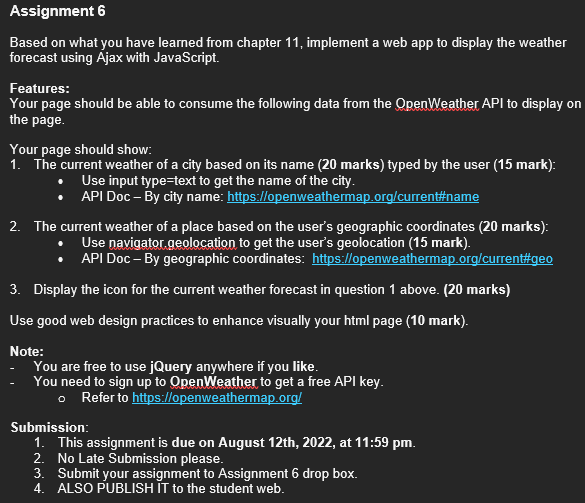
Assignment 6 Based on what you have learned from chapter 11, implement a web app to display the weather forecast using Ajax with JavaScript. Features: Your page should be able to consume the following data from the OpenWeather API to display on the page. Your page should show: 1. The current weather of a city based on its name (20 marks) typed by the user (15 mark): Use input type=text to get the name of the city. API Doc - By city name: https://openweathermap.org/current#name 2. The current weather of a place based on the user's geographic coordinates (20 marks): Use navigator geolocation to get the user's geolocation (15 mark). API Doc - By geographic coordinates: https://openweathermap.org/current#geo 3. Display the icon for the current weather forecast in question 1 above. (20 marks) Use good web design practices to enhance visually your html page (10 mark). Note: You are free to use jQuery anywhere if you like. You need to sign up to OpenWeather to get a free API key. Refer to https://openweathermap.org/ Submission: 1. This assignment is due on August 12th, 2022, at 11:59 pm. 2. No Late Submission please. 3. Submit your assignment to Assignment 6 drop box. 4. ALSO PUBLISH IT to the student web.
Step by Step Solution
There are 3 Steps involved in it

Get step-by-step solutions from verified subject matter experts
 Study Help