







Question: ASSIGNMENT 6 In your SQL Server Account, a database, named with your APSU email username, has been created. Use this database to do the following.
ASSIGNMENT 6
In your SQL Server Account, a database, named with your APSU email username, has been created. Use this database to do the following.
1. Create the tables shown in the following Figure (Reference: page 106 of the textbook).
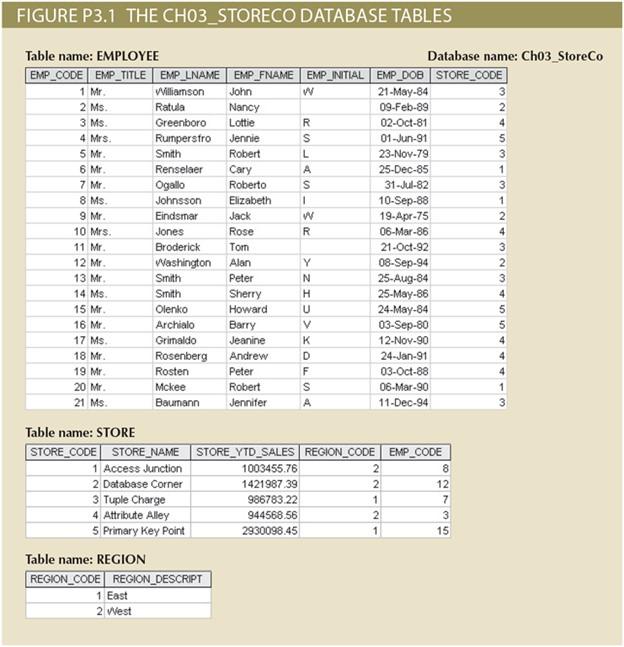
Choose data types as appropriate. Assign the primary key to be the first field in the table in each case. Assign the following foreign keys:
- STORE_CODE in the EMPLOYEE table is a foreign key referencing STORE_CODE in the STORE table (this represents the store to which the employee is assigned)
- REGION_CODE in the STORE table is a foreign key referencing REGION_CODE in the REGION table (this represents the region where the store is located)
- EMP_CODE in the STORE table is a foreign key referencing EMP_CODE in the EMPLOYEE table (this represents the employee who is the stores manager) You must create the tables in the following order: REGION, STORE, EMPLOYEE. Be sure to finish the table creation before starting on part 2. Note: The general format for a FOREIGN KEY clause, at the end of the table definition, is FOREIGN KEY(STORE_CODE) REFERENCES STORE(STORE_CODE)
2. Insert all rows of data from the textbook for all tables using the SQL insert command. It will be wise to save the code that does this in case you have to run it again. Since there is a lot of data, cutting and pasting will be advisable.
Tahle namo. EMPI YFF Natahaco nama. Ch03_StoreCo Table name: STORE Table name: REGION
Step by Step Solution
There are 3 Steps involved in it

Get step-by-step solutions from verified subject matter experts
 Study Help