







Question: Assignment 7 Ship Registry CMSC203 Concepts tested by this program: Reading from / Writing to a file ArrayList For each loop Inheritance Polymorphism Abstract classes
Assignment 7 Ship Registry
CMSC203
Concepts tested by this program:
Reading from / Writing to a file
ArrayList
For each loop
Inheritance
Polymorphism
Abstract classes
Overriding methods
super()
Sort ArrayList
Writing to a file
In this assignment, you will enter, store, and retrieve information about ships. You have been provided with a JavaFX GUI, a JUnit test file, and an interface file that will guide you in developing the application. (Note: the information about each ship is not exactly as the maritime experts would state it. Follow these requirements instead.)
Operation:
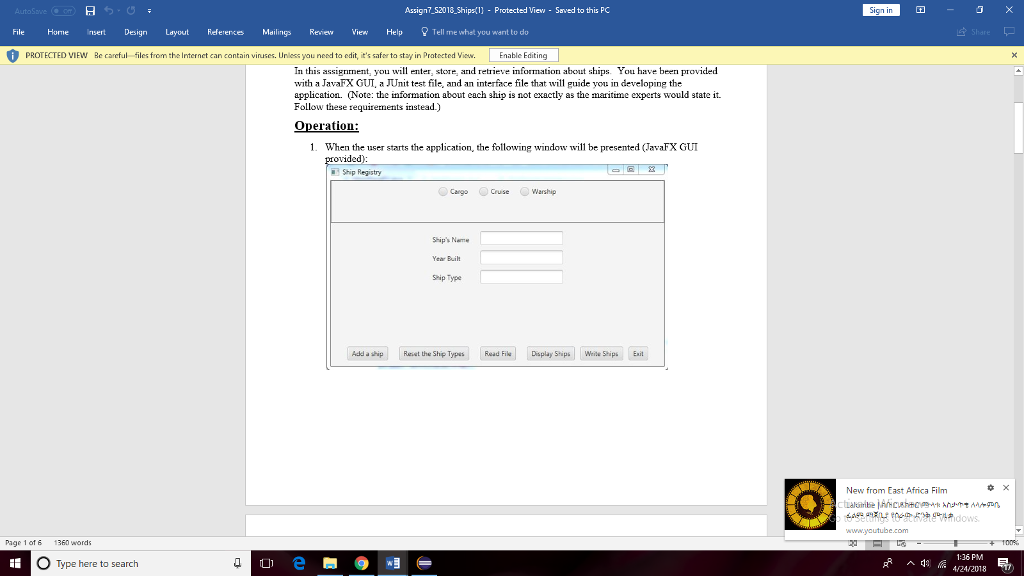
When the user starts the application, the following window will be presented (JavaFX GUI provided):
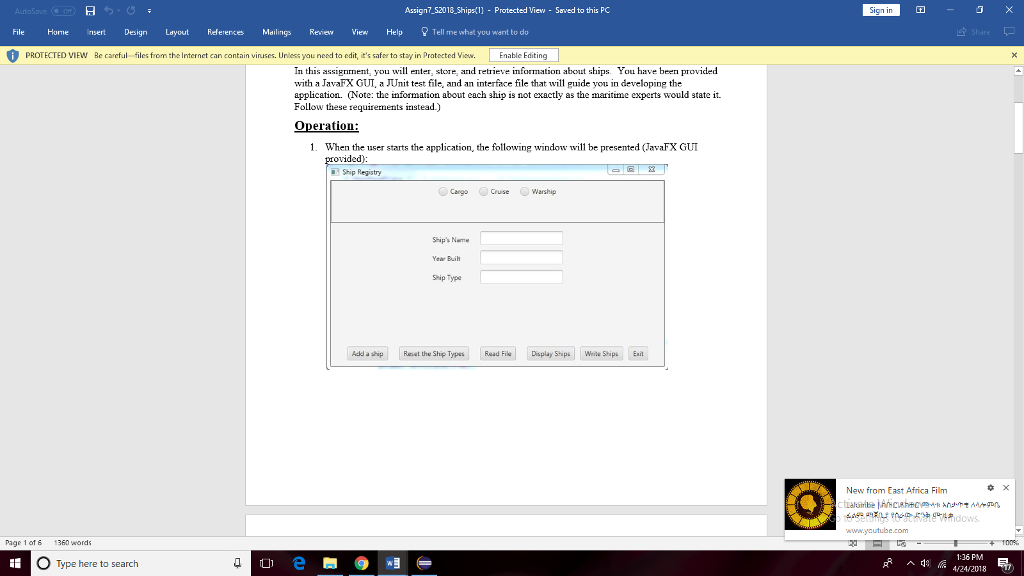
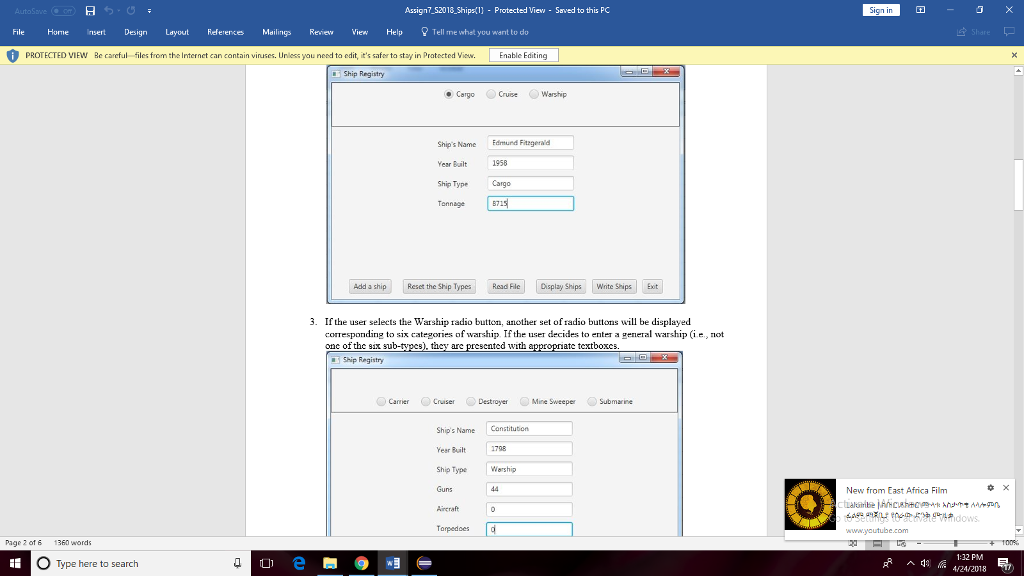
The user will select a radio button specifying which type of ship they wish to create. The ship type text field will be pre-populated, but the user will type in the Ships name and year built, and for a cargo ship, the tonnage, or for a cruise ship, the number of passengers.
If the user selects the Warship radio button, another set of radio buttons will be displayed corresponding to six categories of warship. If the user decides to enter a general warship (i.e., not one of the six sub-types), they are presented with appropriate textboxes.
If the user decides to enter one of the six sub-categories of warships by selecting a radio button, they will be provided with a pre-populated ship type and appropriate text fields to fill in.
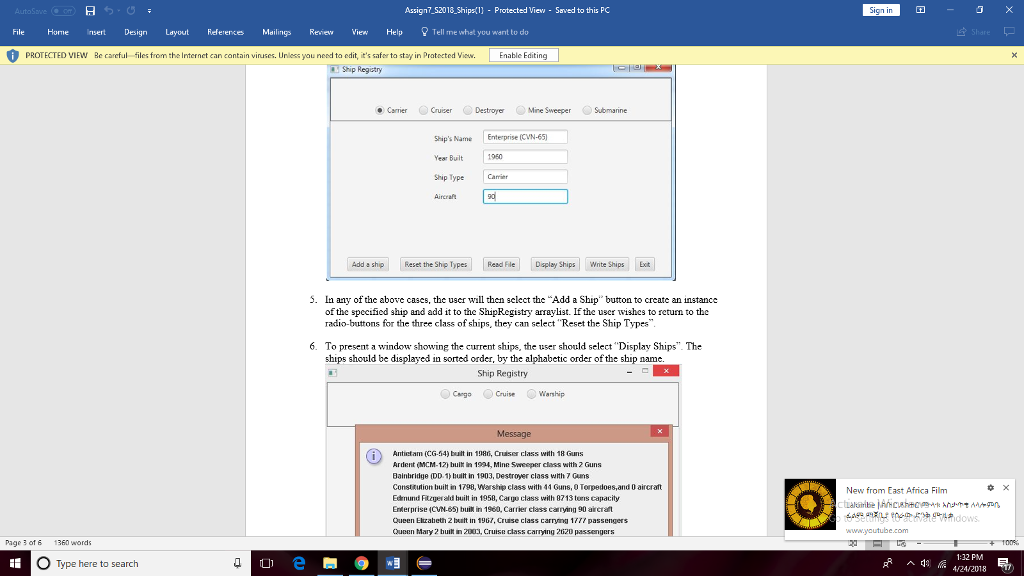
In any of the above cases, the user will then select the Add a Ship button to create an instance of the specified ship and add it to the ShipRegistry arraylist. If the user wishes to return to the radio-buttons for the three class of ships, they can select Reset the Ship Types.
To present a window showing the current ships, the user should select Display Ships. The ships should be displayed in sorted order, by the alphabetic order of the ship name.
To read from a file, select the Read File button. The user will be presented with a file explorer from which they can select an input file. If the file is correctly formatted, each line will become a ship added to the ShipRegistry. Similarly, to write the current ShipRegistry to a file, the user selects Write Ships.
Specifications
General - Write a Java program to allow the user to enter information about a ship, add it to a registry, write the ship information to a file, and read the information into the registry.
Create an abstract class called Ship with private fields name and year of type String, and type of ShipType, and public getters and setters for each. The field name represents the name of the ship, year is the year commissioned, and type is a string that represents one of the enumeration values below.
Data Elements: Create three classes that inherit from Ship: CargoShip, CruiseShip, and WarShip. Instances of WarShip will be further refined into five types, but will all be WarShip objects.
Create an enumeration class named ShipType.java that has the following values: CARGO, CRUISE, WARSHIP, CARRIER, CRUISER, DESTROYER, MINE_SWEEPER, and SUBMARINE. These categories are meant to represent the following:
CARGO a merchant ship carrying cargo
CRUISE a passenger ship
WARSHIP a general warship, which is not further refined by the following categories (we will record guns, torpedoes, and aircraft, although older warships only had guns)
CARRIER an aircraft carrier
CRUISER a cruiser (while cruisers have sophisticated electronic and sonar equipment, missile launchers, etc, which define them, we will simplify them by just recording a number of guns)
DESTROYER a destroyer (while destroyer have torpedo launchers, missile launchers, depth charges, and sophisticated electronic and sonar equipment, etc, we will simplify them by just recording a number of guns)
MINE_SWEEPER a counter-mine ship (while mine-sweepers have sophisticated electronics, sonar, other counter-mine equipment, we will simplify them by just recording a number of guns)
SUBMARINE a submarine (while modern submarines have missile launch capability, we will simplify them by just recording a number of torpedo launchers)
Create a Data Manager class called ShipRegistry that implements ShipRegistryInterface. It will contain an Arraylist which holds Ship objects (Cargo, Cruise, and Warship all extending Ship). It will have methods required by the ShipRegistryInterface, i.e., addShip, getShips, getShipDescriptions, getWarshipDescriptions, readFile, and writeFile.
Create a toString method for each ship class that will return a String describing the ships name, year commissioned, and type, and the following field or fields depending on ship type. For each ship type, the fourth and subsequent fields will be:
CARGO number of tons of cargo
CRUISE number of passengers
WARSHIP number of guns, number of torpedo launchers, and number of aircraft
CARRIER number of aircraft
CRUISER number of guns
DESTROYER number of guns
MINE_SWEEPER number of guns
SUBMARINE number of torpedo launchers
Create a toString() method for the ShipRegistry class that sorts the current ships according to the alphabetic order of the ships name, and then iterates through the current ships and appends each ships toString method to the string returned. This will require the Ship class to implement the Comparable interface, which requires Ship to implement the compareTo method. This method should get the ships names and compare the names using the library compareTo method for Strings.
Create a writeString method for each ship class and category that returns an exact string that will be written to an output file, and then perhaps read back in. The writeString method for each type of ship will have the following form. Note that all fields are separated by commas, so that the output file that is written using this method becomes a comma-delimited file (e.g., a csv file). These methods do need to write in exactly the following format. The first three fields are the string representation, and the subsequent field(s) is a string representation of an integer.
CARGO name,shipType,year,tonnage
CRUISE name,shipType,year,passengers
WARSHIP name,shipType,year,guns,torpedos,aircraft
CARRIER name,shipType,year,aircraft
CRUISER name,shipType,year,guns
DESTROYER name,shipType,year,guns
MINE_SWEEPER name,shipType,year,guns
SUBMARINE name,shipType,year,torpedoes
Your ShipRegistry methods must pass the JUnit Test class (provided). Do not modify this file. You also are provided a JUnit STUDENT Test file, which you should modify to further test your program. Your program will also be tested by private JUnit tests run by the instructor.
Create Javadoc for your classes.
Turn in all your java code, including ShipRegistryInterface.java, ShipRegistryTest.java, and ShipRegistrySTUDENTTest.java.
Create and turn in a final UML Class Diagram and a Design Reflection Word document, explaining how your initial design was modified, and how your final design differs from or matches the design solution.
/////////////////////////////////////////////////////////////////////////////////////////////////////////////////////////////////////////////////////////////////////////////////////
public abstract class Function { /** * Calculates the value f(x) of the function at x * @param x The x-value at which the function will be evaluated * @return a double, the value of the function at x */ public abstract double fnValue(double x); /** * Translates f(x) to the display coordinate system. Note that Java graphics * places (0,0) in the upper left, and (xmax, ymax) in the lower right of the * display. A buffer of 5 pixels is kept at top and bottom. * @param x the value at which f(x) will be evaluated * @param d the height in pixels of the display * @param minY the minimum f(x) to be displayed, over the extent of the x's * @param maxY the maximum f(x) to be displayed, over the extent of the x's * @return the value of f(x) translated to the display coordinate system */ public double fnValueToPlot(double x, double d, double minY, double maxY) { double y = fnValue(x); double yDraw = (d+5)-((y-minY)*(d/(maxY-minY))); return yDraw; } /** * Determines the display value where y=0 * @param height Height of the Canvas * @param minY th=0e minimum height of the function within the chosen extents * @param maxY the maximum height of the function within the chosen extents * @return the value of y to display corresponding to y */ public double originToPlot(double height, double minY, double maxY) { double yDraw = (height+5)-((0-minY)*(height/(maxY-minY))); return yDraw; } }//////////////////////////////////////////////////////////////////////////////////////////////////////////////////////////////////////////////////////////////////////////////////////////////////
public class Function1 extends Function { @Override public double fnValue(double x) { if (x==0.0) return Double.MAX_VALUE; else return 1/x; } public String toString() { return "1/x"; } }/////////////////////////////////////////////////////////////////////////////////////////////
public class Function2 extends Function { @Override public double fnValue(double x) { return Math.sin(x); } public String toString() { return "sin(x)"; } }//////////////////////////////////////////////////////////////////////////////////////////////////////////////////////////////////////
public class Function3 extends Function { @Override public double fnValue(double x) { return (8*x-Math.sqrt(x))/(Math.pow(x,3) - (7*Math.pow(x,2)) + 15*x - 9); } public String toString () { return "(8*x-sqrt(x))/x^3 - 7*x^2 + 15*x - 9"; } }/////////////////////////////////////////////////////////////////////////////////////////////////////////////////////////////////////////////
import javafx.application.Application; import javafx.scene.Scene; import javafx.scene.layout.BorderPane; import javafx.stage.Stage; public class GraphDriverFX extends Application { public final double CANVAS_WIDTH = 400; public final double CANVAS_HEIGHT = 300; public final double WINDOW_HEIGHT = 400; public static void main(String[] args){ launch(args); } /** * start is required by the class Application and is called by launch * It initializes MainPaneFX, which returns the main panel */ public void start(Stage stage) throws Exception { MainPaneFX mainPane = new MainPaneFX(CANVAS_WIDTH, CANVAS_HEIGHT); BorderPane root = mainPane.getMainPane(); Scene scene = new Scene(root, CANVAS_WIDTH, WINDOW_HEIGHT); stage.setScene(scene); stage.setTitle("Function Grapher"); stage.show(); } }///////////////////////////////////////////////////////////////////////////////////////////////////////////
/** * The manager deals with the specified functions, i.e., selecting the function that the user wants, * setting the x-axis and y-axis extents that the user wants plotted, getting the function value at a * specified x, and getting the y value to be drawn on the GUI. * @author ralexander * */ public class GraphManager implements GraphManagerInterface { private double xLeft, xRight; private double yTop = Integer.MIN_VALUE; private double yBottom = Integer.MAX_VALUE; private int functionChoice=-999; Function function1, function2, function3, function4, function5, function6; /** * Constructor instantiates the functions specified. */ GraphManager() { function1 = new Function1(); function2 = new Function2(); function3 = new Function3(); } /** * getFnValue calculates the value of the function requested by the user, at a specific x value. * @param fnNum the choice of which function to evaluate * @param x the value at which to evaluate the function * @return the value of f(x) */ public double getFnValue (int fnNum, double x) { switch(fnNum) { case 1: return function1.fnValue(x); case 2: return function2.fnValue(x); case 3: return function3.fnValue(x); default: return 0; } } /** * Sets the function choice * @param choice an integer indexing the function desired */ public void setFunctionChoice(int choice) { functionChoice = choice; } /** * Gets the function index previously selected by the user * @return an index 1-4 corresponding to a function */ public int getFunctionChoice() { return functionChoice; } /** * Gets the actual function instance * @param choice the index of the function desired * @return an instance of a sub-class of the Function class */ public Function getFunction(int choice) { switch(choice) { case 1: return function1; case 2: return function2; case 3: return function3; default: return null; } } /** * Sets the left and right extents to be considered, and computes and sets the minimum and maximum * values of f(x) for those left-right extents. * @param xLeft user's desired left extent * @param xRight user's desired right extent * @param d width of the panel in pixels */ public void setExtents(double xLeft, double xRight, double d) { this.xLeft = xLeft; this.xRight = xRight; double x0=xLeft, x1=0, y1; Function fn = getFunction(functionChoice); yTop = Integer.MIN_VALUE; yBottom = Integer.MAX_VALUE; y1 = fn.fnValue(x0); if (y1>yTop && y1Integer.MIN_VALUE) yBottom=y1; for (int i=1; iyTop && y1Integer.MIN_VALUE) yBottom=y1; x0=x1; } System.out.println("xLeft = "+xLeft+"; xRight = "+xRight+" maxY = "+yTop+"; minY = "+yBottom+" gridWidth = "+d); } /** * Gets the left extent of the function to be considered * @return the x value of the left extent as a double */ public double getLeftExtent () { return xLeft; } /** * Gets the right extent of the function to be considered * @return the x value of the right extent as a double */ public double getRightExtent () { return xRight; } /** * Gets the top extent of the function to be considered * @return the maximum f(x) value that occurs from left to right */ public double getTopExtent () { return yTop; } /** * Gets the bottom extent of the function to be considered * @return the minimum f(x) value that occurs from left to right */ public double getBottomExtent () { return yBottom; } /** * Overrides toString, creating a string describing the functions' formulas */ public String toString() { String rtnString = ""; rtnString+="1. "+function1.toString()+" "; rtnString+="2. "+function2.toString()+" "; rtnString+="3. "+function3.toString()+" "; return rtnString; } }/////////////////////////////////////////////////////////////////////////////////////////////////////////////////////////////////////////////////////////////
public interface GraphManagerInterface { /** * getFnValue calculates the value of the function requested by the user, at a specific x value. * @param fnNum the choice of which function to evaluate * @param x the value at which to evaluate the function * @return the value of f(x) */ public double getFnValue (int fnNum, double x); /** * Gets the actual function instance * @param choice the index of the function desired * @return an instance of a sub-class of the Function class */ public Function getFunction(int choice); /** * Sets the left and right extents to be considered, and computes and sets the minimum and maximum * values of f(x) for those left-right extents. Note that these values are NOT transformed to fit in the * display grid, they are just the values of x and f(x) * @param xLeft user's desired left extent * @param xRight user's desired right extent * @param gridWidth width of the panel in pixels */ public void setExtents(double xLeft, double xRight, double gridWidth); /** * Gets the left extent of the function to be considered * @return the x value of the left extent as a double */ public double getLeftExtent (); /** * Gets the right extent of the function to be considered * @return the x value of the right extent as a double */ public double getRightExtent (); /** * Gets the top extent of the function to be considered * @return the maximum f(x) value that occurs from left to right */ public double getTopExtent (); /** * Gets the bottom extent of the function to be considered * @return the minimum f(x) value that occurs from left to right */ public double getBottomExtent (); }/////////////////////////////////////////////////////////////////////////////////////////////////////////////////////////////////////////////////////////////////////
import javafx.scene.canvas.Canvas; import javafx.scene.canvas.GraphicsContext; import javafx.scene.paint.Paint; /** * GraphPanelFX creates the Canvas and draws the graph * @author ralexander * */ public class GraphPanelFX { double gridWidth; double gridHeight; double xLeft, xRight, yTop, yBottom; GraphManager graphMgr; Canvas graphCanvas; GraphicsContext gc; GraphPanelFX(GraphManager graphManager, double CANVAS_WIDTH, double CANVAS_HEIGHT) { graphMgr = graphManager; graphCanvas = new Canvas(CANVAS_WIDTH, CANVAS_HEIGHT); gc = graphCanvas.getGraphicsContext2D(); } public Canvas getGraphCanvas(GraphPanelFX graphPanel2) { return graphCanvas; } /** * drawGraph is called when the "Graph a Function" button is selected */ public void drawGraph() { gridWidth = gc.getCanvas().getWidth(); gridHeight = gc.getCanvas().getHeight(); gc.clearRect(0,0,gridWidth,gridHeight); System.out.println("in paintComponent(); width="+gridWidth+"; height="+gridHeight); drawGraph(gridWidth, gridHeight-10, gc); } /** * Draws line segments from left extent to right extent, pixel by pixel, transforming points * to the coordinate system of the panel. * @param gridWidth2 the width of the panel in pixels * @param gridHeight the height of the panel in pixels * @param g2 the Graphics2D instance generated by Java library classes and sent as a argument of paintComponent */ public void drawGraph(double gridWidth2, double gridHeight, GraphicsContext gc) { double x0=xLeft, y0, x1=0; double x1Draw, x0Draw, y1Draw, y0Draw; int functionChoice = graphMgr.getFunctionChoice(); Function fn = graphMgr.getFunction(functionChoice); //check to make sure a function choice has been made before drawing if(functionChoice>0) { xLeft = graphMgr.getLeftExtent(); xRight = graphMgr.getRightExtent(); graphMgr.setExtents(xLeft, xRight, gridWidth2); yTop = graphMgr.getTopExtent(); yBottom = graphMgr.getBottomExtent(); //draw a gray horizontal line at y=0 gc.setStroke(Paint.valueOf("Gray")); y1Draw = fn.originToPlot(gridHeight, yBottom, yTop); gc.strokeLine(0,y1Draw,gridWidth2,y1Draw); //set the graphing color and width gc.setStroke(Paint.valueOf("BLUE")); gc.setLineWidth(2); x0=xLeft; y0 = graphMgr.getFnValue(functionChoice, x0); //loop pixel by pixel, drawing the function between each value of x for (int i=1; i import javax.swing.JOptionPane; import javafx.geometry.Insets; import javafx.geometry.Pos; import javafx.scene.Group; import javafx.scene.Parent; import javafx.scene.canvas.Canvas; import javafx.scene.canvas.GraphicsContext; import javafx.scene.control.Button; import javafx.scene.layout.BorderPane; import javafx.scene.layout.HBox; import javafx.scene.layout.StackPane; /** * This panel is the basic pane, inside which other panes are placed. * @author ralexander */ public class MainPaneFX { private BorderPane mainPane; private HBox buttonPanel; private GraphPanelFX graphPanel; private Canvas graphCanvas; private Button graphFunctionButton, exitButton; //The manager is the way the GUI communicates with the worker code private GraphManager graphManager; /** * The MainPanel constructor sets up the GUI with two buttons and a display area. */ MainPaneFX(double CANVAS_WIDTH, double CANVAS_HEIGHT) { mainPane = new BorderPane(); //create the dataManager instance graphManager = new GraphManager(); //create the exitButton exitButton = new Button("Exit"); //exitButton.setToolTipText("Exit the program"); exitButton.setOnAction(event -> System.exit(0) ); //create the button to start graphing graphFunctionButton = new Button("Graph a Function"); //graphFunctionButton.setToolTipText("Select a function and graph it"); /* * When the button pushed was the graph function button, user is prompted to select one of the functions, * and is asked for the left and right limits (extents) to plot the function. */ graphFunctionButton.setOnAction(event -> { graphCanvas.setVisible(false); int choice = 0; double left=0, right=0; choice = askForFunction("Select one of the following functions to graph (by number): "+graphManager.toString()); if(choice != 0) { graphManager.setFunctionChoice(choice); try { left = askForExtent("Enter the left extent of the function domain"); right = askForExtent("Enter the right extent of the function domain"); graphManager.setExtents(left, right, graphCanvas.getWidth()); graphPanel.drawGraph(); } catch (NullPointerException e) { JOptionPane.showMessageDialog(null, "No entry: exiting"); } graphCanvas.setVisible(true); } }); //create the buttonPanel buttonPanel = new HBox(); //buttonPanel.setPreferredSize(new Dimension(600,50)); buttonPanel.setVisible(true); buttonPanel.setAlignment(Pos.CENTER); HBox.setMargin(exitButton, new Insets(10,10,10,10)); HBox.setMargin(graphFunctionButton, new Insets(10,10,10,10)); buttonPanel.getChildren().addAll(exitButton, graphFunctionButton); //buttonPanel.add(graphFunctionButton); //add the panel to the bottom section of the main panel mainPane.setBottom(buttonPanel); //panel to hold the graph graphPanel = new GraphPanelFX(graphManager, CANVAS_WIDTH, CANVAS_HEIGHT); graphCanvas = graphPanel.getGraphCanvas(graphPanel); graphCanvas.setVisible(true); mainPane.setCenter(graphCanvas); } public GraphManager getGraphManager() { return graphManager; } private int askForFunction(String str) { boolean error=false; int returnVal=0; do { try { returnVal = Integer.parseInt(JOptionPane.showInputDialog (null, str)); if (returnVal5) { error = true; JOptionPane.showMessageDialog(null, "Choice of function must be an integer between 1 and 5"); } else error = false; } catch (NumberFormatException e) { JOptionPane.showMessageDialog(null, "Input Error: "+e); error = true; } } while(error); return returnVal; } private double askForExtent(String str) throws NullPointerException { boolean error=false; double returnVal=0; do { try { returnVal = Double.parseDouble(JOptionPane.showInputDialog(null, str)); error = false; } catch (NumberFormatException e) { JOptionPane.showMessageDialog(null, "Input Error - "+e); error = true; } } while(error); return returnVal; } public BorderPane getMainPane() { // TODO Auto-generated method stub return mainPane; } }
AutoS Assign7_52018 Shipa(l) Protected Views - Saved to this PC File Home insert DesignLayoutRefereces Mailings Review View Help ell me whet you want to do PROTECTED VIEW Be careful files from the Internet can contain vinuses. Unless you need to edit, t's safer to stay in PratectedVsw nable Editing In this assignment, y will enter, store, arnd retrieve information about ships. You have been provided with a JavaFX GUIaJUnt test file, and an interface file that will guide you in developing the application. (Note: the information about each ship is not exactly as the maritime experts would state it. Follow these requirements instead.) Operation: 1. When the user starts the application, the following window will be presented (JavaFX GUT Ship Registry Cango Warship Ships Name Year Built seip Type Add a shipReset the Shp TyRead FiDisplay ShipsWie Ships Eit New from East Africa Film Page 1 of 1360 words 1:36 PM 4/24/2018 Type here to search ^ da AutoS Assign7_52018 Shipa(l) Protected Views - Saved to this PC File Home insert DesignLayoutRefereces Mailings Review View Help ell me whet you want to do PROTECTED VIEW Be careful files from the Internet can contain vinuses. Unless you need to edit, t's safer to stay in PratectedVsw nable Editing In this assignment, y will enter, store, arnd retrieve information about ships. You have been provided with a JavaFX GUIaJUnt test file, and an interface file that will guide you in developing the application. (Note: the information about each ship is not exactly as the maritime experts would state it. Follow these requirements instead.) Operation: 1. When the user starts the application, the following window will be presented (JavaFX GUT Ship Registry Cango Warship Ships Name Year Built seip Type Add a shipReset the Shp TyRead FiDisplay ShipsWie Ships Eit New from East Africa Film Page 1 of 1360 words 1:36 PM 4/24/2018 Type here to search ^ da
Step by Step Solution
There are 3 Steps involved in it

Get step-by-step solutions from verified subject matter experts
 Study Help