







Question: Assignment: Create a Java Program with JOptionPane That Generates A Hotel Room Cleaning Roster For The Custodians. A hotel room cleaning roster is like a
Assignment: Create a Java Program with JOptionPane That Generates A Hotel Room Cleaning Roster For The Custodians.
A hotel room cleaning roster is like a schedule for housekeeping staff, detailing when and how each hotel room will be cleaned. This plan ensures that all rooms receive regular cleaning, maintaining a pleasant and hygienic experience for guests. To create your own hotel room cleaning roster, you can use nested loops in Java.
Nested loops in Java involve placing one loop inside another, providing a structured approach for repetitive tasks, especially when dealing with complex data or patterns. Essentially, there's an outer loop that encloses an inner loop. The inner loop completes its iterations for each run of the outer loop, helping you organize and execute cleaning tasks efficiently.
JOptionPane is a Java class in the javax.swing package. It simplifies the creation of dialog boxes for user interaction. JOptionPane provides static methods to display input prompts, messages, and confirmations, making it easy to integrate user interaction into Java applications.
Setting Up:
Open Visual Studio Code VSC and create a new file with the class named HotelRoomEx
Add a comment block at the top, including your name, UIN, section, and date
Java Code:
Write Java code with correct indention and formatting.
Utilize JoptionPane.showInputDialog to prompt the user for starting floor, total number of floors, and total number of rooms per floor.
Use JoptionPane.showllessageDialog to show a message if the user enters an invalid input, guiding them to enter a different number.
Skip the th floor due to superstitions.
Utilize nested loops to create the hotel room cleaning roster.
Roster Display:
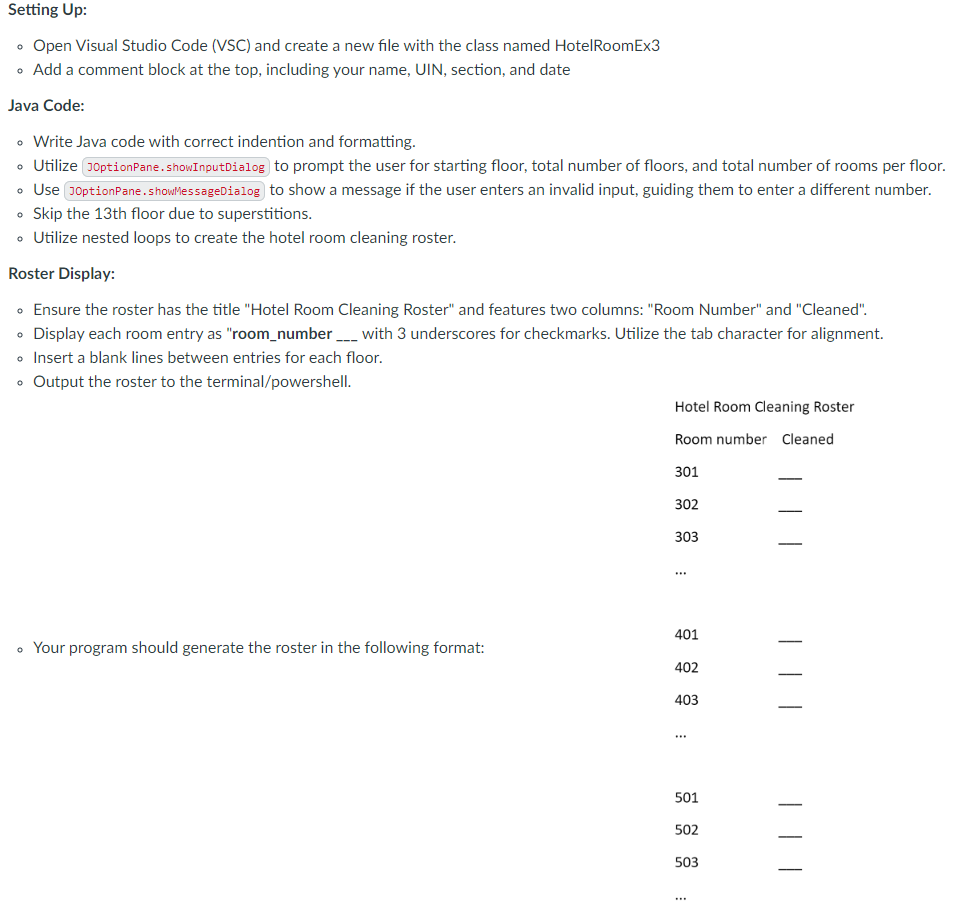
Ensure the roster has the title "Hotel Room Cleaning Roster" and features two columns: "Room Number" and "Cleaned".
Display each room entry as "roomnumber
with underscores for checkmarks. Utilize the tab character for alignment.
Insert a blank lines between entries for each floor.
Output the roster to the terminalpowershell
Your program should generate the roster in the following format:
Hotel Room Cleaning Roster
Room number Cleaned
Floor Requirements:
Confirm that the starting floor falls between and
if not, output to the screen
"Starting floor must be between and and exit.
Validate the total number of floors does not exceed
if not, output to the screen
"Top floor must be between and and exit.
Guarantee the same number of rooms per floor.
Room Numbering:
For floors with fewer than rooms, use a digit room number eg For floors and above, use a digit number eg
If there are or more rooms per floor, use a digit room number eg or digits for floors and above.
if there are no rooms or more than digits of rooms per floor output to the screen
"Rooms per floor should be between and and exit.
Comments:
Comment different sections of code for clarity.
File Management:
Save the Java code in a file named HotelRoomExjava
Step by Step Solution
There are 3 Steps involved in it
1 Expert Approved Answer
Step: 1 Unlock

Question Has Been Solved by an Expert!
Get step-by-step solutions from verified subject matter experts
Step: 2 Unlock
Step: 3 Unlock
 Study Help