







Question: Assignment Details 1. Download the MS-Access file called Assignment from your Submission Link. It will contain a table called Grades. 2. Create a table called
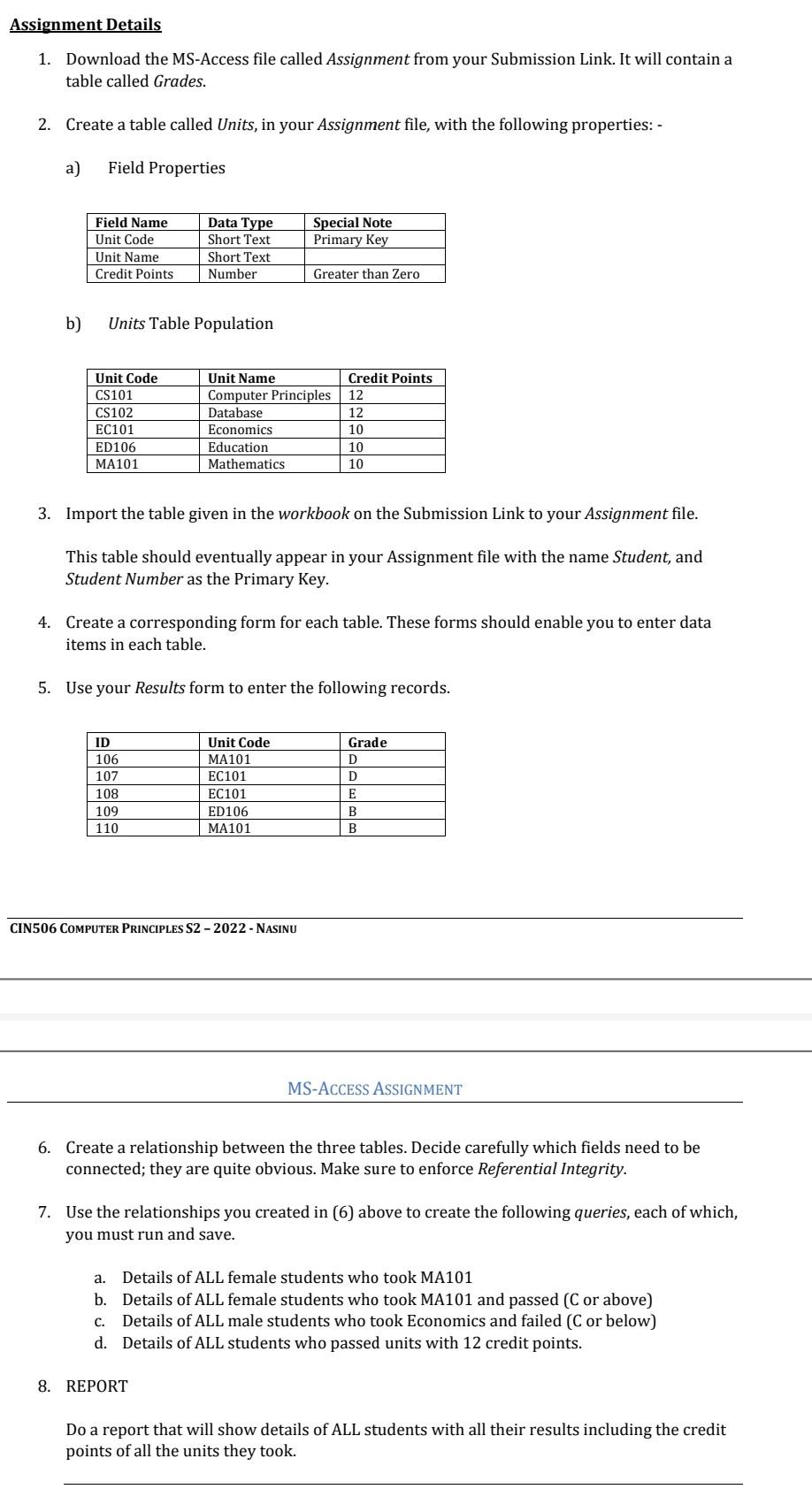
Assignment Details 1. Download the MS-Access file called Assignment from your Submission Link. It will contain a table called Grades. 2. Create a table called Units, in your Assignment file, with the following properties: - a) Field Properties b) Units Table Population 3. Import the table given in the workbook on the Submission Link to your Assignment file. This table should eventually appear in your Assignment file with the name Student, and Student Number as the Primary Key. 4. Create a corresponding form for each table. These forms should enable you to enter data items in each table. 5. Use your Results form to enter the following records. CIN506 COMPUTER PRINCIPLES S2 - 2022 - NASINU MS-ACCESS ASSIGNMENT 6. Create a relationship between the three tables. Decide carefully which fields need to be connected; they are quite obvious. Make sure to enforce Referential Integrity. 7. Use the relationships you created in (6) above to create the following queries, each of which, you must run and save. a. Details of ALL female students who took MA101 b. Details of ALL female students who took MA101 and passed (C or above) c. Details of ALL male students who took Economics and failed (C or below) d. Details of ALL students who passed units with 12 credit points. 8. REPORT Do a report that will show details of ALL students with all their results including the credit points of all the units they took. Assignment Details 1. Download the MS-Access file called Assignment from your Submission Link. It will contain a table called Grades. 2. Create a table called Units, in your Assignment file, with the following properties: - a) Field Properties b) Units Table Population 3. Import the table given in the workbook on the Submission Link to your Assignment file. This table should eventually appear in your Assignment file with the name Student, and Student Number as the Primary Key. 4. Create a corresponding form for each table. These forms should enable you to enter data items in each table. 5. Use your Results form to enter the following records. CIN506 COMPUTER PRINCIPLES S2 - 2022 - NASINU MS-ACCESS ASSIGNMENT 6. Create a relationship between the three tables. Decide carefully which fields need to be connected; they are quite obvious. Make sure to enforce Referential Integrity. 7. Use the relationships you created in (6) above to create the following queries, each of which, you must run and save. a. Details of ALL female students who took MA101 b. Details of ALL female students who took MA101 and passed (C or above) c. Details of ALL male students who took Economics and failed (C or below) d. Details of ALL students who passed units with 12 credit points. 8. REPORT Do a report that will show details of ALL students with all their results including the credit points of all the units they took
Step by Step Solution
There are 3 Steps involved in it

Get step-by-step solutions from verified subject matter experts
 Study Help