







Question: Assignment purpose: To compile, build, and execute an interactive program using functions from stdio.li (printf and scant), math in C. condition PRACTCE, a while loop.
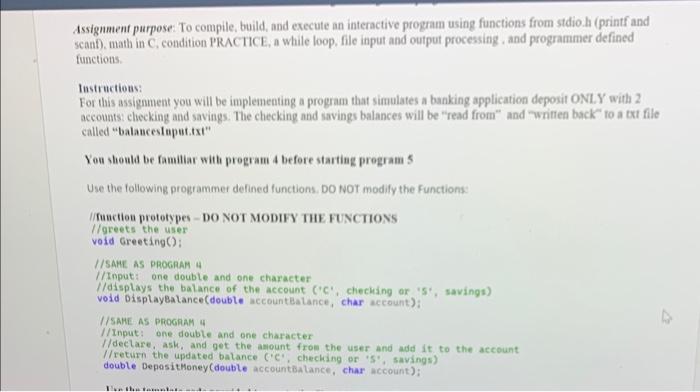
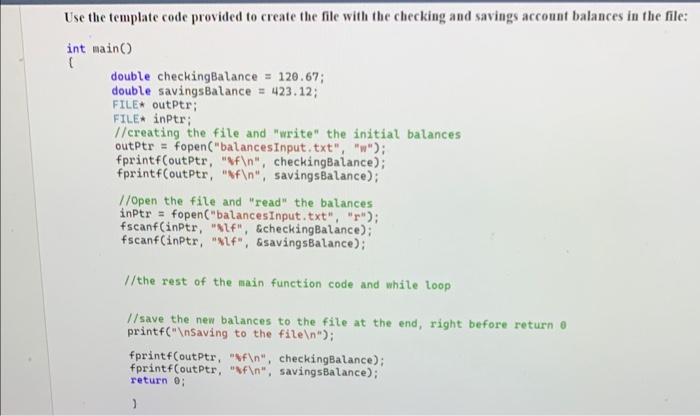
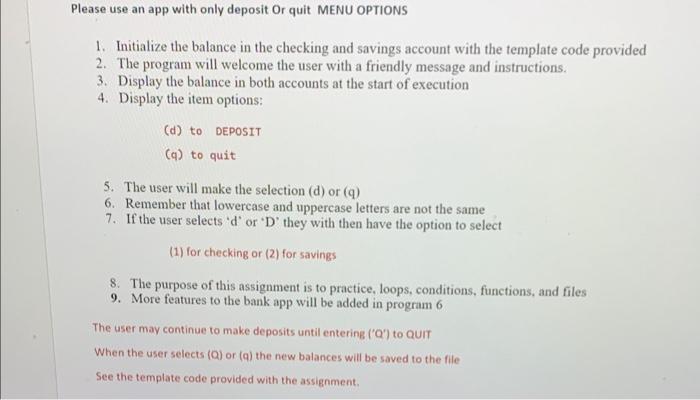
Assignment purpose: To compile, build, and execute an interactive program using functions from stdio.li (printf and scant), math in C. condition PRACTCE, a while loop. file input and output processing , and programmer defined functions. Instructious: For this assignment you will be implementing a program that simulates a banking application deposit ONL.Y with 2 accounts: checking and savings. The checking and iavings balances will be "read from" and "written back" to a tri file called "balauceslaputitxt" You should be familiar with program 4 before starting program 5 Use the following programmer defined functions. DO for modify the Functions: I/ funcliou prototypes - DO NOT MODIFY THE FUNCTIONS l/greets the user void 6 reeting ( ) I/SARE AS PROCRAM I //Inpat: one double and one character l/displays the balance of the account ('C', cheching or 'st, savings) void Displaybalance(doubte accountBalance, char account): I/ SAME AS PROGAM 4 IIImput: one double and one character //declare, ash, and get the asount from the user and add it to the account. //return the updated batance ('C', cheching or 'S', savings) double Deposithoney (double accountibalance, char account): Use the template code provided to create the file with the checking and savings account balances in the file: Please use an app with only deposit Or quit MENU OPTIONS 1. Initialize the balance in the checking and savings account with the template code provided 2. The program will welcome the user with a friendly message and instructions. 3. Display the balance in both accounts at the start of execution 4. Display the item options: (d) to DEPOSIT (q) to quit 5. The user will make the selection (d) or (q) 6. Remember that lowercase and uppercase letters are not the same 7. If the user selects ' d ' or ' D ' they with then have the option to select (1) for checking or (2) for savings
Step by Step Solution
There are 3 Steps involved in it

Get step-by-step solutions from verified subject matter experts
 Study Help