







Question: Assignment Scope For this assignment students will experience changing requirements resulting in modifying the original design. This is real world experience and is intentionally incorporated
Assignment Scope
For this assignment students will experience changing requirements resulting in modifying the original design. This is real world experience and is intentionally incorporated into projects every semester to expose students to the need to be flexible in software engineering. After initial project design of a project, when software engineers delve into writing the source code, it frequently exposes gaps in previous assumptions.
Additionally, software engineers will write some test code for the backend development that eventually will not be used in the final project or also known as thrown away. We do this to make sure our backend logic works before we add a user interface. We will also incorporate this methodology for this assignment of the project.
Finally, software engineers always perform regression testing after modifying source code. Regression testing is a type of software testing which verifies that software which was previously developed and tested still performs the same way after it was changed or interfaced with other software. Changes may include software enhancements, patches, configuration changes, etc.
The goal is to simulate the foundation of the components of the game MasterMind by creating a Codemaker, Codebreaker, and the Game; this includes:
1. Allow the code breaker to attempt guessing the secret code.
2. Have the code maker respond to the code breakers attempt.
a. If the correct color is in the correct position, the code makers response should include a red peg
b. If the correct color is in the wrong position, the code makers response should include a white peg
c. If the color is not correct no pegs are used
d. Red pegs are presented first, then the white pegs
3. Limit the number of attempts to 10 guesses, if the code breaker guesses the code, they win the game, if the code breaker does not guess the code within 10 guesses, they lose the game.
To accomplish this, write the follow source code:
1. Reference the tasks below for the specifics of the source code requirements.
2. Compress a project and submit to Webcourses
3. Decompress compressed project and verify it is a Netbeans project
Deliverables
Tasks and Rubric
| Activity | |
| MasterMind project | |
| MasterMind class |
|
| Constants package | |
| Constants class | |
| core package | |
| Codebreaker class | 1. Add private method consoleAttempt() that will allow for backend testing of the logic, it shall do the following: a. Remove previous data stored in member variable codebreakerAttempt (Hint: class ArrayList has a handy method . removeAll()) b. Instantiate an instance of class Scanner to take input from the console c.Prompt the user to enter their guess, my implementation was as follows:i. System.out.println(" Enter your colors in left to right order " + ii. "Use BLUE, BLACK, ORANGE, WHITE, YELLOW, RED, GREEN, PINK:"); d. Loop until the user enters four valid colors with no duplicates i. Instantiate an instance of class String set equal to Scanners method next() 1. Evaluate the users input (Hint: recommend using either String method .toUpperCase() or .toLowerCase() to alleviate issues with case sensitivity) a. If the entered color matches one of the eight valid colors of the game, do the following: i. Output to the console the selected color ii. Add the color to the member variable codebreakerAttempt b. If the size of the codebreakerAttempt is less than the max pegs specified in our Constants.java file then add a prompt to enter for the user their next color e. Using an enhanced for loop output to the console the codebreakers attempt 2. Update method getCodebreakerAttempt() to call method consoleAttempt() |
| Codemaker class | 1. Update method signature checkAttemptedCode () to match the modified method signature in interface ICodemaker 2. Implement method checkAttemptedCode() to do the following:a. Create local variables to store the number of red and white pegs scored by the codebreaker b. Create a local variable to store which pegs have been evaluated of the codebreakers guess c. Create a local variable to convert the secret code Set member variable to an ArrayList object d. Check if the codebreakers guess is exactly equal to the codemakers attempt (Hint: class ArrayList has a handy method .equals())i. If true, then red pegs should equal 4 ii. If true, then white pegs should equal 0 e. If item d. fails, then determine which pegs are the correct color in the correct position or the correct color in the wrong position i. Loop through the max pegs as defined in our Constants.java class 1. Check if a correct color is in the correct position by comparing index to index of the two ArrayLists representing the secret code and the codebreakers guess a. If true, increment the red peg counter b. Add the codebreakers guess at this index to the Set that stores the evaluated pegs 2. Use an enhanced for loop using the codebreakers attempt as the collection object a. Check if the secret code ArrayList contains the current element of the codebreakers attempt (Hint: class ArrayList has a handy method .contains()) i. Loop through the max pegs as defined in our Constants.java class 1. Check if the secret code ArrayList is NOT equal to the codebreakers attempt at the specific index AND the secret code ArrayList contains the codebreakers attempt at the specific index AND the pegs evaluated Set does NOT include the current codebreakers attempt at the specific index a. If true, then increment the white pegs counter b. Add the current index of the codebreakers attempt to the ArrayList that stores the evaluated pegs f. Evaluate the red and white peg counters to populate the codemakers responsei. For each red peg, add to the member variable codemakerResponse Color.RED ii. For each white peg, add to the member variable codemakerResponse Color.WHITE iii.Red is always first, then white! iv. Use an enhanced for loop to output to the console the codemaerkers response |
| Game class | 1. Modify custom constructor a. Call method play() 2. Method play() a. Loop for the max number of attempts as defined in our Constants.java class AND the codebreaker hasnt guessed the secrete code i. Instantiate an instance of class ArrayList specified as using class Color, set equal to calling method getCodebreakerAttempt() in class Codebreaker ii. Call method checkAttemptedCode() in class Codemaker, passing the local variable from step a. as an argument iii. Instantiate an instance of class ArrayList specified as using class Color, set equal to calling method getCodemakerResponse () in class Codemaker iv. Use an enhanced for loop to output to the console the codemakers response for each codebreakers attempt |
| ICodebreaker interface |
|
| ICodemaker interface | 1. Modify method signature public void checkAttemptedCode() a. Add parameter ArrayListattempt to the method signature |
| IGame interface |
|
| userInterface package | |
| MasterMindUi class | |
| MasterMind application | |
| Test Case 1 | Test Case 1 passes regression testing |
| Source compiles with no errors | |
| Source runs with no errors | |
| Source includes comments | |
Perform the following test cases
| Test Cases | ||
| Action | Expected outcome | |
| Test Case 1 | Run application start the game | JOptionPane.showMessageDialog() displays similar to figure 1 |
| Test Case 2 | Run application codemaker generates secret code | The console window should be similar to figure 2 Java does NOT automatically translate its Color objects to a String value, rather it prints the RGB code of the color. |
| Test Case 3 | Run application codebreaker prompted for their guess | The console window should be similar to figure 3 |
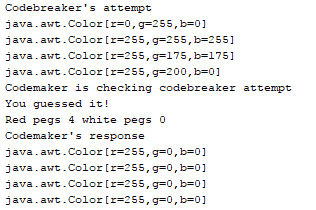
| Test Case 4 | Run application codebreaker entries acknowledged | The console window should be similar to figure 4 |
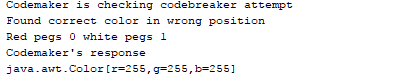
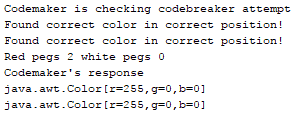
| Test Case 5 | Run application codemaker response | The console window should be similar to figure 5 |
Figure 1 JOptionPane.showMessageDialog()
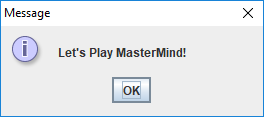
Figure 2 Generated secret code
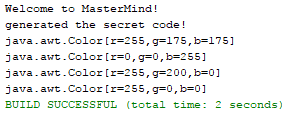
Figure 3 Prompt the user for four colors

Figure 4 Prompting user for color selections
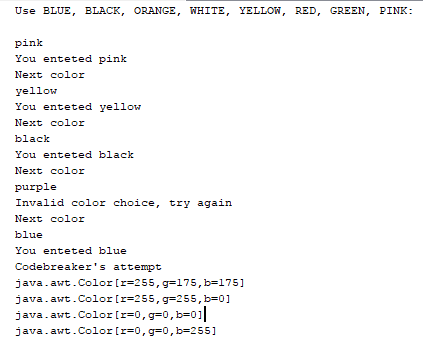
Figure 5 Codemaker's Response
Step by Step Solution
There are 3 Steps involved in it

Get step-by-step solutions from verified subject matter experts
 Study Help