







Question: Assignment - State with PHP *Html at end Required HTML code: lab8-1.html First Name: Last Name: Username: email: Password: Re-enter Password: lab8-4.html Username: userimagesddl.sql --
Assignment - State with PHP
*Html at end
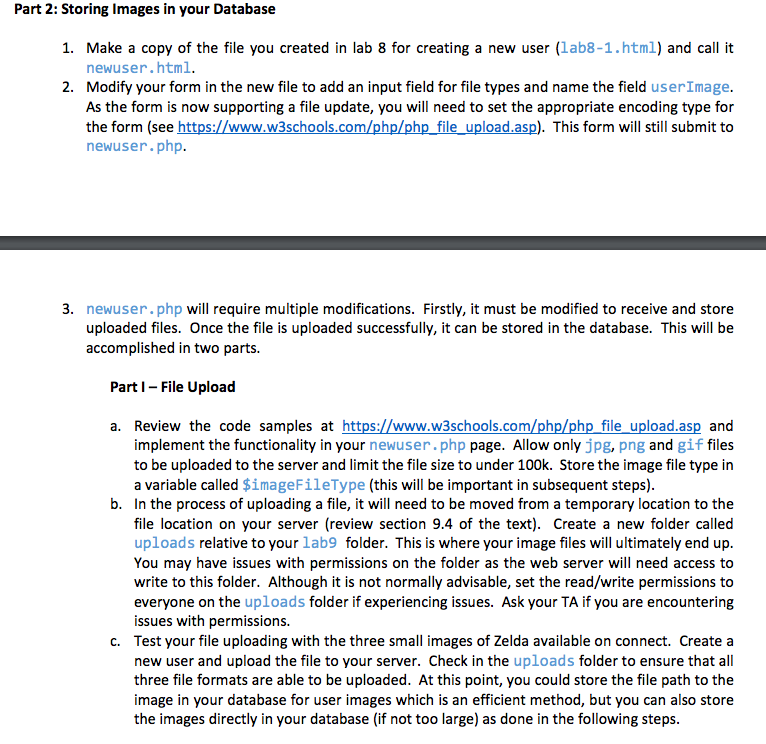
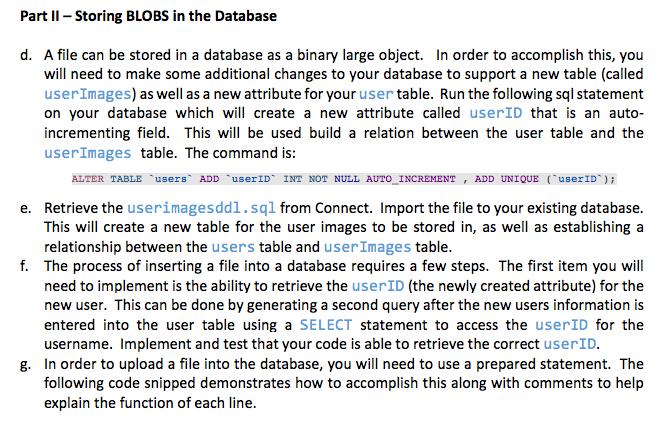
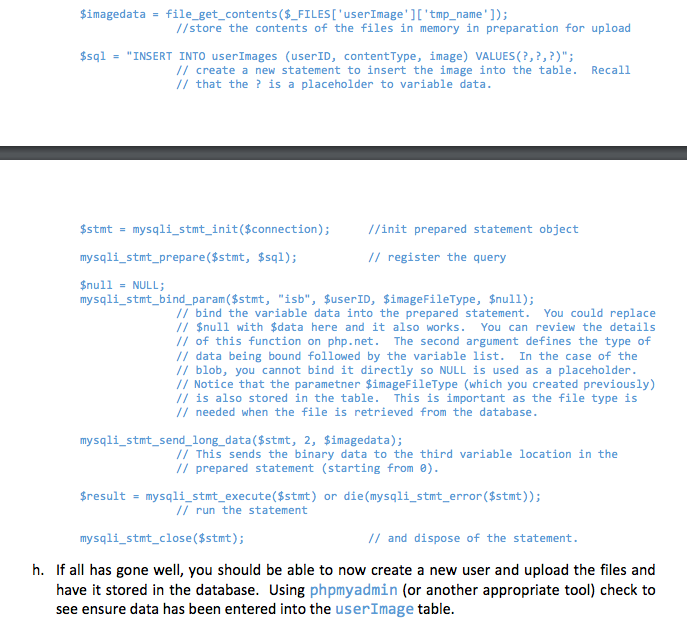
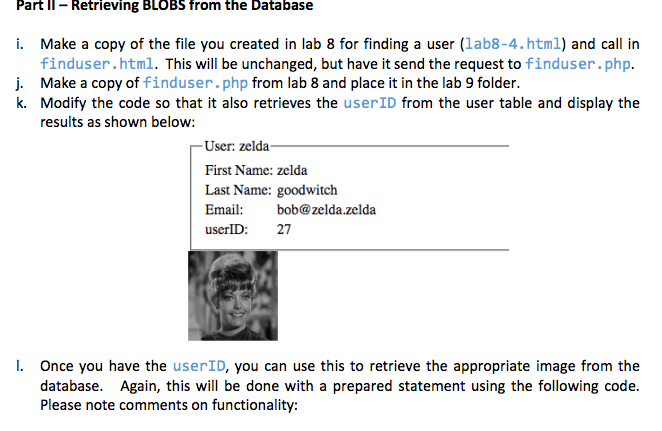
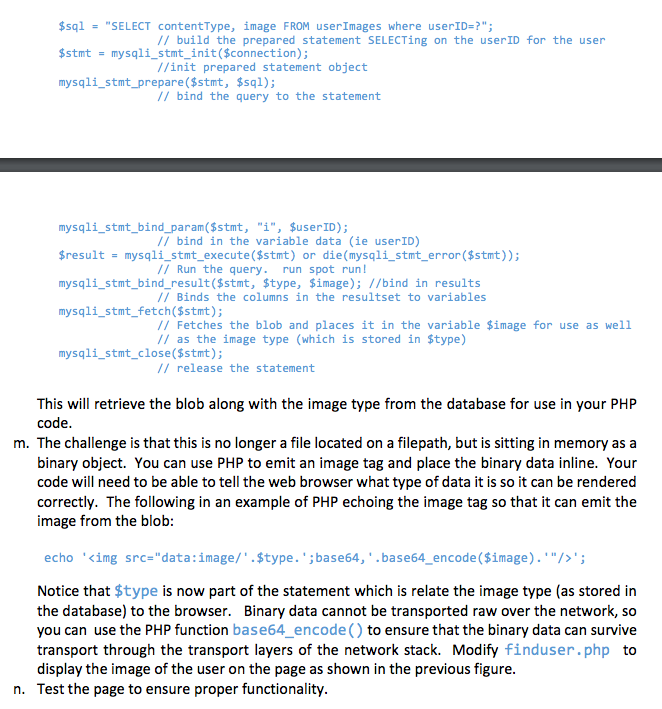
Required HTML code:
lab8-1.html
lab8-4.html
userimagesddl.sql
-- phpMyAdmin SQL Dump -- version 4.6.5.2 -- https://www.phpmyadmin.net/ -- -- Host: localhost -- Generation Time: Mar 16, 2017 at 11:59 PM -- Server version: 10.1.21-MariaDB -- PHP Version: 5.6.30
SET SQL_MODE = "NO_AUTO_VALUE_ON_ZERO"; SET time_zone = "+00:00";
/*!40101 SET @OLD_CHARACTER_SET_CLIENT=@@CHARACTER_SET_CLIENT */; /*!40101 SET @OLD_CHARACTER_SET_RESULTS=@@CHARACTER_SET_RESULTS */; /*!40101 SET @OLD_COLLATION_CONNECTION=@@COLLATION_CONNECTION */; /*!40101 SET NAMES utf8mb4 */;
-- -- Database: `lab8` --
-- --------------------------------------------------------
-- -- Table structure for table `userImages` --
CREATE TABLE `userImages` ( `userID` int(11) NOT NULL, `contentType` varchar(255) NOT NULL, `image` blob NOT NULL ) ENGINE=InnoDB DEFAULT CHARSET=latin1;
-- -- Indexes for dumped tables --
-- -- Indexes for table `userImages` -- ALTER TABLE `userImages` ADD PRIMARY KEY (`userID`), ADD KEY `userID` (`userID`);
-- -- Constraints for dumped tables --
-- -- Constraints for table `userImages` -- ALTER TABLE `userImages` ADD CONSTRAINT `userimages_ibfk_1` FOREIGN KEY (`userID`) REFERENCES `users` (`userID`) ON DELETE CASCADE ON UPDATE CASCADE;
/*!40101 SET CHARACTER_SET_CLIENT=@OLD_CHARACTER_SET_CLIENT */; /*!40101 SET CHARACTER_SET_RESULTS=@OLD_CHARACTER_SET_RESULTS */; /*!40101 SET COLLATION_CONNECTION=@OLD_COLLATION_CONNECTION */;
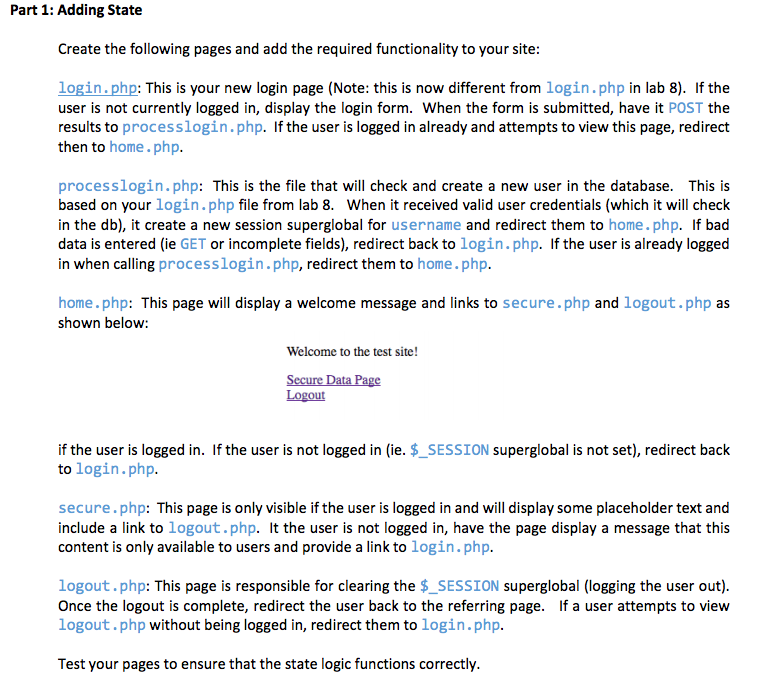
Part 1: Adding State Create the following pages and add the required functionality to your site: login.php: This is your new login page (Note: this is now different from login.php in lab 8). If the user is not currently logged in, display the login form. When the form is submitted, have it POST the results to processlogin.php. If the user is logged in already and attempts to view this page, redirect then to home.php. process login.php This is the file that will check and create a new user in the database This is based on your login.php file from lab 8. When it received valid user credentials (which it will check in the db), it create a new session superglobal for username and redirect them to home. php. If bad data is entered (ie GET or incomplete fields), redirect back to login.php. f the user is already logged in when calling process login.php. redirect them to home.php. home.php: This page will display a welcome message and links to secure.php and logout.php as shown below: Welcome to the test site! ecure Data Page out if the user is logged in. If the user is not logged in (ie. SESSION superglobal is not set), redirect back to login.php. secure .php: This page is only visible if the user is logged in and will display some placeholder text and include a link to logout.php. It the user is not logged in, have the page display a message that this content is only available to users and provide a link to login.php. logout.php: This page is responsible for clearing the SESSION superglobal (logging the user out). Once the logout is complete, r the user back to the referring page. If a user attempts to view logout.php without being logged in, redirect them to login.php Test your pages to ensure that the state logic functions correctly
Step by Step Solution
There are 3 Steps involved in it

Get step-by-step solutions from verified subject matter experts
 Study Help