







Question: Assignment2.java - A driver class that contains only a main method which should do the following: Create a new PhoneDirectory object While (true) { Prompt
Assignment2.java - A driver class that contains only a main method which should do the following:
Create a new PhoneDirectory object
While (true) {
Prompt user to enter command;
if (command is "a") {
Prompt user for name and number;
Create a phone record and store it in the database;
} else if (command is "f") {
Prompt user for search key;
Search the database for records whose names begin with the search key;
(The user doesn't need to enter an entire name. The program will display all names that begin with the characters entered by the user. The case of the input doesn't matter)
Print these names and the corresponding phone numbers;
} else if (command is "q") {
Terminate program;
} else {
Display error message;
}
}
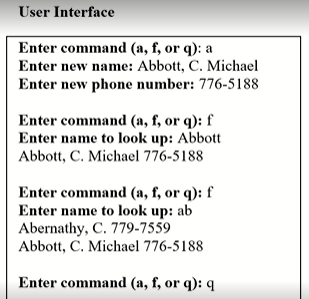
Sample Output Picture:
PhoneDirectory.java - This class contains an array of PhoneRecord objects. It should have the following data attributes and methods:
private intNumRecords - number of records in the array.
private PhoneRecord[ ] data - array of PhoneRecord objects
public PhoneDirectory( ) - constructor that should initialize memory for data array and numRecords value.
public void enterPhoneRecords(PhoneRecord new record) - store a new phone record in the database.
public void find(PhoneRecord(String key) - Search the database for records whose names begin with the search key. The user doesn't need to enter an entire name. This method will display all names that begin with the characters entered by the user. The case of the input doesn't matter. If the customer number is not in the array, the program will print that "the phone record does not exist"
PhoneRecord.java - a class that contains the following data attributes and methods:
private String name - the customer's name
private String number - the customer's phone number
public PhoneRecord(String personName, String phoneNumber) - constructor
get/set Methods for each data attribute
public String toString( ) - Special method to be used when printing a phoneRecord object
* Please include comments and documentation in code.
Here are my written programs for reference:
PhoneDirectory.java
import java.util.Scanner; public class PhoneDirectoryV2 { public static void main(String[] args) { Scanner scan1 = new Scanner(System.in); Scanner scan2 = new Scanner(System.in); //records will store array of PhoneRecord PhoneRecord[] records = new PhoneRecord[100]; /ewRecords indicate how many records in the array //as well as what is the next available position in the array int numRecords = 0; // Display list of commands System.out.println("Phone directory commands: " + " a - Add a new phone number " + " c - Change name and/or phone number " + " f - Find a phone number " + " q - Quit "); // Read and execute commands while (true) { // Prompt user to enter a command System.out.print("Enter command (a, c, f, or q): "); String command = scan1.next(); // Determine whether command is "a", "c", "f", "q", or // illegal; execute command if legal. if (command.equalsIgnoreCase("a")) { // Command is "a". Prompt user for name and number, // then create a phone record and store it in the // database. if (numRecords 0) records[position].setName(name); System.out.print("Enter new phone number: "); String number = scan2.nextLine().trim(); if (number.length() > 0) records[position].setNumber(number); } else System.out.println("No unique matching record; " + "try again"); } else if (command.equalsIgnoreCase("f")) { // Command is "f". Prompt user for search key. // Search the database for records whose names begin // with the search key. Print these names and the // corresponding phone numbers. System.out.print("Enter name to look up: "); String key = scan2.nextLine().trim().toLowerCase(); // go through the array for (int i = 0; i
PhoneRecord.java
public class PhoneRecord { private String name; private String number; // Constructor public PhoneRecord(String personName, String phoneNumber) { name = personName; number = phoneNumber; } // Returns the name stored in the record public String getName(){ return name; } // Returns the phone number stored in the record public String getNumber() { return number; } // Modifies the name stored in the record public void setName(String personName) { name = personName; } // modifies the phone number stored in the record public void setNumber(String phoneNumber) { number = phoneNumber; } //convert the content of the object into String format @Override public String toString() { return "{" + "name='" + name + '\'' + ", number='" + number + '\'' + '}'; } }
User Interface Enter command (a, f, or q): a Enter new name: Abbott, C. Michael Enter new phone number: 776-5188 Enter command (a, f, or g): f Enter name to look up: Abbott Abbott, C. Michael 776-5188 Enter command (a, f, or q): f Enter name to look up: ab Abernathy, C. 779-7559 Abbott, C. Michael 776-5188 Enter command (a, f, or 9): 9 Step by Step Solution
There are 3 Steps involved in it

Get step-by-step solutions from verified subject matter experts
 Study Help