



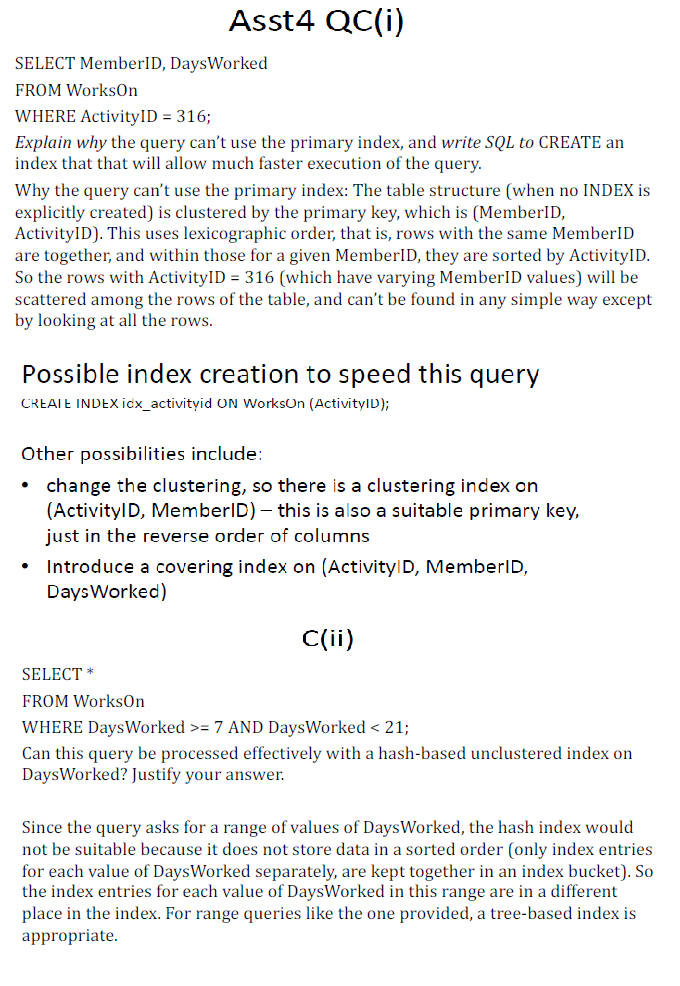
Question: Asst 4 QC ( i ) SELECT MemberID, DaysWorked FROM WorksOn WHERE ActivityID = 3 1 6 ; Explain why the query can't use the
Asst QCi
SELECT MemberID, DaysWorked
FROM WorksOn
WHERE ActivityID ;
Explain why the query can't use the primary index, and write SQL to CREATE an index that that will allow much faster execution of the query.
Why the query can't use the primary index: The table structure when no INDEX is explicitly created is clustered by the primary key, which is MemberID ActivityID This uses lexicographic order, that is rows with the same MemberID are together, and within those for a given MemberID, they are sorted by ActivityID. So the rows with ActivityID which have varying MemberID values will be scattered among the rows of the table, and can't be found in any simple way except by looking at all the rows.
Possible index creation to speed this query
CREAIE INDEX idxactivityid ON WorksUn ActivityID;
Other possibilities include:
change the clustering, so there is a clustering index on ActivityID MemberID this is also a suitable primary key, just in the reverse order of columns
Introduce a covering index on ActivityID MemberID, DaysWorked
SELECT
FROM WorksOn
WHERE DaysWorked AND DaysWorked ;
Can this query be processed effectively with a hashbased unclustered index on DaysWorked? Justify your answer.
Since the query asks for a range of values of DaysWorked, the hash index would not be suitable because it does not store data in a sorted order only index entries for each value of DaysWorked separately, are kept together in an index bucket So the index entries for each value of DaysWorked in this range are in a different place in the index. For range queries like the one provided, a treebased index is appropriate.
Step by Step Solution
There are 3 Steps involved in it
1 Expert Approved Answer
Step: 1 Unlock

Question Has Been Solved by an Expert!
Get step-by-step solutions from verified subject matter experts
Step: 2 Unlock
Step: 3 Unlock