







Question: Asynchronous Front-End Below are steps to setup the Frontend to get you started. In the frontend folder, create the following files index html - landing
Asynchronous Front-End
Below are steps to setup the Frontend to get you started.
In the frontend folder, create the following files index html - landing page add html - a form page to add new data update html - for updating a record ajax js - main JavaScript file to perform AJAX calls
The index html file will display all the data received from the backend in a table. Create an AJAX call to backend via the GET request. Display the data in a table as follows
ID Title Author Publisher Year Actions 1 Intro to HTML5 Christian Hur Hur Publication 2020 Edit | Delete 2 The MEAN Stack Lois Lane Daily Planet 2019 Edit | Delete 3 AJAX Made Simple Alvin Chipmunks Publication 2021 Edit | Delete
Delete All
When the Edit button is clicked, load the update html file and provide the edit When the Delete button is clicked, send a DELETE request with an ID to the backend to delete a single record When Delete All is clicked, send a DELETE request to the backend to delete ALL records. Create a link to the insert html page to allow new data to be added
The add html page should have a web form to allow data entry. Process the data and send it as a JSON string to the backend via a POST request.
The update html page should look identical to the add html page. Make sure not to modify the ID field. Process the data and send it as a JSON string to the backend via a PUT request along with the ID for this record.
You have two options to retrieve the data to pre-fill this form: You can retrieve the data from the current data table Or use the associated ID and send a GET request to the backend to retrieve a single record.
Dont forget to verify the backend to make sure your AJAX calls are working correctly. To see the result and status, just open a new browser or tab to this url using your port number.
The above is run directly via the browser so the default HTTP Request type is always a GET. Since were pointing to the endpoint /api/, thats a GET ALL Records. The following endpoint /api/3 will GET a single record matching ID of 3: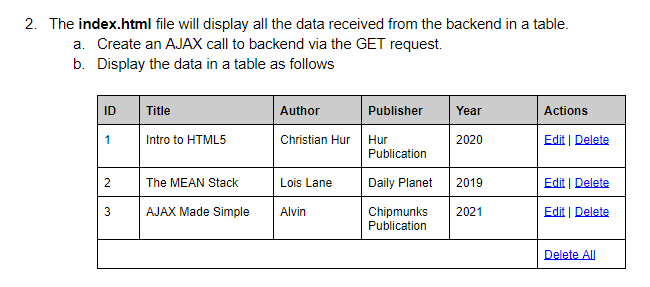
2. The index.html file will display all the data received from the backend in a table. a. Create an AJAX call to backend via the GET request. b. Display the data in a table as follows ID Title Author Publisher Year Actions 1 Intro to HTML5 Christian Hur 2020 Hur Publication Edit Delete 2 The MEAN Stack Lois Lane Daily Planet 2019 Edit Delete 3 AJAX Made Simple Alvin 2021 Chipmunks Publication Edit | Delete Delete AU 2. The index.html file will display all the data received from the backend in a table. a. Create an AJAX call to backend via the GET request. b. Display the data in a table as follows ID Title Author Publisher Year Actions 1 Intro to HTML5 Christian Hur 2020 Hur Publication Edit Delete 2 The MEAN Stack Lois Lane Daily Planet 2019 Edit Delete 3 AJAX Made Simple Alvin 2021 Chipmunks Publication Edit | Delete Delete AU
Step by Step Solution
There are 3 Steps involved in it

Get step-by-step solutions from verified subject matter experts
 Study Help