







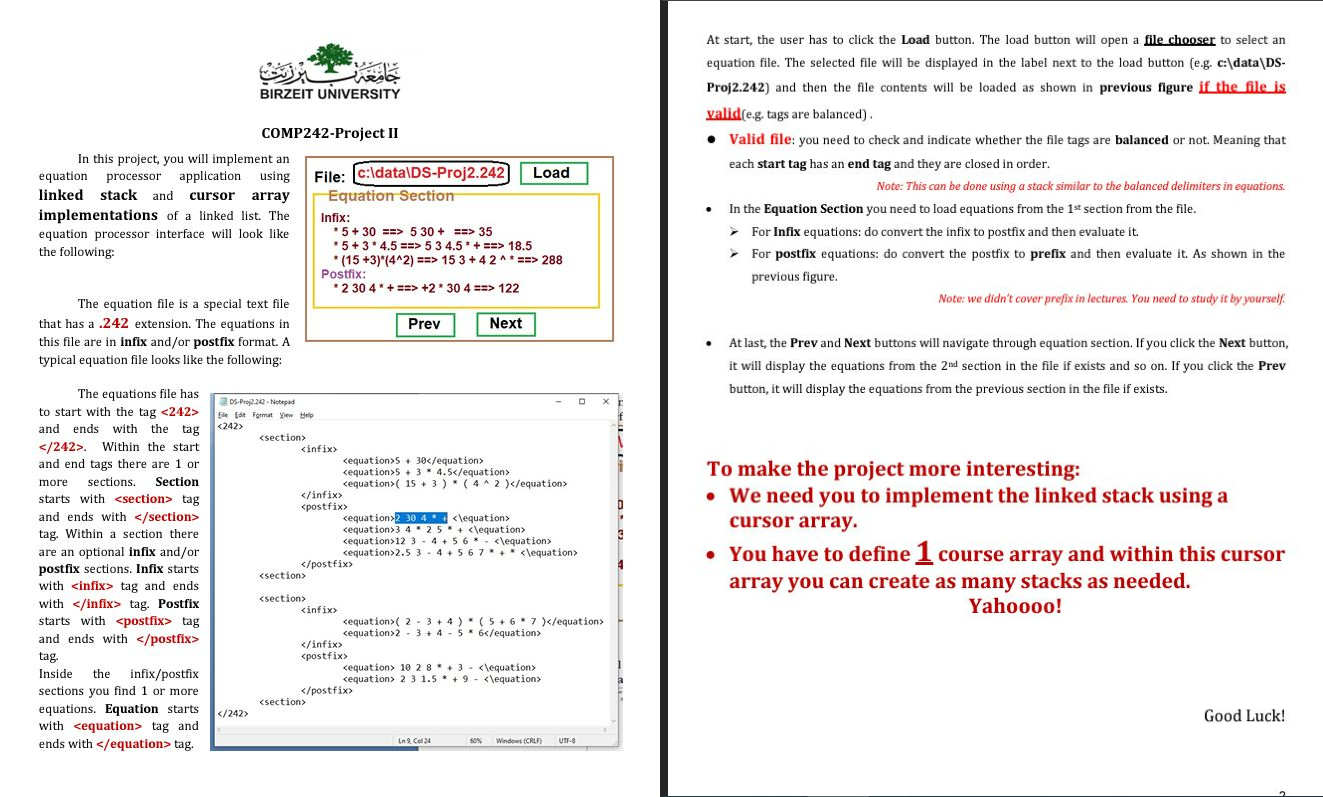
Question: At start, the user has to click the Load button. The load button will open a file chooser to select an equation file. The selected
At start, the user has to click the Load button. The load button will open a file chooser to select an
equation file. The selected file will be displayed in the label next to the load button eg c:dataDS
Proj and then the file contents will be loaded as shown in previous figure if the file is
valideg tags are balanced
Valid file: you need to check and indicate whether the file tags are balanced or not. Meaning that
each start tag has an end tag and they are closed in order.
Note: This can be done using a stack similar to the balanced delimiters in equations.
In the Equation Section you need to load equations from the section from the file.
For Infix equations: do convert the infix to postfix and then evaluate it
For postfix equations: do convert the postfix to prefix and then evaluate it As shown in the
previous figure.
Note: we didn't cover prefix in lectures. You need to study it by yourself.
At last, the Prev and Next buttons will navigate through equation section. If you click the Next button,
it will display the equations from the section in the file if exists and so on If you click the Prev
button, it will display the equations from the previous section in the file if exists.
To make the project more interesting:
We need you to implement the linked stack using a
cursor array.
You have to define course array and within this cursor
array you can create as many stacks as needed.
Yahoooo!
Step by Step Solution
There are 3 Steps involved in it
1 Expert Approved Answer
Step: 1 Unlock

Question Has Been Solved by an Expert!
Get step-by-step solutions from verified subject matter experts
Step: 2 Unlock
Step: 3 Unlock
 Study Help