







Question: a.There are four errors in the following program that will prevent it from running as intended. For each error, state what the error is and
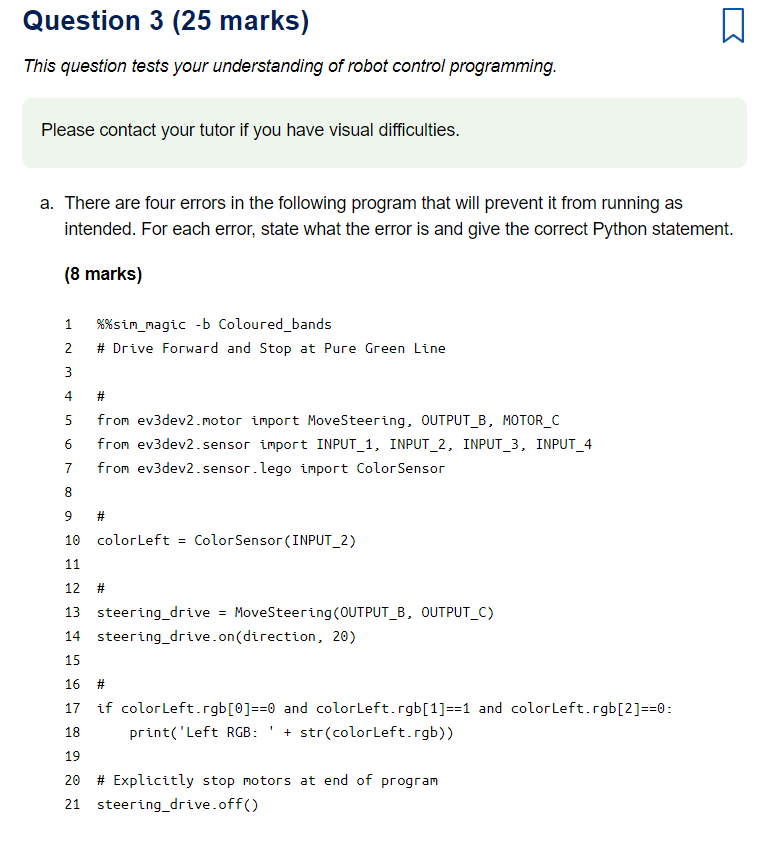 a.There are four errors in the following program that will prevent it from running as intended. For each error, state what the error is and give the correct Python statement.
-
b.What is a comment in a computer program? For each of the four empty comments in the program above, provide a meaningful comment that describes the action of the program.
(5 marks)
-
c.For this part of the question, use the version of the program you corrected in part (a).
- i.Give an example of a conditional statement in this program.
- ii.State two forms of loop that can be used in a Python program. How can the program flow escape a loop and continue to the next part of the program?
- iii.State one way, other than correcting the errors or adding comments, in which the original program in part (a) could be improved.
(6 marks)
-
d.Write a program to make the simulated robot trace out a regular pentagon. Your program should use named constants or variables where appropriate and include comments to explain how your program operates.
Briefly describe how well your robot performed the task. Identify any possible sources of error, such as the susceptibility of your program to incremental errors, particularly if the robot does not trace the shape out as accurately as you might have hoped.
Copy your program code into your TMA document.
Include in your TMA document a screenshot showing the trace of the robots movement. Your screenshot should show:
- your program, with the text displayed at a readable size
- the behaviour of the simulator, as recorded by running your program.
If you cannot capture a screenshot then you should submit a short, written description of what the simulator did when you ran your program.
(6 marks)
Question 3 (25 marks) This question tests your understanding of robot control programming. Please contact your tutor if you have visual difficulties. a. There are four errors in the following program that will prevent it from running as intended. For each error, state what the error is and give the correct Python statement. (8 marks) 1 2 %%sim_magic -b Coloured_bands # Drive Forward and Stop at Pure Green Line 3 4 # 5 from ev3 dev2.motor import MoveSteering, OUTPUT_B, MOTOR_C from ev3dev2.sensor import INPUT_1, INPUT_2, INPUT_3, INPUT_4 from ev3dev2. sensor. lego import Color Sensor 7 9 10 colorLeft = Color Sensor (INPUT_2) 11 12 # 13 steering drive MoveSteering (OUTPUT_B, OUTPUT_C) 14 steering_drive.on(direction, 20) 15 # if colorLeft.rgb[0]==0 and colorLeft.rgb[1]==1 and colorLeft.rgb[2]==0: print('Left RGB: + str(colorLeft.rgb)) 16 17 18 19 20 # Explicitly stop motors at end of program steering_drive.off) 21 Question 3 (25 marks) This question tests your understanding of robot control programming. Please contact your tutor if you have visual difficulties. a. There are four errors in the following program that will prevent it from running as intended. For each error, state what the error is and give the correct Python statement. (8 marks) 1 2 %%sim_magic -b Coloured_bands # Drive Forward and Stop at Pure Green Line 3 4 # 5 from ev3 dev2.motor import MoveSteering, OUTPUT_B, MOTOR_C from ev3dev2.sensor import INPUT_1, INPUT_2, INPUT_3, INPUT_4 from ev3dev2. sensor. lego import Color Sensor 7 9 10 colorLeft = Color Sensor (INPUT_2) 11 12 # 13 steering drive MoveSteering (OUTPUT_B, OUTPUT_C) 14 steering_drive.on(direction, 20) 15 # if colorLeft.rgb[0]==0 and colorLeft.rgb[1]==1 and colorLeft.rgb[2]==0: print('Left RGB: + str(colorLeft.rgb)) 16 17 18 19 20 # Explicitly stop motors at end of program steering_drive.off) 21
Step by Step Solution
There are 3 Steps involved in it

Get step-by-step solutions from verified subject matter experts
 Study Help