







Question: AT&T RI 411 99% 8:44 PM Question Part1: Using the attached HR_Database diagram, preform the following tasks: Note: Do NOT create your database as a
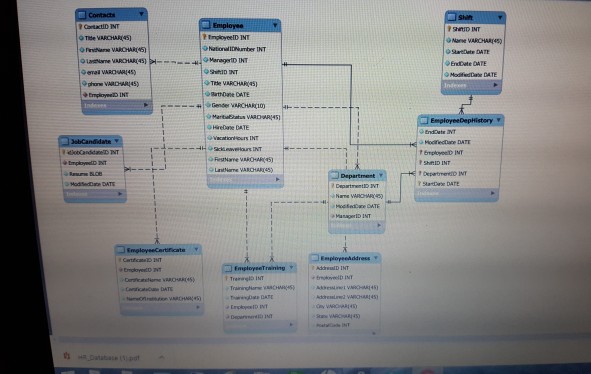
AT&T RI 411 99% 8:44 PM Question Part1: Using the attached HR_Database diagram, preform the following tasks: Note: Do NOT create your database as a Model or you won't be able to perform select queries on it. You do not need to provide SQL statements for creating and relating the tables requested below. Create the tables. There should be a total of nine (9) tables overall Establish relationships between the tables, specify primary and foreign keys. Note that the "EmployeeDepHistory" table has a composite primary that consists of FOUR attributes (EmployeelD, DepartmentID, ShiftID and StartDate). Add data to your database and validate that your records loaded properly. In tabular format, include 3 rows for each table, making sure that the primary key and foreign key relationships are properly applied. You can use the INSERT command, or you can insert the information manually into the tables. You do not have to provide copies of the SQL commands for this task Create ONE consolidated word document for the queries and screenshots requested for Part 2 & 3 below Part2: Next, perform queries using JOIN syntax of the database.. Create a SELECT query for every table that displays all the columns and shows all three rows. Take a screen shot that shows each query and its
Step by Step Solution
There are 3 Steps involved in it

Get step-by-step solutions from verified subject matter experts
 Study Help