







Question: Attached is a sample matlab code for encoding an image using Jpeg algorithm. The code does not include the zig-zag scanning step and variable length
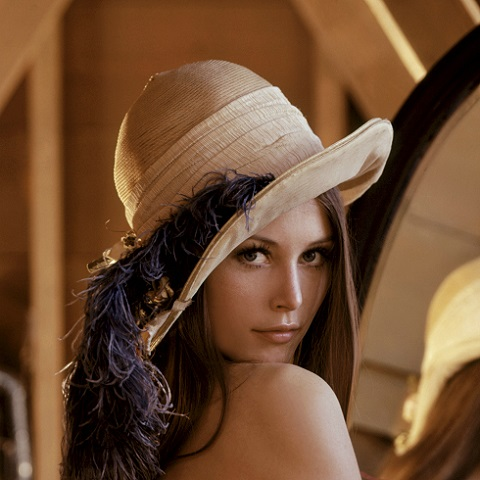
Attached is a sample matlab code for encoding an image using Jpeg algorithm. The code does not include the zig-zag scanning step and variable length coding. However, it includes decompressing and comparing the decompressed image with the original image using PSNR.Use the attached image for running the code, and make sure that you explain every step please to understand how this encoding works.
dsample.m
function r=dsample(b) r=zeros(8,8); b = int16(b); for i=1:2:15 for j=1:2:15 r((i+1)/2,(j+1)/2) = uint8((b(i,j)+b(i+1,j)+b(i,j+1)+b(i+1,j+1))/4); end end end
----------------------------------------------------------------------------------------------------------------------------------
jpeg_algorithm.m
lena = imread('lena.jpg'); figure('Name', 'Original Image') imshow(lena); Q = [ 16 11 10 16 24 40 51 61; 12 12 14 19 26 58 60 55; 14 13 16 24 40 57 69 56; 14 17 22 29 51 87 80 62; 18 22 37 56 68 109 103 77; 24 35 55 64 81 104 113 92; 49 64 78 87 103 121 120 101; 72 92 95 98 112 100 103 99]; % divide into macro blocks [row, col, depth] = size(lena); lena_new = zeros(row, col, depth); for r = 1:16:row-1 for c = 1:16:col-1 b1 = lena(r:r+15, c:c+15, :); b2 = rgb2ycbcr(b1); % down sample and divide macroblock into blocks b2_cb = dsample( b2(:,:,2) ); b2_cr = dsample( b2(:,:,3) ); b2_y1 = b2(1:8,1:8,1); b2_y2 = b2(1:8,9:16,1); b2_y3 = b2(9:16,1:8,1); b2_y4 = b2(9:16, 9:16,1); % DCT dct_b2_cb = dct2(b2_cb); dct_b2_cr = dct2(b2_cr); dct_b2_y1 = dct2(b2_y1); dct_b2_y2 = dct2(b2_y2); dct_b2_y3 = dct2(b2_y3); dct_b2_y4 = dct2(b2_y4); % Quantization qcb = int16(dct_b2_cb ./ Q); qcr = int16(dct_b2_cr ./ Q); qy1 = int16(dct_b2_y1 ./ Q); qy2 = int16(dct_b2_y2 ./ Q); qy3 = int16(dct_b2_y3 ./ Q); qy4 = int16(dct_b2_y4 ./ Q); % Inverse Quantization qcb = qcb .* int16(Q); qcr = qcr .* int16(Q); qy1 = qy1 .* int16(Q); qy2 = qy2 .* int16(Q); qy3 = qy3 .* int16(Q); qy4 = qy4 .* int16(Q); % IDCT icb = idct2(qcb); icr = idct2(qcr); iy1 = idct2(qy1); iy2 = idct2(qy2); iy3 = idct2(qy3); iy4 = idct2(qy4); %upsample and create the block iucb = usample(icb); iucr = usample(icr); iuy = [iy1 iy2; iy3 iy4]; rb = zeros(16,16,3); rb(:,:,1) = iuy; rb(:,:,2) = iucb; rb(:,:,3) = iucr; rb1 = ycbcr2rgb(uint8(rb)); lena_new(r:r+15, c:c+15, :) = rb1; end end lena_new = uint8(lena_new); figure('name', 'decompressed image'); imshow(lena_new);
-----------------------------------------------------------------------------------------------------------------------------------------------
usample.m
function r=usample(b) r=zeros(16,16); for i=1:16 for j=1:16 r(i,j) = b(floor((i+1)/2),floor((j+1)/2)); end end end
Step by Step Solution
There are 3 Steps involved in it

Get step-by-step solutions from verified subject matter experts
 Study Help