







Question: Attempt to ping the server from a PC0 or PC1. What response do you get?______________________________ Open the web-browser of PC0 or PC1. Browse to Server0s
Attempt to ping the server from a PC0 or PC1. What response do you get?______________________________
Open the web-browser of PC0 or PC1. Browse to Server0s "internal" address (10.255.255.254). Does it work? What error do you get (if any)?__________________________________________________
- Now let's connect to the website. Open the web-browser of PC0 or PC1. Browse to Server0s "internal" address. Does it work?
What error do you get (if any)? _____________________________________________
Out on the open internet we don't connect to other computers internal network addresses. So let's try the public address (129.219.10.242). Does that work? What error do you get (if any)?_____________________________
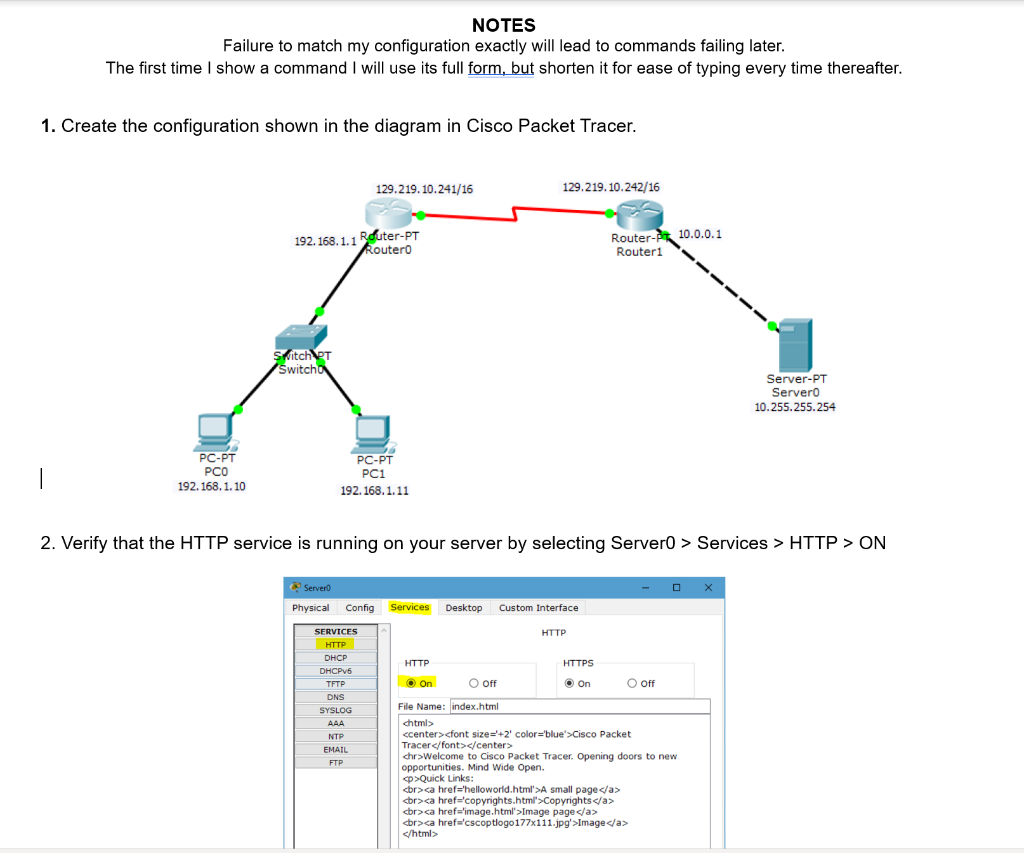
NOTES Failure to match my configuration exactly will lead to commands failing later The first time I show a command I will use its full form, but shorten it for ease of typing every time thereafter. 1. Create the configuration shown in the diagram in Cisco Packet Tracer 129.219.10.241/16 129.219.10.242/16 192.168. 1.1 Rduter-PT Router-P10.0.01 outer0 Routeri tch Switch Server-PT Server0 10.255.255.254 PC-PT PCO 192.168.1.10 PC-PT PC1 192.168.1.11 2. Verify that the HTTP service is running on your server by selecting Server0 > Services > HTTP > ON Physical Config Services Desktop Custom Interface SERVICES HTTP DHCP HTTP HTTPS O off TFTP DNS SYSLOG File Name: index.html ccenter>cfont size +2' color-'blue> Cisco Packet Tracer chr>Welcome to Cisco Packet Tracer. Opening doors to new opportunities. Mind Wide Open. p Quick Links A small page Copyrights dr>Image page Image EMAIL
Step by Step Solution
There are 3 Steps involved in it

Get step-by-step solutions from verified subject matter experts
 Study Help