







Question: AutoSave om 9 Call alvarez_TTH12e_52_13_Start - Protected View - Excel Search AutoSave Of H alvarez TTH12e_S2_13_Start - Protected View - Excel Search File Home Insert
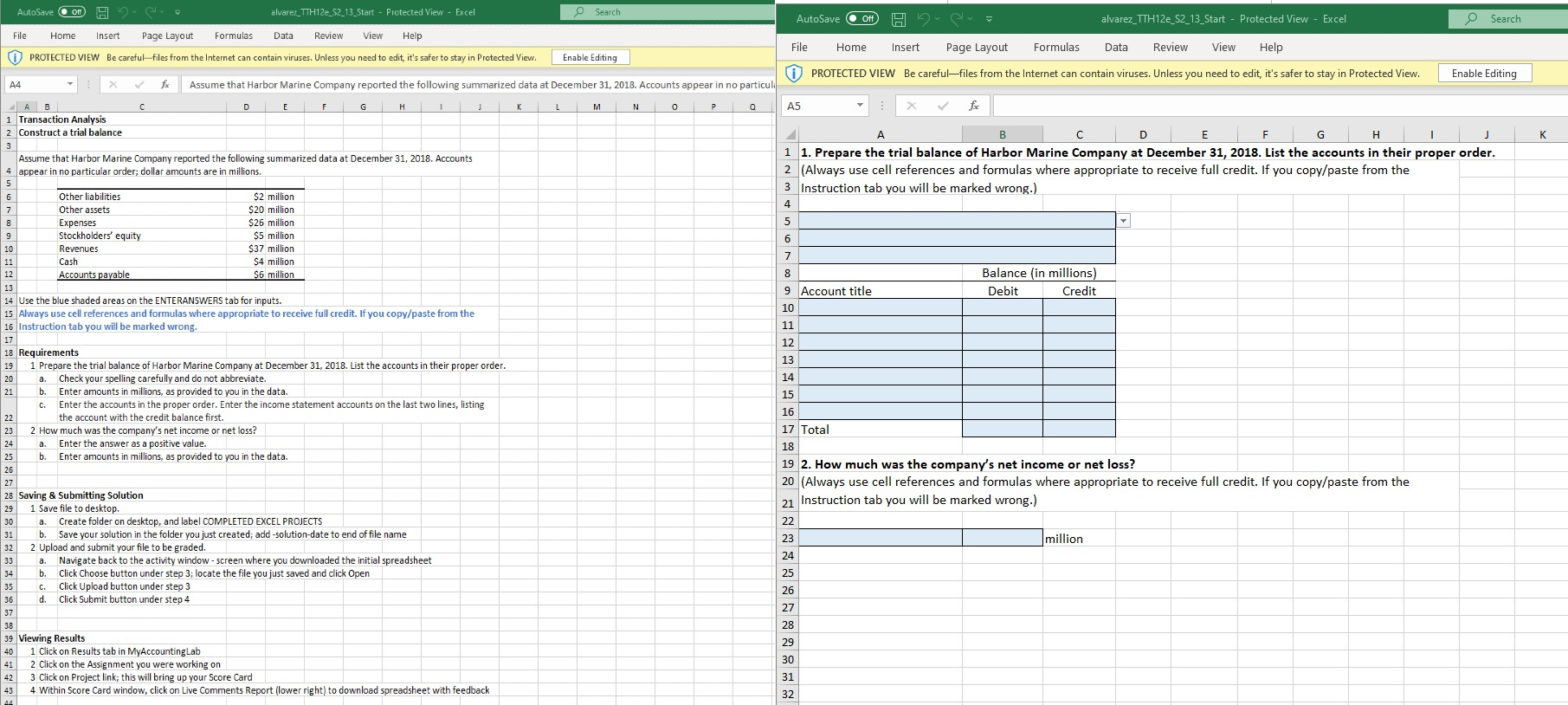
AutoSave om 9 Call alvarez_TTH12e_52_13_Start - Protected View - Excel Search AutoSave Of H alvarez TTH12e_S2_13_Start - Protected View - Excel Search File Home Insert Page Layout Formulas Data Review View Help PROTECTED VIEW Be careful-files from the Internet can contain viruses. Unless you need to edit, it's safer to stay in Protected View File Enable Editing Home Insert Page Layout Formulas Data Review View Help PROTECTED VIEW Be carefulfiles from the Internet can contain viruses. Unless you need to edit, it's safer to stay in Protected View Enable Editing A4 X f Assume that Harbor Marine Company reported the following summarized data at December 31, 2018. Accounts appear in no particula D E F G H I J K L M N O P Q A B 1 Transaction Analysis 2 Construct a trial balance J K AS : * for B C D E F G H I 1 1. Prepare the trial balance of Harbor Marine Company at December 31, 2018. List the accounts in their proper order. 2 (Always use cell references and formulas where appropriate to receive full credit. If you copy/paste from the 3 Instruction tab you will be marked wrong.) Assume that Harbor Marine Company reported the following summarized data at December 31, 2018. Accounts 4 appear in no particular order; dollar amounts are in millions. Other liabilities Other assets Expenses Stockholders' equity Revenues Cash Accounts payable $2 million $20 million $26 million $5 million $37 million $4 million $6 million Balance (in millions) Debit Credit 9 Account title 14 Use the blue shaded areas on the ENTERANSWERS tab for inputs. 15 Always use cell references and formulas where appropriate to receive full credit. If you copy/paste from the 16 Instruction tab you will be marked wrong. 17 18 Requirements 19 1 Prepare the trial balance of Harbor Marine Company at December 31, 2018. List the accounts in their proper order. 20 a. Check your spelling carefully and do not abbreviate. b. Enter amounts in millions, as provided to you in the data. C. Enter the accounts in the proper order. Enter the income statement accounts on the last two lines, listing the account with the credit balance first. 2 How much was the company's net income or net loss? a. Enter the answer as a positive value. 25 b. Enter amounts in millions, as provided to you in the data. 17 Total 26 19 2. How much was the company's net income or net loss? 20 (Always use cell references and formulas where appropriate to receive full credit. If you copy/paste from the Instruction tab you will be marked wrong.) million 28 Saving & Submitting Solution 29 1 Save file to desktop. 30 a. Create folder on desktop, and label COMPLETED EXCEL PROJECTS b. Save your solution in the folder you just created; add-solution-date to end of file name 32 2 Upload and submit your file to be graded 33 a. Navigate back to the activity window - screen where you downloaded the initial spreadsheet 34 b. Click Choose button under step 3, locate the file you just saved and click Open 35 C. Click Upload button under step 3 d. Click Submit button under step 4 39 Viewing Results 40 1 click on Results tab in My AccountingLab 41 2 Click on the Assignment you were working on 42 3 Click on Project link; this will bring up your Score Card 43 4 Within Score Card window, click on Live Comments Report (lower right) to download spreadsheet with feedback 4
Step by Step Solution
There are 3 Steps involved in it

Get step-by-step solutions from verified subject matter experts
 Study Help