







Question: B 1 Data Description 10% 2 Annual Discount Rate 3 Initial Investment cost - $5,000 4 Cash inflow from year 1 $1,800 5 $2,100 Cash
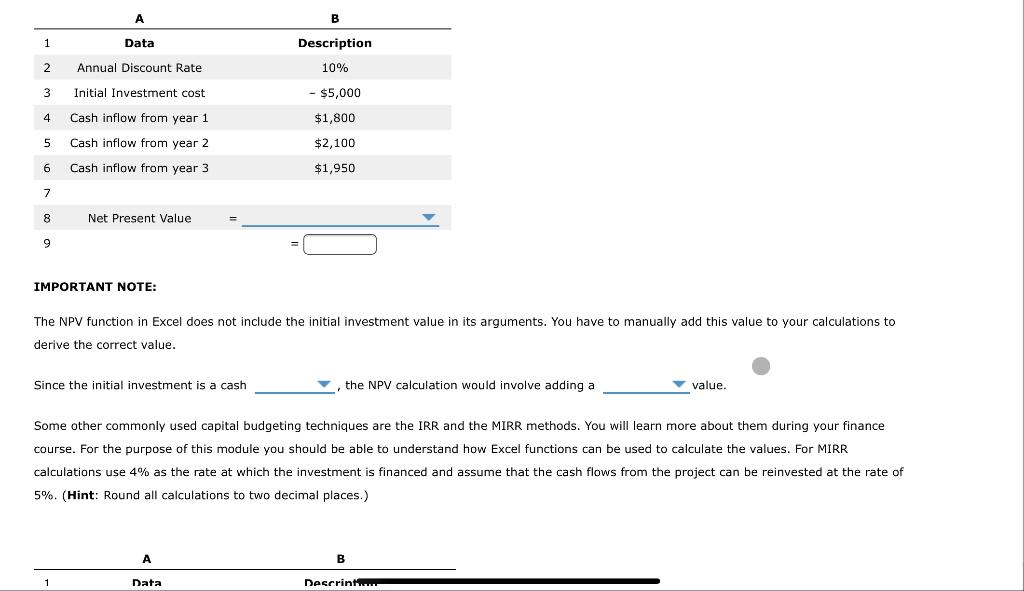
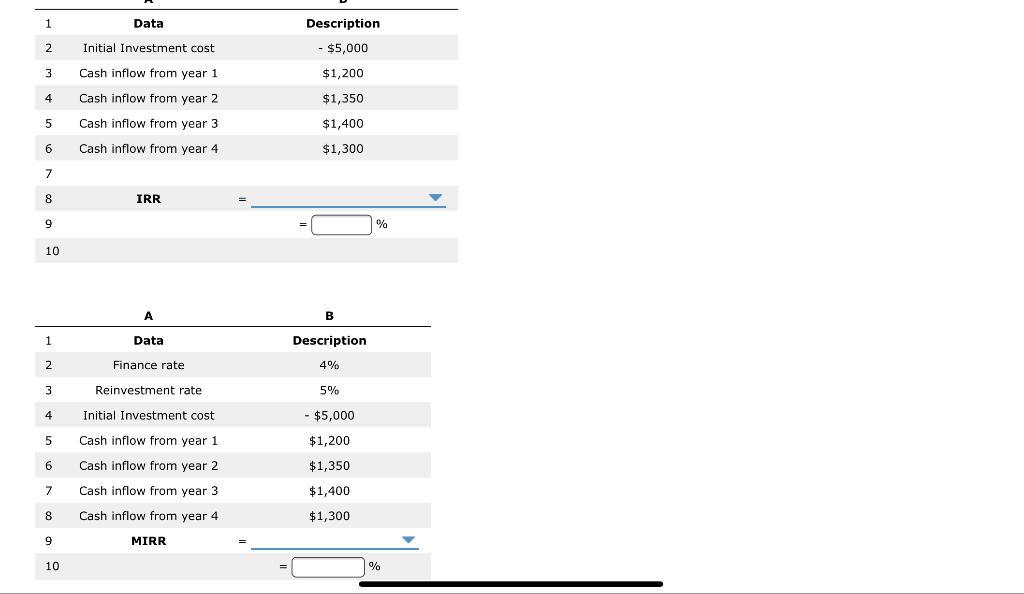
B 1 Data Description 10% 2 Annual Discount Rate 3 Initial Investment cost - $5,000 4 Cash inflow from year 1 $1,800 5 $2,100 Cash inflow from year 2 Cash inflow from year 3 6 $1,950 7 8 Net Present Value 9 IMPORTANT NOTE: The NPV function in Excel does not include the initial investment value in its arguments. You have to manually add this value to your calculations to derive the correct value. Since the initial investment is a cash the NPV calculation would involve adding a value. Some other commonly used capital budgeting techniques are the IRR and the MIRR methods. You will learn more about them during your finance course. For the purpose of this module you should be able to understand how Excel functions can be used to calculate the values. For MIRR calculations use 4% as the rate at which the investment is financed and assume that the cash flows from the project can be reinvested at the rate of 5%. (Hint: Round all calculations to two decimal places.) B 1 Data Descrint... 1 Data 2 Initial Investment cost Description - $5,000 $1,200 $1,350 3 Cash inflow from year 1 4 Cash inflow from year 2 5 Cash inflow from year 3 $1,400 6 Cash inflow from year 4 $1,300 7 8 IRR 9 10 B 1 Data Description 2 Finance rate 4% 3 Reinvestment rate 5% 4 Initial Investment cost - $5,000 5 Cash inflow from year 1 $1,200 6 Cash inflow from year 2 $1,350 7 $1,400 Cash inflow from year 3 Cash inflow from year 4 8 $1,300 MIRR 10 %
Step by Step Solution
There are 3 Steps involved in it

Get step-by-step solutions from verified subject matter experts
 Study Help