







Question: B C C D 1 PROBLEM 3-4 2 PREPARING A BALANCE SHEET 3 Prepare a balance sheet from the following information. What is the 4
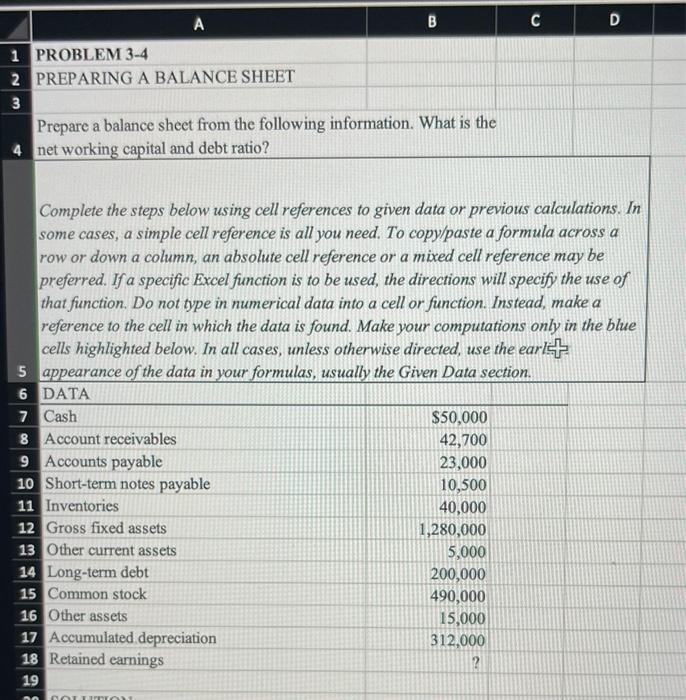
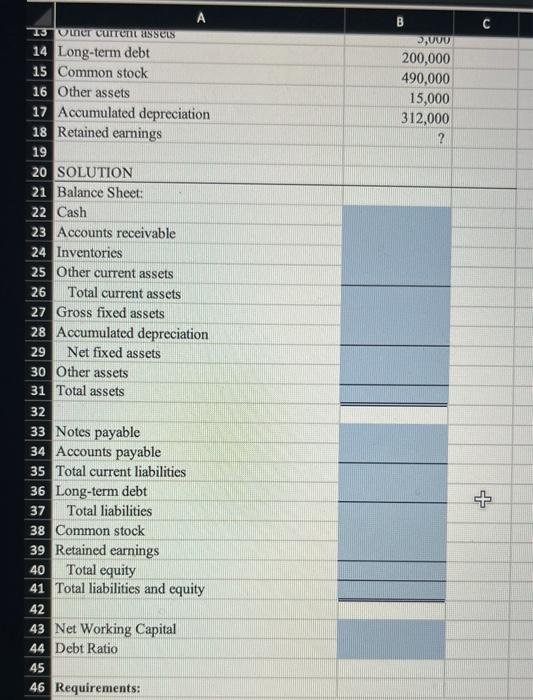
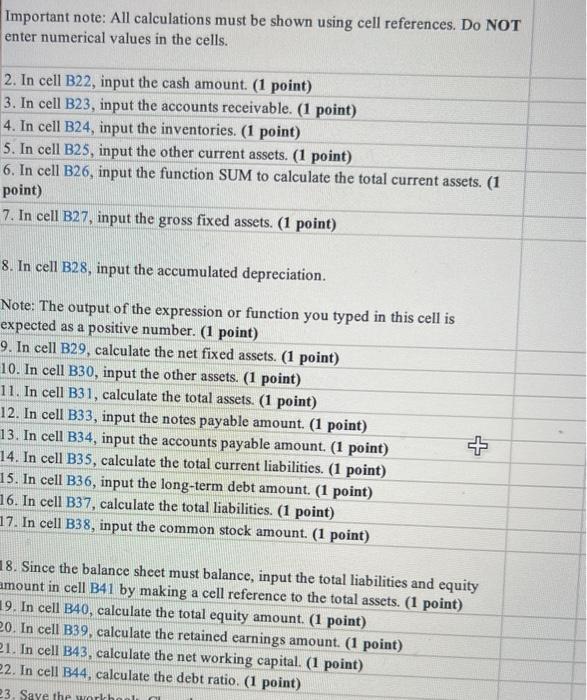
B C C D 1 PROBLEM 3-4 2 PREPARING A BALANCE SHEET 3 Prepare a balance sheet from the following information. What is the 4 net working capital and debt ratio? Complete the steps below using cell references to given data or previous calculations. In some cases, a simple cell reference is all you need. To copy/paste a formula across a row or down a column, an absolute cell reference or a mixed cell reference may be preferred. If a specific Excel function is to be used, the directions will specify the use of that function. Do not type in numerical data into a cell or function. Instead, make a reference to the cell in which the data is found. Make your computations only in the blue cells highlighted below. In all cases, unless otherwise directed, use the earl 5 appearance of the data in your formulas, usually the Given Data section. 6 DATA 7 Cash $50,000 8 Account receivables 42,700 9 Accounts payable 23,000 10 Short-term notes payable 10,500 11 Inventories 40,000 12 Gross fixed assets 1,280,000 13 Other current assets 5,000 14 Long-term debt 200,000 15 Common stock 490,000 16 Other assets 15,000 17 Accumulated depreciation 312,000 18 Retained earnings 2 19 no NOTTITIOT C B DAUUU 200,000 490,000 15,000 312,000 2 13 Umer current asses 14 Long-term debt 15 Common stock 16 Other assets 17 Accumulated depreciation 18 Retained earnings 19 20 SOLUTION 21 Balance Sheet: 22 Cash 23 Accounts receivable 24 Inventories 25 Other current assets 26 Total current assets 27 Gross fixed assets 28 Accumulated depreciation 29 Net fixed assets 30 Other assets 31 Total assets 32 + 37 33 Notes payable 34 Accounts payable 35 Total current liabilities 36 Long-term debt Total liabilities 38 Common stock 39 Retained earnings 40 Total equity 41 Total liabilities and equity 42 43 Net Working Capital 44 Debt Ratio 45 46 Requirements: Important note: All calculations must be shown using cell references. Do NOT enter numerical values in the cells. 2. In cell B22, input the cash amount. (1 point) 3. In cell B23, input the accounts receivable. (1 point) 4. In cell B24, input the inventories. (1 point) 5. In cell B25, input the other current assets. (1 point) 6. In cell B26, input the function SUM to calculate the total current assets. (1 point) 7. In cell B27, input the gross fixed assets. (1 point) 8. In cell B28, input the accumulated depreciation. Note: The output of the expression or function you typed in this cell is expected as a positive number. (1 point) 9. In cell B29, calculate the net fixed assets. (1 point) 10. In cell B30, input the other assets. (1 point) 11. In cell B31, calculate the total assets. (1 point) 12. In cell B33, input the notes payable amount. (1 point) 13. In cell B34, input the accounts payable amount. (1 point) 14. In cell B35, calculate the total current liabilities. (1 point) 15. In cell B36, input the long-term debt amount. (1 point) 16. In cell B37, calculate the total liabilities. (1 point) 17. In cell B38, input the common stock amount. (1 point) 18. Since the balance sheet must balance, input the total liabilities and equity amount in cell B41 by making a cell reference to the total assets. (1 point) 19. In cell B40, calculate the total equity amount. (1 point) 20. In cell B39, calculate the retained earnings amount (1 point) 21. In cell B43, calculate the net working capital. (1 point) 22. In cell B44, calculate the debt ratio. (1 point) 23, Save the workhool
Step by Step Solution
There are 3 Steps involved in it

Get step-by-step solutions from verified subject matter experts
 Study Help