


Question: B E F G H K L M N P R T. U z AB AC AD AE 1 2 3 =B4 Try out various
B E F G H K L M N P R T. U z AB AC AD AE 1 2 3

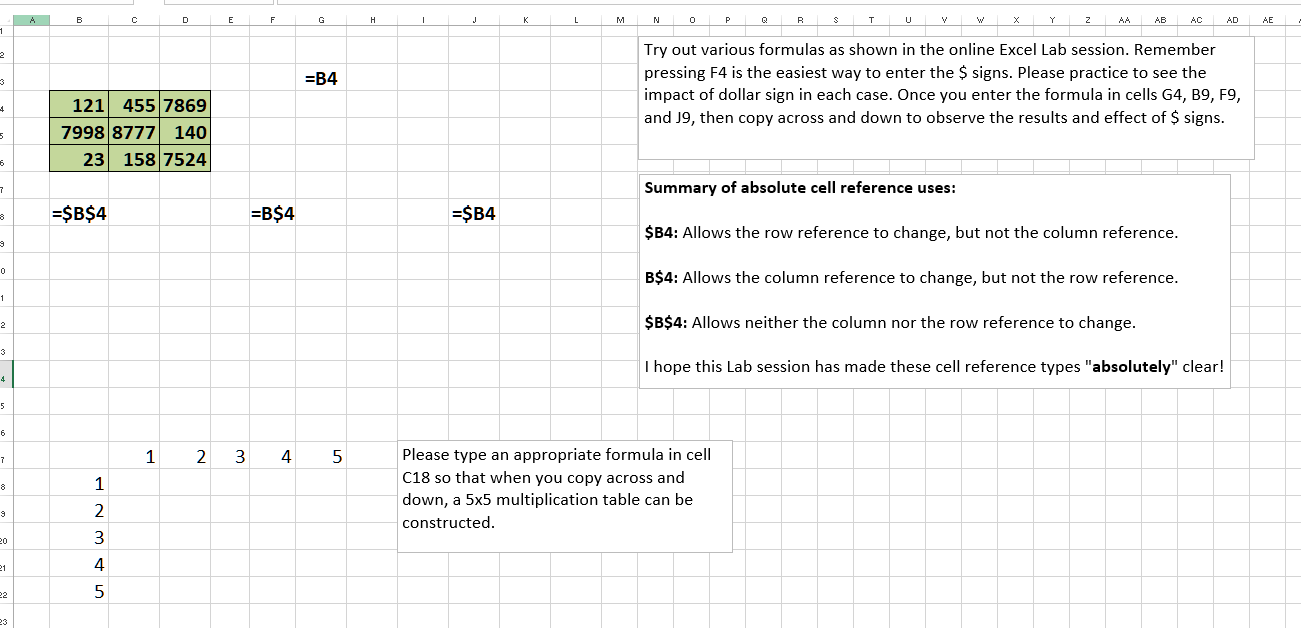
B E F G H K L M N P R T. U z AB AC AD AE 1 2 3 =B4 Try out various formulas as shown in the online Excel Lab session. Remember pressing F4 is the easiest way to enter the $ signs. Please practice to see the impact of dollar sign in each case. Once you enter the formula in cells G4, B9, F9, and J9, then copy across and down to observe the results and effect of $ signs. 4 5 121 455 7869 79988777 140 23 158 7524 6 7 Summary of absolute cell reference uses: 3 =$B$4 =B$4 =$B4 $B4: Allows the row reference to change, but not the column reference. 3 0 B$4: Allows the column reference to change, but not the row reference. 1 2 $B$4: Allows neither the column nor the row reference to change. 3 I hope this Lab session has made these cell reference types "absolutely" clear! 4 5 6 7 1 2 3 4 5 . 1 Please type an appropriate formula in cell C18 so that when you copy across and down, a 5x5 multiplication table can be constructed. 9 20 nmn 21 22 23

Step by Step Solution

There are 3 Steps involved in it

1 Expert Approved Answer
Step: 1 Unlock blur-text-image

Question Has Been Solved by an Expert!

Get step-by-step solutions from verified subject matter experts

Step: 2 Unlock
Step: 3 Unlock

Students Have Also Explored These Related General Management Questions!