







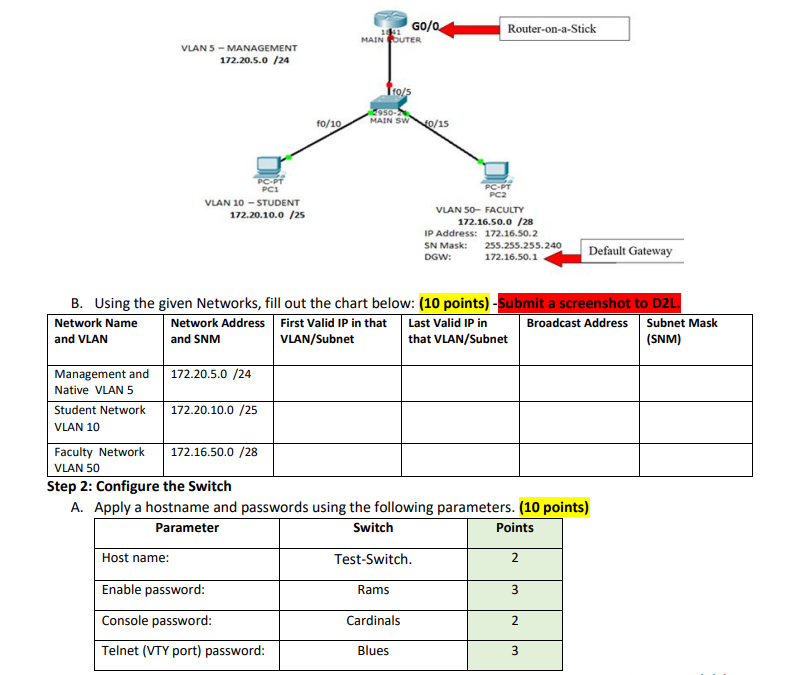
Question: B . Using the given Networks, fill out the chart below: ( 1 0 points ) - First photo Step 2 : Configure the Switch
B Using the given Networks, fill out the chart below: points First photo
Step : Configure the Switch
A Apply a hostname and passwords using the following parameters. points
B Create and name the VLANs for the Student, Faculty, and Management Subnets. points
C Based on the port that the PCs and router are plugged into, configure each port with the correct mode
and assign it into the correct VLAN. points
D Assign an IP address and subnet mask to the ManagementNative VLAN. points
Step : Configure the Router
A Apply a hostname and passwords using the following parameters. points
B Configure a subinterface on the correct physical interface for the VLANs and then turn on the physical
interface. points
Step : Configure the PCs points
Assign a static IP SUBNET MASK and Default Gateway on the Student and Faculty PCs from the correct
subnets.
Step : Test your Network points
Step by Step Solution
There are 3 Steps involved in it
1 Expert Approved Answer
Step: 1 Unlock

Question Has Been Solved by an Expert!
Get step-by-step solutions from verified subject matter experts
Step: 2 Unlock
Step: 3 Unlock
 Study Help