







Question: banner 950377236 CST 235 LAB 5: Manipulating Database Table Structure using SQL Instructions: 29oto CourseName EnrolmentID SudID) CourseIDO CourseID Enrolment Course SudEmail Enrols in Teaches
 banner 950377236
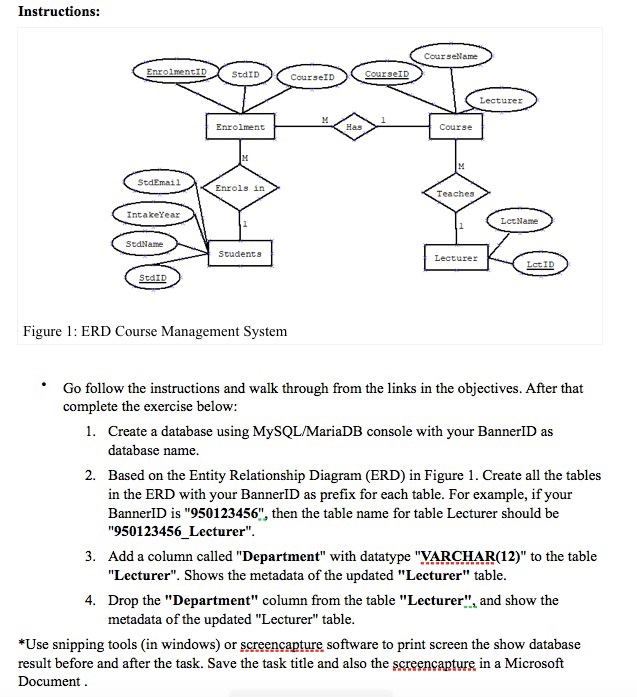
Instructions: 29oto CourseName EnrolmentID SudID) CourseIDO CourseID Enrolment Course SudEmail Enrols in Teaches > IntakeYear (LeoName SedName Students Lecturer SEID Figure 1: ERD Course Management System Go follow the instructions and walk through from the links in the objectives. After that complete the exercise below: 1. Create a database using MySQL/MariaDB console with your BannerID as database name. 2. Based on the Entity Relationship Diagram (ERD) in Figure 1. Create all the tables in the ERD with your BannerID as prefix for each table. For example, if your BannerID is "950123456", then the table name for table Lecturer should be "950123456_Lecturer". 3. Add a column called "Department" with datatype "VARCHAR(12)" to the table "Lecturer". Shows the metadata of the updated "Lecturer" table. 4. Drop the "Department" column from the table "Lecturer", and show the metadata of the updated "Lecturer" table. *Use snipping tools (in windows) or screencapture software to print screen the show database result before and after the task. Save the task title and also the screencapture in a Microsoft Document
Step by Step Solution
There are 3 Steps involved in it

Get step-by-step solutions from verified subject matter experts
 Study Help