







Question: Base on C++ about Objective Desgin, implement a view and control class to control User I/O Array.cc #include #include using namespace std; #include Book.h #include
Base on C++ about Objective Desgin, implement a view and control class to control User I/O
Array.cc
#include
Array::Array(){ size=0; Book *elements[MAX_ARR_SIZE]={}; } void Array::add(Book *book){ elements[size]=&book; ++size; } void Array::print(){ for(int i=0;i
Array.h
#ifndef ARRAY_H #define ARRAY_H #define MAX_ARR_SIZE 128 using namespace std;
class Array{ public: Array(); void add(Book*); void print(); private: Book *elements[MAX_ARR_SIZE]; int size;
};
#endif
Book.cc
#include
#include "Book.h"
Book::Book(int i, string t, string a, int y) { id = i; title = t; author = a; year = y; }
void Book::print() { cout year; }
Book.h
#ifndef BOOK_H #define BOOK_H
#include
class Book { public: Book(int=0, string="Unknown", string="Unknown", int=0); void setBook(int, string, string, int); void print();
private: int id; string title; string author; int year; };
#endif
Library.cc
#include
Library::Library(){ } void Library::addBook(Book *book){ Arr.add(book); } void Library::print(){ cout
Library.h
#ifndef LIBRARY_H #define LIBRARY_H using namespace std; #include "Array.h"
class Library{ public: void addBook(Book*); void print(); Library(); private: Array Arr;
};
#endif
main.cc
#include
int mainMenu();
int main() { int numBooks = 0; string title, author; int id, year; int menuSelection; Library library=Library(); Book bookputin; while (1) { menuSelection = mainMenu();
if (menuSelection == 0) break; else if (menuSelection == 1) { cout > id; cout > year; bookyear=&Book(id,title,author,year); int i=0; while(i
if (numBooks > 0) library.print();
return 0; }
int mainMenu() { int numOptions = 1; int selection = -1;
cout
while (selection numOptions) { cout > selection; }
return selection; }
Control.cc
#include
Control::Control(){ View view; int menuSelection; while(1){ menuSelection =view.selection; if (menuSelection == 0) break; else if (menuSelection == 1) { cout > id; cout > year; readBook(id,title,author,year); } }
Control.h
View.cc
#include
View::view(){ int numOptions =1; int selection =-1; cout numOptions) { cout > selection; read(&selection); } } void View::readBook(int id, string title,string author, int year){ Book* bookputin = new Book(id,title,author,year); library.addBook(bookputin); ++numBooks; } }
void View::print(Library library){ library.print(); }
View.h
Makefile
OPT = -Wall
t05: main.o Book.o Library.o Array.o
g++ $(OPT) -o t05 main.o Book.o Library.o Array.o Control.o View.o
main.o: main.cc Book.h Library.h Control.h View.h
g++ $(OPT) -c main.cc
Book.o: Book.cc Book.h
g++ $(OPT) -c Book.cc
Library.o: Library.cc Library.h Book.h Array.h
g++ $(OPT) -c Library.cc
Array.o:Array.cc Array.h Book.h
g++ $(OPT) -c Array.cc
Control.o:Control.cc Control.h View.h
g++ $(OPT) -c Control.cc
View.o:View.cc View.h
g++ $(OPT) -c View.cc
clean:
rm -f *.o t05
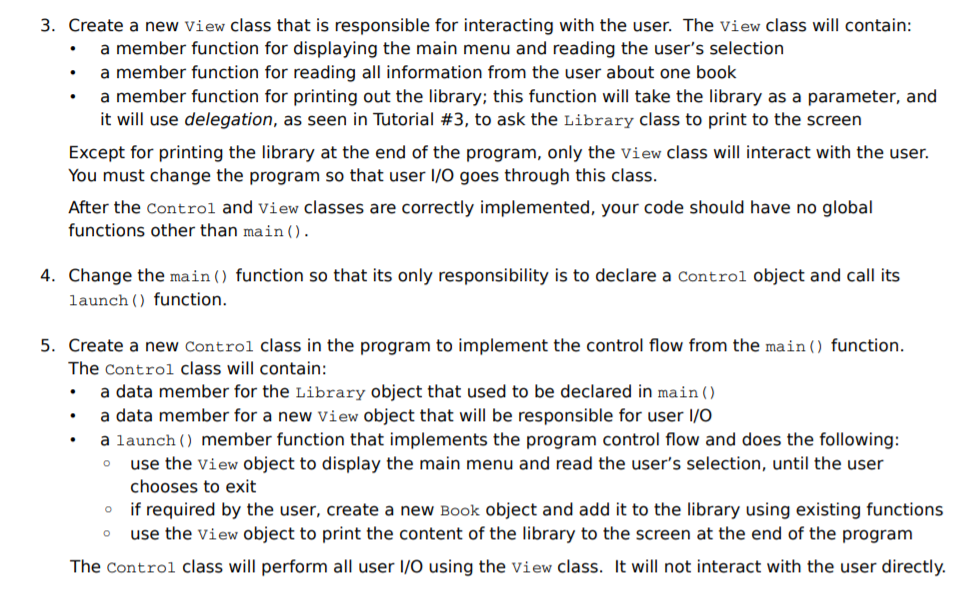
3. Create a new View class that is responsible for interacting with the user. The view class will contain .a member function for displaying the main menu and reading the user's selection .a member function for reading all information from the user about one book .a member function for printing out the library; this function will take the library as a parameter, and it will use delegation, as seen in Tutorial #3, to ask the Library class to print to the screen Except for printing the library at the end of the program, only the view class will interact with the user. You must change the program so that user I/O goes through this class. After the control and view classes are correctly implemented, your code should have no global functions other than main() 4. Change the main) function so that its only responsibility is to declare a Control object and call its launch) function. 5. Create a new control class in the program to implement the control flow from the main function The Control class will contain: . a data member for the Library object that used to be declared in main) a data member for a new view object that will be responsible for user l/O .a launch member function that implements the program control flow and does the following: use the view object to display the main menu and read the user's selection, until the user chooses to exit if required by the user, create a new Book object and add it to the library using existing functions o o use the view object to print the content of the library to the screen at the end of the program The control class will perform all user I/O using the view class. wl not interact with the user directly. 3. Create a new View class that is responsible for interacting with the user. The view class will contain .a member function for displaying the main menu and reading the user's selection .a member function for reading all information from the user about one book .a member function for printing out the library; this function will take the library as a parameter, and it will use delegation, as seen in Tutorial #3, to ask the Library class to print to the screen Except for printing the library at the end of the program, only the view class will interact with the user. You must change the program so that user I/O goes through this class. After the control and view classes are correctly implemented, your code should have no global functions other than main() 4. Change the main) function so that its only responsibility is to declare a Control object and call its launch) function. 5. Create a new control class in the program to implement the control flow from the main function The Control class will contain: . a data member for the Library object that used to be declared in main) a data member for a new view object that will be responsible for user l/O .a launch member function that implements the program control flow and does the following: use the view object to display the main menu and read the user's selection, until the user chooses to exit if required by the user, create a new Book object and add it to the library using existing functions o o use the view object to print the content of the library to the screen at the end of the program The control class will perform all user I/O using the view class. wl not interact with the user directly
Step by Step Solution
There are 3 Steps involved in it

Get step-by-step solutions from verified subject matter experts
 Study Help