







Question: Based on the file you used in previous labs, create a file topo_lab11.py to build the topology shown in the picture above Here is an
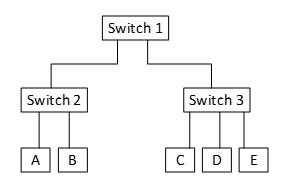
Based on the file you used in previous labs, create a file topo_lab11.py to build the topology shown in the picture above
Here is an example:
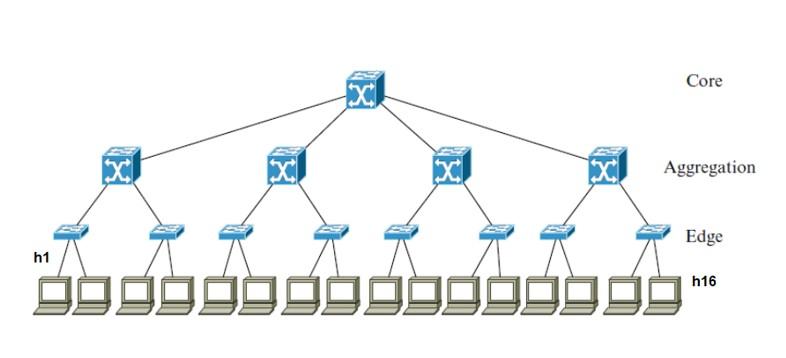
Py file:
"""Custom topology example Two directly connected switches plus a host for each switch: host --- switch --- switch --- host Adding the 'topos' dict with a key/value pair to generate our newly defined topology enables one to pass in '--topo=mytopo' from the command line. """ from mininet.topo import Topo class MyTopo( Topo ): "Simple topology example." def __init__( self ): "Create custom topo." # Initialize topology Topo.__init__( self ) # Add hosts and switches Host1 = self.addHost( 'h1' ) Host2 = self.addHost( 'h2' ) Host3 = self.addHost( 'h3' ) Host4 = self.addHost( 'h4' ) Host5 = self.addHost( 'h5' ) Host6 = self.addHost( 'h6' ) Host7 = self.addHost( 'h7' ) Host8 = self.addHost( 'h8' ) Host9 = self.addHost( 'h9' ) Host10 = self.addHost( 'h10' ) Host11 = self.addHost( 'h11' ) Host12 = self.addHost( 'h12' ) Host13 = self.addHost( 'h13' ) Host14 = self.addHost( 'h14' ) Host15 = self.addHost( 'h15' ) Host16 = self.addHost( 'h16' ) Switch1 = self.addSwitch( 's1' ) Switch2 = self.addSwitch( 's2' ) Switch3 = self.addSwitch( 's3' ) Switch4 = self.addSwitch( 's4' ) Switch5 = self.addSwitch( 's5' ) Switch6 = self.addSwitch( 's6' ) Switch7 = self.addSwitch( 's7' ) Switch8 = self.addSwitch( 's8' ) Switch21 = self.addSwitch( 's21' ) Switch22 = self.addSwitch( 's22' ) Switch23 = self.addSwitch( 's23' ) Switch24 = self.addSwitch( 's24' ) Switch25 = self.addSwitch( 's25' ) # Core # Add links self.addLink( Host1, Switch1 ) self.addLink( Host2, Switch1 ) self.addLink( Host3, Switch2 ) self.addLink( Host4, Switch2 ) self.addLink( Host5, Switch3 ) self.addLink( Host6, Switch3 ) self.addLink( Host7, Switch4 ) self.addLink( Host8, Switch4 ) self.addLink( Host9, Switch5 ) self.addLink( Host10, Switch5 ) self.addLink( Host11, Switch6 ) self.addLink( Host12, Switch6 ) self.addLink( Host13, Switch7 ) self.addLink( Host14, Switch7 ) self.addLink( Host15, Switch8 ) self.addLink( Host16, Switch8 ) self.addLink( Switch1, Switch21 ) self.addLink( Switch2, Switch21 ) self.addLink( Switch3, Switch22 ) self.addLink( Switch4, Switch22 ) self.addLink( Switch5, Switch23 ) self.addLink( Switch6, Switch23 ) self.addLink( Switch7, Switch24 ) self.addLink( Switch8, Switch24 ) self.addLink( Switch21, Switch25 ) self.addLink( Switch22, Switch25 ) self.addLink( Switch23, Switch25 ) self.addLink( Switch24, Switch25 ) topos = { 'mytopo': ( lambda: MyTopo() ) } Switch 1 Switch 2 Switch 3 A B C D E
Step by Step Solution
There are 3 Steps involved in it
1 Expert Approved Answer
Step: 1 Unlock

Question Has Been Solved by an Expert!
Get step-by-step solutions from verified subject matter experts
Step: 2 Unlock
Step: 3 Unlock
 Study Help