







Question: Based on the output of the show version command, answer the following questions about the router. If you are examining a different model router, include
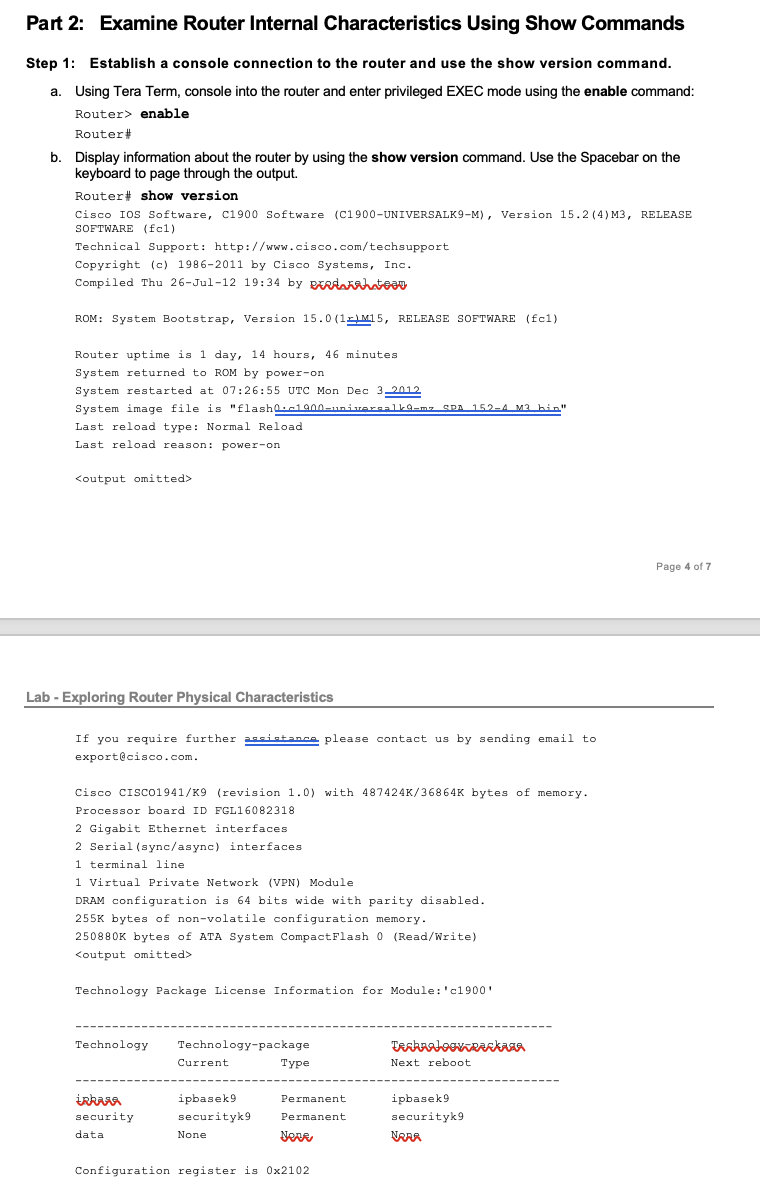
Based on the output of the show version command, answer the following questions about the router. If you are examining a different model router, include the information about it here.
[Report] What is the version of the Cisco IOS and what is the system image filename?
________________________________________________________________________________
[Report] What is the Bootstrap program version in ROM BIOS?
________________________________________________________________________________
[Report] How long has the router been running without a restart (also known as its uptime)?
________________________________________________________________________________
[Report] How much dynamic random-access memory (DRAM) memory does the router have?
________________________________________________________________________________
[Report] What is the routers processor board ID number?
________________________________________________________________________________
[Report] What network interfaces does the router have?
________________________________________________________________________________
[Report] How much CompactFlash memory for IOS storage is there?
________________________________________________________________________________
[Report] How much nonvolatile random-access memory (NVRAM) memory for configuration file storage is there?
________________________________________________________________________________
[Report] What is the setting of the configuration register?
________________________________________________________________________________
answer the following question
Part 2: Examine Router Internal Characteristics Using Show Commands Step 1: Establish a console connection to the router and use the show version command. a. Using Tera Term, console into the router and enter privileged EXEC mode using the enable command: Router> enable Router\# b. Display information about the router by using the show version command. Use the Spacebar on the keyboard to page through the output. Router\# show version Cisco IOS Software, C1900 Software (C1900-UNIVERSALK9-M), Version 15.2 (4)M3, RELEASE SOFTWARE (fc1) Technical Support: http://www.cisco.com/techsupport Copyright (c) 1986-2011 by Cisco Systems, Inc. Compiled Thu 26-Jul-12 19:34 by Exelntrlatean Router uptime is 1 day, 14 hours, 46 minutes system returned to ROM by power-on System restarted at 07:26:55 UTC Mon Dec 32012 System image file is "flasho.adanominorgalla-mz gon 152-4 M2 hin" Last reload type: Normal Reload Last reload reason: power-on Lab - Exploring Router Physical Characteristics If you require further aseistanco please contact us by sending email to export(ecisco.com. Cisco CISCo1941/K9 (revision 1.0 ) with 487424K/36864K bytes of memory. Processor board ID FGL16082318 2 Gigabit Ethernet interfaces 2 Serial (sync/async) interfaces 1 terminal line 1 Virtual Private Network (VPN) Module DRAM configuration is 64 bits wide with parity disabled. 255K bytes of non-volatile configuration memory. 250880K bytes of ATA System CompactFlash O (Read/Write) Technology Package License Information for Module:'c1900' Part 2: Examine Router Internal Characteristics Using Show Commands Step 1: Establish a console connection to the router and use the show version command. a. Using Tera Term, console into the router and enter privileged EXEC mode using the enable command: Router> enable Router\# b. Display information about the router by using the show version command. Use the Spacebar on the keyboard to page through the output. Router\# show version Cisco IOS Software, C1900 Software (C1900-UNIVERSALK9-M), Version 15.2 (4)M3, RELEASE SOFTWARE (fc1) Technical Support: http://www.cisco.com/techsupport Copyright (c) 1986-2011 by Cisco Systems, Inc. Compiled Thu 26-Jul-12 19:34 by Exelntrlatean Router uptime is 1 day, 14 hours, 46 minutes system returned to ROM by power-on System restarted at 07:26:55 UTC Mon Dec 32012 System image file is "flasho.adanominorgalla-mz gon 152-4 M2 hin" Last reload type: Normal Reload Last reload reason: power-on Lab - Exploring Router Physical Characteristics If you require further aseistanco please contact us by sending email to export(ecisco.com. Cisco CISCo1941/K9 (revision 1.0 ) with 487424K/36864K bytes of memory. Processor board ID FGL16082318 2 Gigabit Ethernet interfaces 2 Serial (sync/async) interfaces 1 terminal line 1 Virtual Private Network (VPN) Module DRAM configuration is 64 bits wide with parity disabled. 255K bytes of non-volatile configuration memory. 250880K bytes of ATA System CompactFlash O (Read/Write) Technology Package License Information for Module:'c1900
Step by Step Solution
There are 3 Steps involved in it

Get step-by-step solutions from verified subject matter experts
 Study Help