







Question: Based on these command, and illustrated in the included screen shot answer the following question....How many files are their, and why? At the command prompt,
Based on these command, and illustrated in the included screen shot answer the following question....How many files are their, and why?
At the command prompt, type:
cd ..
Press
ls -F
Press
At the command prompt, type:
mv --interactive testfile4.txt MyTestFiles/testfile2.txt
Press
The command mv to move file used, and with permission will force overwrite of destination file.
Type y and press
At the command prompt, type:
mv i testfile?.txt MyTestFiles
Press
At the command prompt, type:
ls F
Press
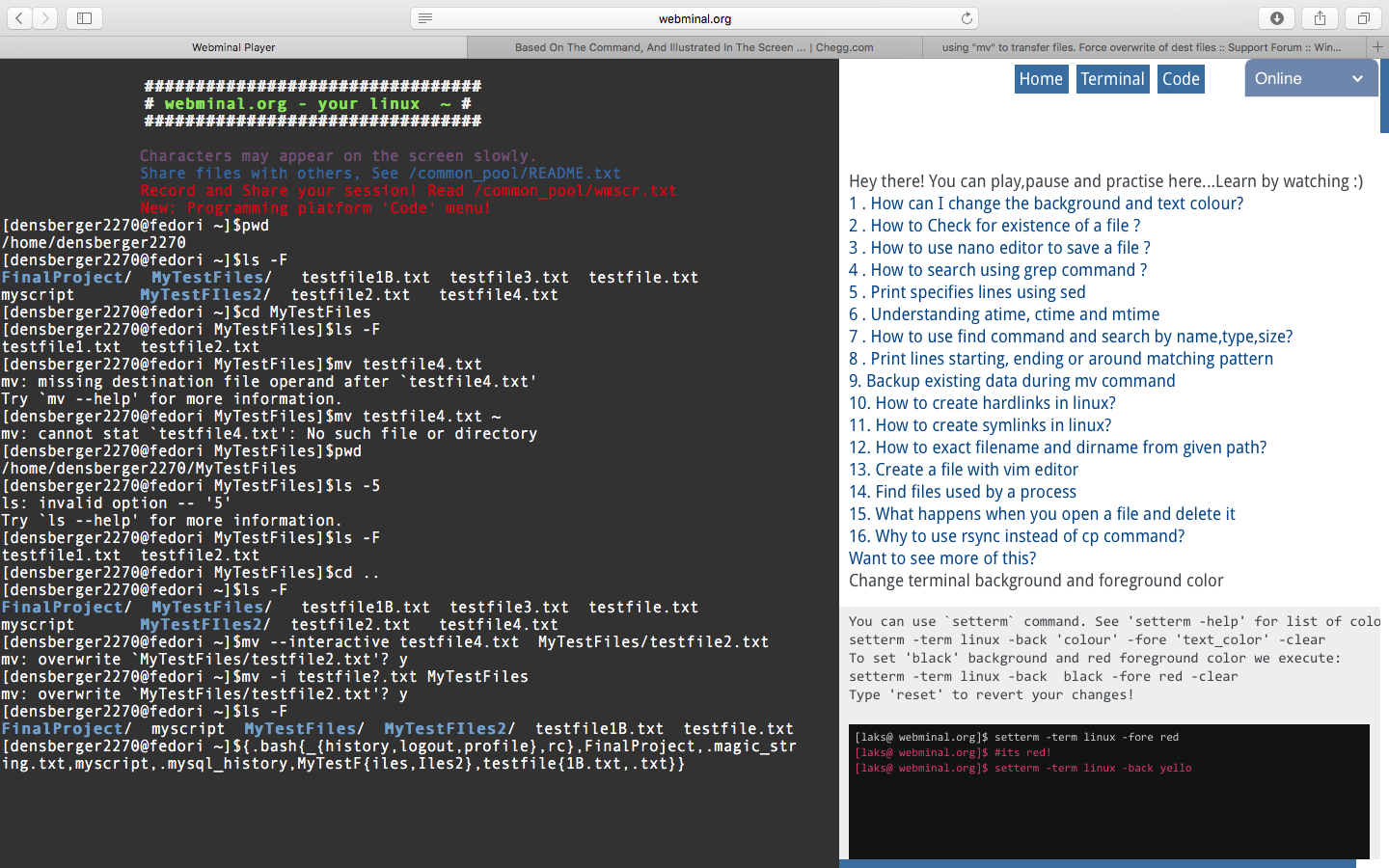
webminal.org Webminal Player Based On The Command, And Illustrated In The Screen ...I Chegg.com using "mv" to transfer files. Force overwrite of dest files: : Support Forum: Win...+ Home TerminalCode Online # webm i nal.org - your linux ~ # Characters may appear on the screen slowly Share files with others, See /common_pool/README.txt Record and Share your session!Read 7common poot/wnscr.EX New: Progra Hey there! You can play,pause and practise here...Learn by watching:) 1. How can I change the background and text colour? 2. How to Check for existence of a file? 3. How to use nano editor to save a file? 4. How to search using grep command? 5. Print specifies lines using sed 6. Understanding atime, ctime and mtime 7.How to use find command and search by name,type,size? 8. Print lines starting, ending or around matching pattern 9. Backup existing data during mv command 10. How to create hardlinks in linux? 11. How to create symlinks in linux? 12. How to exact filename and dirname from given path? 13. Create a file with vim editor 14. Find files used by a process 15. What happens when you open a file and delete it 16. Why to use rsync instead of cp command? Want to see more of this? Change terminal background and foreground color ing platfor odemenu [densberger2270@fedori ~]Spwd /home/densberger2270 [densberger2270@fedori~]Sls -F FinalProject/ MyTestFiles/testfile1B.txt testfile3.txt testfile.txt myscript [densberger2270@fedori -]Scd MyTestFiles [densberger2270@fedori MyTestFiles]$1s F testfile1.txt testfile2.txt [densberger2270@fedori MyTestFiles] $mv testfile4.txt mv: missing destination file operand after 'testfile4.txt' Try mv-help' for more information. [densberger2270@fedori MyTestFiles] $mv testfile4.txt mv: cannot stat 'testfile4.txt': No such file or directory [densberger2270@fedori MyTestFiles]Spwd /home/densberger2270/MyTestFiles [densberger2270@fedori MyTestFiles]$1s -5 ls: invalid option -- 5' Try ls-help' for more information [densberger2270@fedori MyTestFiles]$1s F testfile1.txt testfile2.txt [densberger2270@fedori MyTestFiles]Scd .. [densberger2270@fedori ]Sls -F FinalProject/ MyTestFiles/testfile1B.txt testfile3.txt testfile.txt myscript [densberger2270@fedori ] Smv --interactive testfile4.txt MyTestFiles/testfile2.txt mv: overwrite MyTestFiles/testfile2. txt'? y [densberger2270@fedori 1 Smv -i testfile?.txt MyTestFiles mv: overwrite MyTestFiles/testfile2.txt'? y [densberger2270@fedor FinalProject/ myscript MyTestFiles/l MyTestFIles2/ testfile1B.txt testfile.txt [densberger2279@fedori ~]$(.bash(-(history,logout , profile), rc},FinalProject,.magic-str ing.txt,myscript,.mysql_history,MyTestFfiles, Iles2),testfilef1B.txt,.txt)) MyTestFIles2/ testfile2.txt testfile4.txt You can use setterm command. See 'setterm -help' for list of colo setterm -term linux -back 'colour. -fore 'text color' -clear To set 'black' background and red foreground color we execute: setterm-term linux -back black -fore red -clear Type 'reset' to revert yo MyTestFIles2/ testfile2.txt testfile4.txt cha [laks@ webminal.org]s setterm -term linux -fore red [1aks@ webminal.org]s #its red! laks@ webminal.org]s setterm -term el1
Step by Step Solution
There are 3 Steps involved in it

Get step-by-step solutions from verified subject matter experts
 Study Help