







Question: Based on this code draw a target that looks like this // Target.java Author: HMD // Demonstrates a basic applet. import javax.swing.JApplet; import java.awt.* public
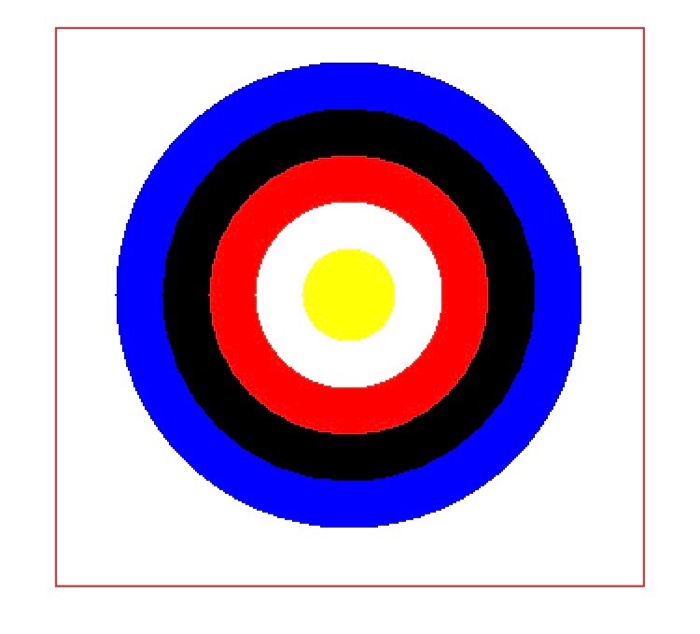
Based on this code draw a target that looks like this 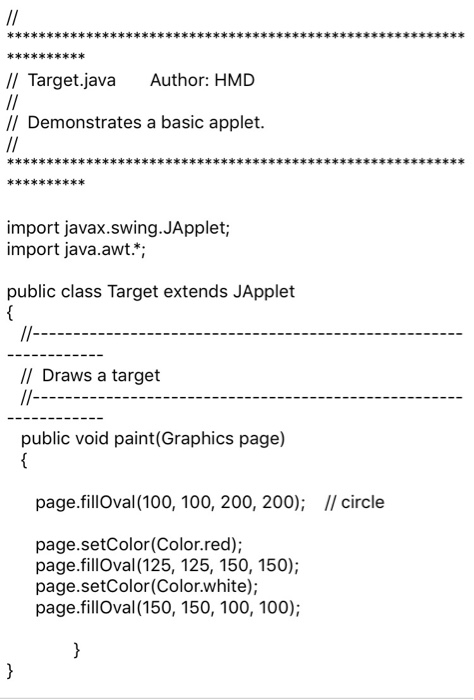
// Target.java Author: HMD // Demonstrates a basic applet. import javax.swing.JApplet; import java.awt.* public class Target extends JApplet // Draws a target public void paint(Graphics page) page.fillOval (100, 100, 200, 200); I/ circle page.setColor(Color.red); page.fillOval (125, 125, 150, 150); page.setColor(Color.white); page.fillOval (150, 150, 100, 100)
Step by Step Solution
There are 3 Steps involved in it
1 Expert Approved Answer
Step: 1 Unlock

Question Has Been Solved by an Expert!
Get step-by-step solutions from verified subject matter experts
Step: 2 Unlock
Step: 3 Unlock
 Study Help