







Question: Bash shell programming If the user enters a list of user IDs as arguments to the program it should only report processes for those users.
Bash shell programming
If the user enters a list of user IDs as arguments to the program it should only report processes for those users. Example is shown below:
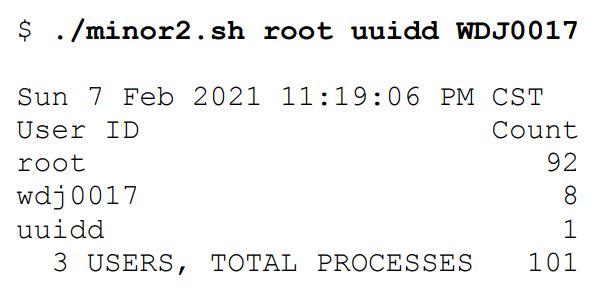
In the example, root, uuidd, and WDJ0017 are the user ids used as arguments by the user. You can use any user id to display output similar to one above.
Minor2 is the file name
I can't get my code to display the user ID in a column, the count for each, the Total users and Total Processes. It should like look the example above. If the user enters a list of user IDs as an argument, it should displays the output exactly as shown above.
while [ "$1" != "" ] do echo `date` echo "USER ID COUNT"
ps -eo user=|sort|uniq -c|awk '{ print $2 " " $1 }'|column -t numOfProcess=`ps -eo user|awk '{print $1}' |sort|uniq -u|egrep ''|wc -l` totalUsers=`ps -eo user|awk '{print $1}' |sort|uniq -u|egrep ''|wc -l` echo "$totalUsers USERS,TOTAL PROCESSES $numOfProcess"
sleep 5 done
$ ./minor2.sh root uuidd WDJ0017 Sun 7 Feb 2021 11:19:06 PM CST User ID Count root 92 wdj 0017 8 uuidd 1 3 USERS, TOTAL PROCESSES 101 $ ./minor2.sh root uuidd WDJ0017 Sun 7 Feb 2021 11:19:06 PM CST User ID Count root 92 wdj 0017 8 uuidd 1 3 USERS, TOTAL PROCESSES 101
Step by Step Solution
There are 3 Steps involved in it

Get step-by-step solutions from verified subject matter experts
 Study Help