







Question: Basic Router Configs 1. Refer to example topology. 2. Add a 4331 router 3. Configure the 4331 router - Host name - Passwords for Privileged-Exec
Basic Router Configs
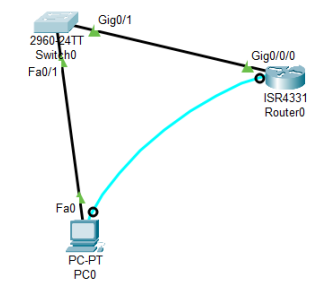
1. Refer to example topology.
2. Add a 4331 router
3. Configure the 4331 router
- Host name - Passwords for Privileged-Exec
- Passwords for Console
- Logging synchronous
- Passwords for VTY
- make ssh and telnet both available
- encrypt passwords
- banner warning unauthorized access
- enable ipv6 routing - configure interfaces
g0/0/0
- Ip address 10.0.1.1/24
- Ipv6 address 2001:db8:acad:1::1/64
- Link-local fe80::1:a
g0/0/1
- Ip address 10.0.2.1/24 Ipv6 address 2001:db8:acad:2::1/64
- Link-local fe80::1:b
4. Configure the default gateway for the PC and switch.
5. Documentation should be on the topology and include device names, ports, network addresses with prefixes, and host addresses.
6. Verify connectivity between the PC, switch, and interfaces on the 4331 router.
7. Submit one Word document with a screenshot of:
- Topology (including documentation)
- Show IP interface brief from both routers
- Routing table from route
CoursHeroTranscribedText
2960-24TT Switch0 Fa0/1 Gig0/1 Fa0o PC-PT PC0 Gig0/0/0 ISR4331 Router0
Step by Step Solution
There are 3 Steps involved in it

Get step-by-step solutions from verified subject matter experts
 Study Help