







Question: BCIS 3343 Lab 01 Problem Statement Employee Class Create an application with a class named Employee, which contains the following-: - Private fields for an
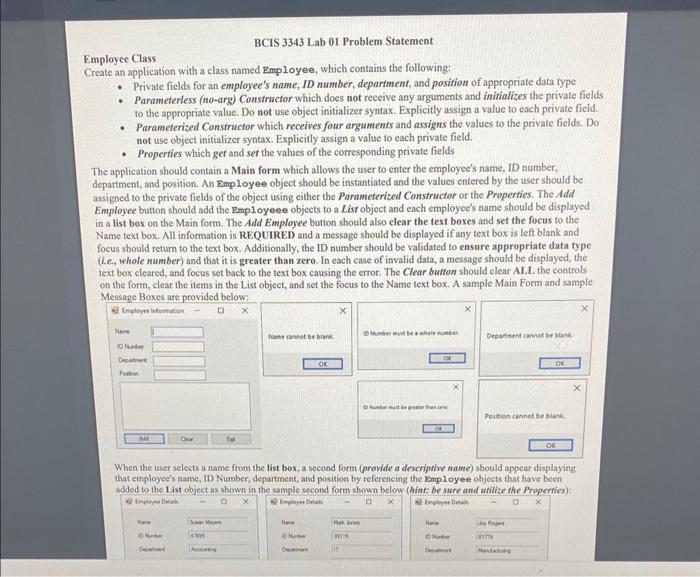
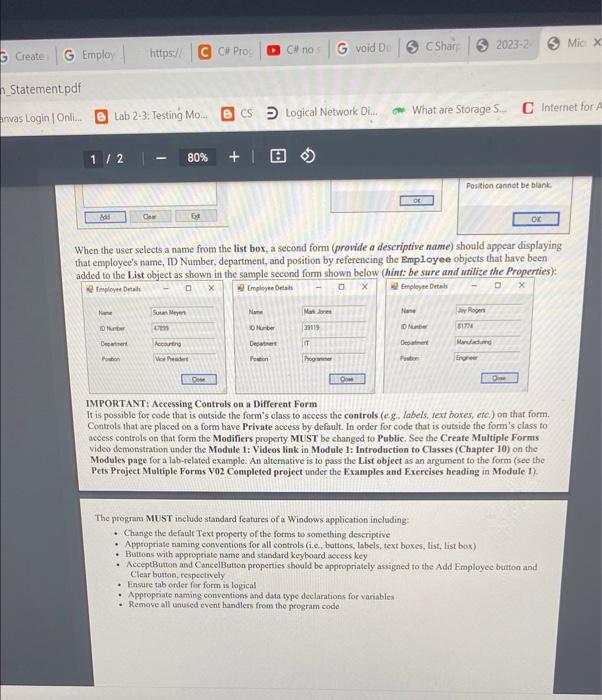
BCIS 3343 Lab 01 Problem Statement Employee Class Create an application with a class named Employee, which contains the following-: - Private fields for an employee's name, ID number, department, and position of appropriate data type - Parameterless (no-arg) Constructor which does not receive any arguments and initializes the private fields to the appropriate value. Do not use object initializer syntax. Explicitly assign a value to each private field. - Parameterized Constructor which receives four arguments and assigns the values to the private fields. Do not use object initializer syntax. Explicitly assign a value to each private field. - Properties which get and set the values of the corresponding private fields The application should contain a Main form which allows the user to enter the employee's name, ID number, department, and position. An Employee object should be instantiated and the values entered by the user should be assigned to the private fields of the object using either the Parameterized Constructor or the Properties. The Add Employee button should add the Employeee objects to a List object and each employee's name should be displayed in a list box on the Main form. The Add Employee button should also clear the text boxes and set the focus to the Name text box. All information is REQUIRED and a message should be displayed if any text box is left blank and focus should return to the text box. Additionally, the ID number should be validated to ensure appropriate data type (ie., whole number) and that it is greater than zero. In each case of invalid data, a message should be displayed, the text box cleared, and focus set back to the text box eausing the error. The Clear button should clear ALL the controls on the form, clear the items in the List object, and set the focus to the Name text box. A sample Main Form and sample When the user selects a name from the list box, a second form (provide a descriptive name) should appear displaying that employee's name, ID Number, department, and position by referencing the Bmployee objects that have been added to the List obiect as shown in the samole second form shown below (hint be sure and arilize the Proserties): When the user selects a name from the list box, a second form (provide a descrigtive name) should appear displaying that employee's name, ID Number, department, and position by referencing the Employee objects that have been added to the List object as shown in the samole second form shown below (hint: be sare and utilize the Properties): IMPORTANT: Accessing Controls on a Different Form It is possible for code that is outside the form's class to access the controls (eg., labels, text boxes, etc.) on that form. Controls that are placed on a form have Private access by default. In order for code that is outside the form's class to access controls on that form the Modifiers property MUST be changed to Public. See the Create Multiple Forms video demonstration under the Module 1: Videos link in Module 1: Introduction to Classes (Chapter 10) on the Modules page for a lab-related example. An alternative is to pass the List object as an argument to the form (see the Pets Project Multiple Forms V02 Completed project under the Examples and Excreises heading in Module 1). The program MIUST include standard features of a Windows application including: - Change the default Text property of the forms to something descriptive - Appropriate naming conventions for all conirols (1.e., butions, labels, text boxes, list, list box) - Buttons with appropriate name and standard keyboard access key - AcceptButton and CancelButton properties shoold be appropriately assigned to the Add Employec bution and Clear buttan, respostively - Ensufe tab order for form is logical - Appropriate naming conventions and daa type declarntions foe variablea - Renove all unused event handlers from the program code
Step by Step Solution
There are 3 Steps involved in it

Get step-by-step solutions from verified subject matter experts
 Study Help