







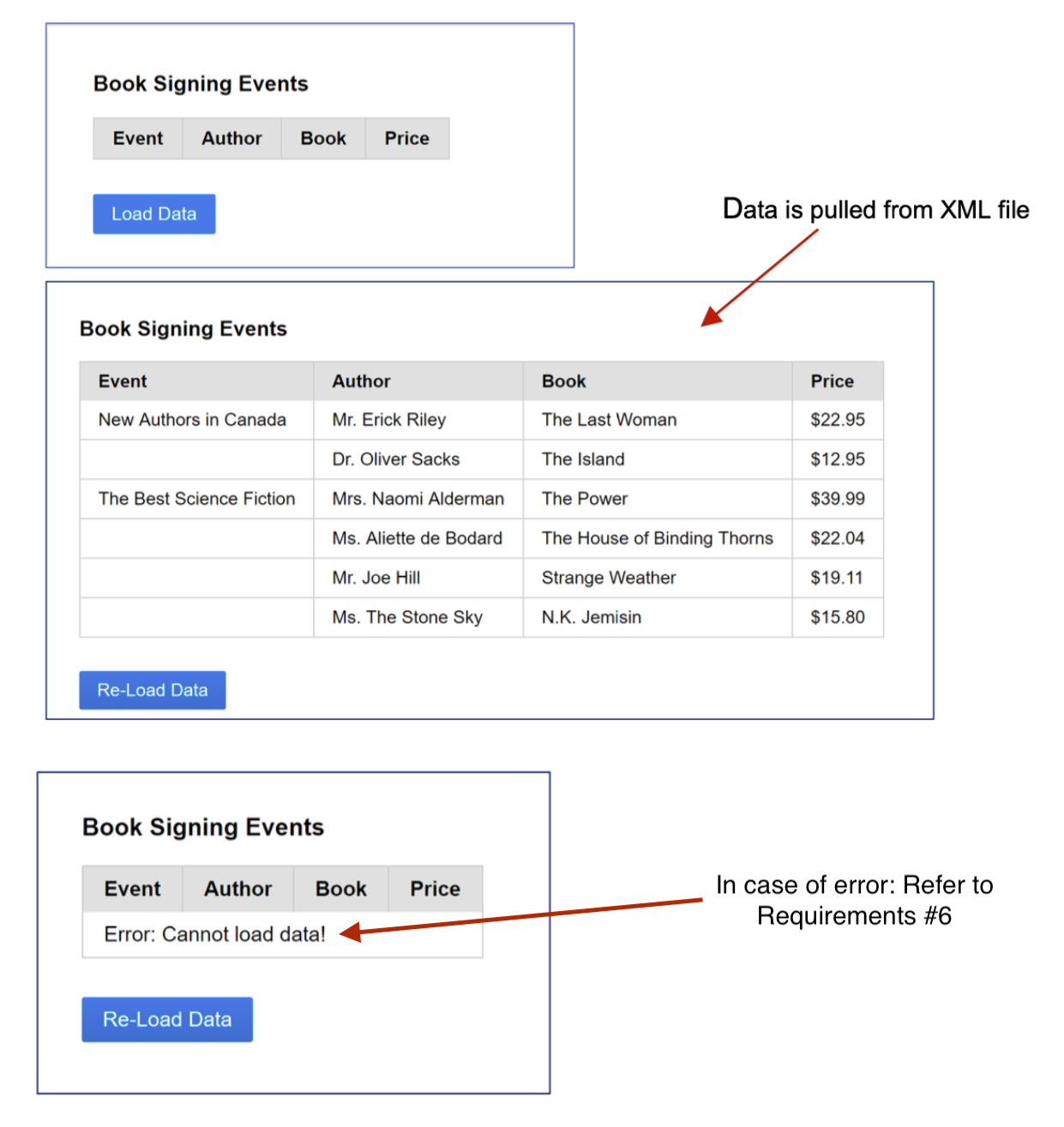
Question: Be sure the # 6 error in the Requirements section does not encounter, ( see last box section in the screenshot ) Guaranteed upvote if
Be sure the #error in the Requirements section does not encounter, see last box section in the screenshotGuaranteed upvote if there is no #error fully completed properly with and a really short paragraph explaining all the codes, really short.
For this project, you need to load an XML file using an AJAX call and display values in the table.
Requirements:
Must use a pure CSS framework and load it via CDN
Must load XML file.
Data must be loaded via AJAX call using XMLHttpRequest object.
Must assume that you dont know how many authors will be displayed in each Assume that inside each tag youll have only author and book.
Must use a nested for loop. DONT hardcore authorsbooks
Need to check that parsed data is not null, see in data.section. In case of errors xml file cannot be loaded; request timeouts or XML data cannot be parsed much display the following notification: See last section box in the screenshot provided
Easily emulate errors by changing URL or timeout property. Must also provide error notification if the XML file doesnt have an events section.
Code must be reasonably optimised: dont pollute global scope with variables. Createuse methods in appropriate objects and functions, avoid duplicate code, cache selectors, etc.
Be sure there are no console messages of any kind and no debugging code left.
JavaScript code must NOT crash
Must not use external JavaScriptCSS files. Everything must be in the index.html file.
Hints:
Need to add an extra Event column where it displays the name of the event.
Need to use XML DOM Traversing might want to use children, getAttribute etc.
Use XML DOM getAttribute method to display price of the book and authors title.
To avoid text nodes use children instead of childNodesfirstElementChild instead of firstChild, etc.
Always use console.dir to troubleshoot the code and JS objects. For example try:
data this.responseXML;
var events data.getElementsByTagNameevent;
console.logevents;
console.logeventschildren;
Need to use a nested loop. To optimise code please cache long objects.
You can hardcore indexes only for tags: author and book. For example, assume the tag is the first tag inside Then would have used something like obj.childrentext.Content to display name of an author
The title of the event is only displayed in the first row. Create a variable title that has event info. You will create rows using variable rows: rows title After you created first row you can simple reset the title using title;
Use correct colspan for error notifications.
Step by Step Solution
There are 3 Steps involved in it
1 Expert Approved Answer
Step: 1 Unlock

Question Has Been Solved by an Expert!
Get step-by-step solutions from verified subject matter experts
Step: 2 Unlock
Step: 3 Unlock
 Study Help