







Question: Before you start, please include Irvine 3 2 . lib. Please build this in 3 2 - Bit MASM assembly using Visual Studio 2 0
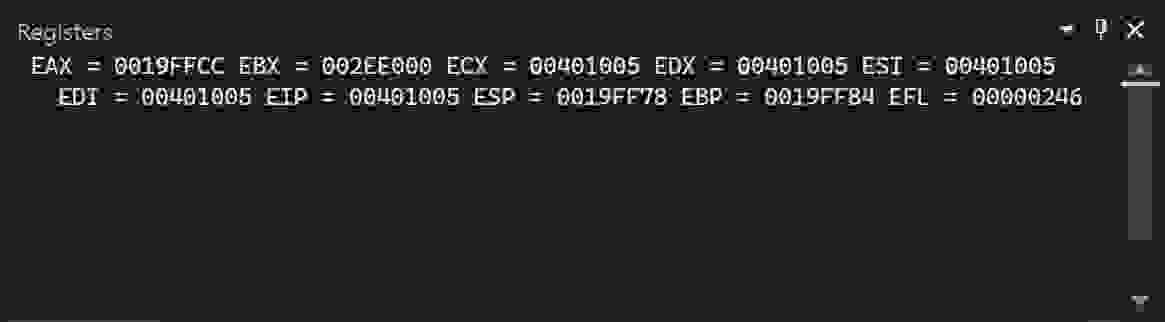
Before you start, please include Irvinelib. Please build this in Bit MASM assembly using Visual Studio Please also include the screenshots of the code output in the form of the register example output included below as well as the completed and working code. Also, please DO NOT use other code from chegg as those do not work. Please make the code from scratch.
Instructions for the project below:
You will write a simple assembly language program that performs a few arithmetic operations. This will require you to establish your programming environment and create the capability to assemble and execute the other assembly programs that will be part of this course. Your College student ID number is a digit number, the number is Begin by splitting your student ID into two different values. Assign the four most significant digits to a variable called 'left' and the three least significant digits to a variable called 'right'. You must choose the data type that is appropriate for the range of decimal values each variable can store. You will choose a data type when you define each of the variables in your program. Try to make efficient use of memory. Calculate the sum of the two variables 'left' and 'right'. Store this result in a variable called 'total'. Calculate the positive difference between the variables 'left' and 'right'. Store this result in a variable called 'diff'. Define a character string called 'message' that contains the characters, "Hello World!". Define an array of data type WORD called 'numbers' that is initialized to the following values: and Write assembly language code using what you know so far do not look ahead in the book just yet to determine the length of 'numbers'. Store this value in a variable called 'arrayLength'. Move the contents of the variable 'left' into the EAX register. Move the contents of the variable 'right' into the EBX register. Move the contents of the variable 'total' into the ECX register. Move the contents of the variable 'diff' into the EDX register. Move the contents of the variable 'arrayLength' into the ESI register. Call the author's DumpReg routine to display the contents of the registers. Submit your assembly language source code and a screen shot of the output.
This is my code
INCLUDE Irvineinc
data
left DWORD
right DWORD
total DWORD
diff DWORD
message BYTE "Hello World!",
numbers WORD
arrayLength DWORD
code
main PROC
mov eax, left
add eax, right
mov total, eax
mov ebx, left
sub ebx, right
mov diff, ebx
mov esi, arrayLength
call DumpReg
mov edx, OFFSET message
call WriteString
call WaitMsg
exit
main ENDP
END main
This is the error I got when I compiled my code
Build started at : PM
Build started: Project: Project, Configuration: Debug Win
Assembling AddSubasm...
AddSubasm: error A: undefined symbol : DumpReg
C:Program FilesMicrosoft Visual StudioCommunityMSBuildMicrosoftVCvBuildCustomizationsmasmtargets: error MSB: The command mlexe c nologo Sg Zi FoDebugAddSubobj" FlProjectlstI c:IrvineWerrorReport:prompt TaAddSubasm" exited with code
Done building project "Project.vcxproj" FAILED.
Build: succeeded, failed, uptodate, skipped
Build completed at : PM and took seconds
This is a comment I also got from the instructor
"Your code does not build correctly. What is DumpReg? Go back and reread the directions for this project."
Could you please create a code solution on VS and submit the code as well as the register outputs?
Step by Step Solution
There are 3 Steps involved in it
1 Expert Approved Answer
Step: 1 Unlock

Question Has Been Solved by an Expert!
Get step-by-step solutions from verified subject matter experts
Step: 2 Unlock
Step: 3 Unlock
 Study Help