







Question: Beginning PL/SQL Please answer a-e below. Please say what letter you are answering. Create a test table called Emp2 that is similar to the Worker
Beginning PL/SQL
Please answer a-e below. Please say what letter you are answering.
Create a test table called Emp2 that is similar to the Worker table Use CREATE TABLE Emp2 AS SELECT * FROM Worker).
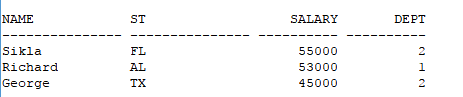
a. Write a procedure called add_any_emp to insert values into your Emp2 table. If a salary is greater than 20000, then set that salary to 20000. Insert at least three rows into your table with your procedure. In furnishing values for the procedure, include a salary greater than 20000 for one of those rows. Display your loaded table.
b. Write a procedure called new_emp to access the Emp2 table created in a. In your procedure, insert a new worker named Madison from WI into the department that has the highest department number. Make the salary equal to the average of all other workers less 15%. Pass the name and state through the parameter list. Save the script you use to create this procedure.
c. Write a function called avg_emp that returns the average salary of workers in your Emp2 table. Do not include the lowest salary in the average. Display the average salary using the Dual table.
d. Retrieve the script used to create the procedure in Exercise 12-2 and use the function created in Exercise 12-3 in the procedure to add another worker to the table. The parameter list should include name, state, and department number.
e. Create a package called Salary that contains both the procedure, new_emp, and the function, avg_emp, but rename the function avg_emp1 for the package. Test new_emp by adding another worker to the Emp2 table and show the table after your addition. Do not put the function in the package specification (you are hiding the function in the package). Try to use avg_emp1 in a SELECT (SELECT Salary.evg_emp1 FROM Dual). Does it work?
Step by Step Solution
There are 3 Steps involved in it

Get step-by-step solutions from verified subject matter experts
 Study Help