







Question: begin{tabular}{|c|c|c|} hline Step & Instructions & Possible hline 1 & ( begin{array}{l}text { Open the Excel workbook Student_Excel_5G_Sports_Programs.xlsx downloaded with this } text
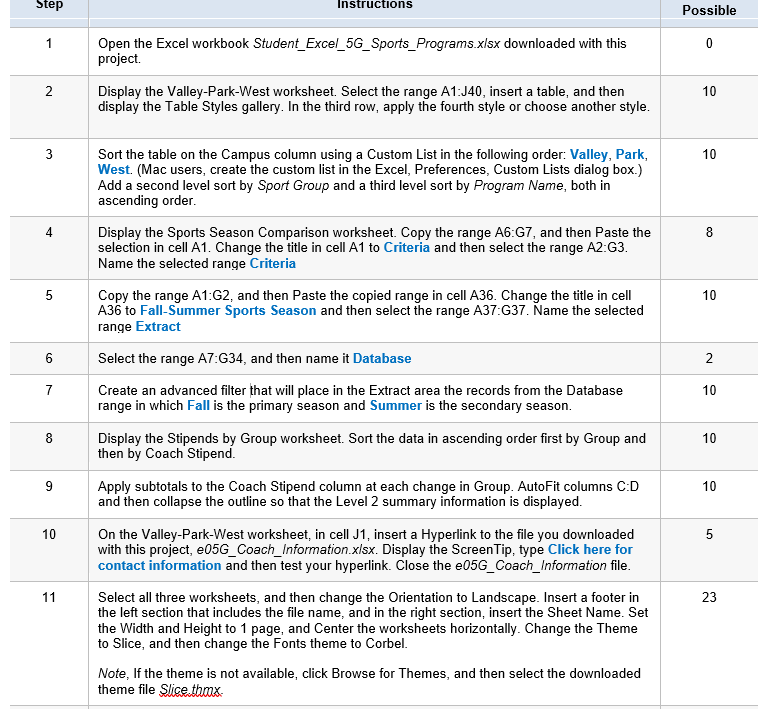
\begin{tabular}{|c|c|c|} \hline Step & Instructions & Possible \\ \hline 1 & \( \begin{array}{l}\text { Open the Excel workbook Student_Excel_5G_Sports_Programs.xlsx downloaded with this } \\ \text { project. }\end{array} \) & 0 \\ \hline 2 & DisplaytheValley-Park-Westworksheet.SelecttherangeA1:J40,insertatable,andthendisplaytheTableStylesgallery.Inthethirdrow,applythefourthstyleorchooseanotherstyle. & 10 \\ \hline 3 & SortthetableontheCampuscolumnusingaCustomListinthefollowingorder:Valley,Park,West.(Macusers,createthecustomlistintheExcel,Preferences,CustomListsdialogbox.)AddasecondlevelsortbySportGroupandathirdlevelsortbyProgramName,bothinascendingorder. & 10 \\ \hline 4 & DisplaytheSportsSeasonComparisonworksheet.CopytherangeA6:G7,andthenPastetheselectionincellA1.ChangethetitleincellA1toCriteriaandthenselecttherangeA2:G3.NametheselectedrangeCriteria & 8 \\ \hline 5 & CopytherangeA1:G2,andthenPastethecopiedrangeincellA36.ChangethetitleincellA36toFall-SummerSportsSeasonandthenselecttherangeA37:G37.NametheselectedrangeExtract & 10 \\ \hline 6 & Select the range A7:G34, and then name it Database & 2 \\ \hline 7 & CreateanadvancedfilterthatwillplaceintheExtractareatherecordsfromtheDatabaserangeinwhichFallistheprimaryseasonandSummeristhesecondaryseason. & 10 \\ \hline 8 & DisplaytheStipendsbyGroupworksheet.SortthedatainascendingorderfirstbyGroupandthenbyCoachStipend. & 10 \\ \hline 9 & ApplysubtotalstotheCoachStipendcolumnateachchangeinGroup.AutoFitcolumnsC:DandthencollapsetheoutlinesothattheLevel2summaryinformationisdisplayed. & 10 \\ \hline 10 & \( \begin{array}{l}\text { On the Valley-Park-West worksheet, in cell J1, insert a Hyperlink to the file you downloaded } \\ \text { with this project, e05G_Coach_Information.x/sx. Display the ScreenTip, type Click here for } \\ \text { contact information and then test your hyperlink. Close the e05G_Coach_Information file. }\end{array} \) & 5 \\ \hline 11 & Selectallthreeworksheets,andthenchangetheOrientationtoLandscape.Insertafooterintheleftsectionthatincludesthefilename,andintherightsection,inserttheSheetName.SettheWidthandHeightto1page,andCentertheworksheetshorizontally.ChangetheThemetoSlice,andthenchangetheFontsthemetoCorbel.Note,Ifthethemeisnotavailable,clickBrowseforThemes,andthenselectthedownloadedthemefileSlicethomx. & 23 \\ \hline \end{tabular}
Step by Step Solution
There are 3 Steps involved in it

Get step-by-step solutions from verified subject matter experts
 Study Help