



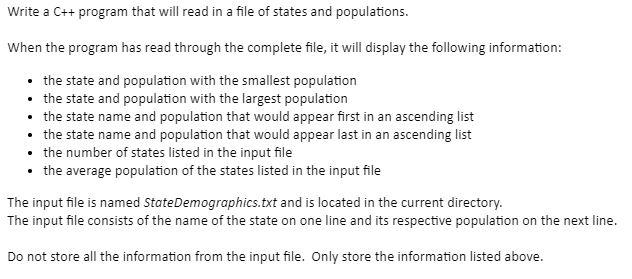
Question: Below are the states and their populations Write a C++ program that will read in a file of states and populations. When the program has
Below are the states and their populations
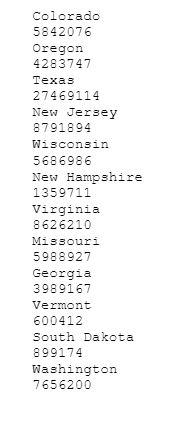
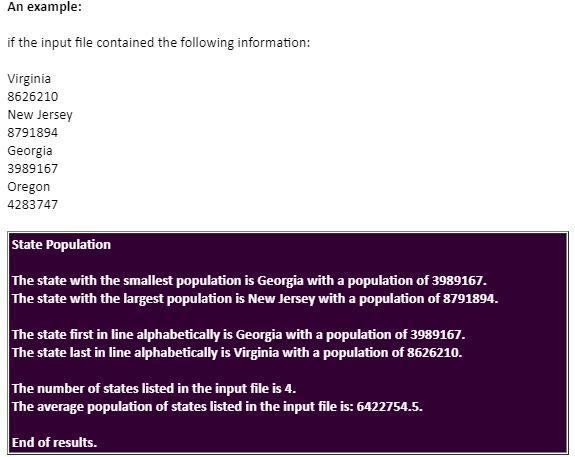
Write a C++ program that will read in a file of states and populations. When the program has read through the complete file, it will display the following information: the state and population with the smallest population the state and population with the largest population the state name and population that would appear first in an ascending list the state name and population that would appear last in an ascending list the number of states listed in the input file the average population of the states listed in the input file The input file is named State Demographics.txt and is located in the current directory. The input file consists of the name of the state on one line and its respective population on the next line. Do not store all the information from the input file. Only store the information listed above. An example: if the input file contained the following information: Virginia 8626210 New Jersey 8791894 Georgia 3989167 Oregon 4283747 State Population The state with the smallest population is Georgia with a population of 3989167. The state with the largest population is New Jersey with a population of 8791894. The state first in line alphabetically is Georgia with a population of 3989167. The state last in line alphabetically is Virginia with a population of 8626210. The number of states listed in the input file is 4. The average population of states listed in the input file is: 6422754.5. End of results. Colorado 5842076 Oregon 4283747 Texas 27469114 New Jersey 8791894 Wisconsin 5686986 New Hampshire 1359711 Virginia 8626210 Missouri 5988927 Georgia 3989167 Vermont 600412 South Dakota 899174 Washington 7656200
Step by Step Solution
There are 3 Steps involved in it

Get step-by-step solutions from verified subject matter experts