







Question: :-Below is Python Code that needs to filled in and the two files one is encrypted text file and one is a bin file i
:-Below is Python Code that needs to filled in and the two files one is encrypted text file and one is a bin file i was not able to attach the files is the window. what the English words list file could be found on http://www.cis.syr.edu/~wedu/seed/Labs_16.04/Crypto/Crypto_Encryption/
#!/usr/bin/python from Crypto.Cipher import AES
def pad_message(message): """Message length must be a multiple of 16 characters for aes_cbc. Pad with the appropriate characters if needed"""
# You will have to determine: # - How many bytes to pad # - What character to use to pad # You can use the chr() function to convert an integer into a hex string # i.e. chr(15) = '\x0f', a two byte hex formatted 15 (F)
return message
def pad_key(key): """Key length must be 16 - if the key is less than 16, add # to it until it is 16 characters"""
# Pad the key with # an appropriate amount
return key
def encrypt(key): """Encrypt the (padded) message with the provided key"""
# Initialization factor must be represented as hex # Hex in strings in python are represented with \x before the hex value iv_ascii = "aabbccddeeff00998877665544332211" iv_hex = "\xaa\xbb\xcc\xdd\xee\xff\x00\x99\x88\x77\x66\x55\x44\x33\x22\x11"
mode = AES.MODE_CBC obj = AES.new(key, mode, iv_hex) ciphertext = obj.encrypt(message) return ciphertext
# Plain text message message = "This is a top secret." message = pad_message(message) print message
# Open the cipher text for comparison with open('ciphertext.bin', mode='rb') as file: encrypted_file = str(file.read())
# open and go through the values in the words.txt file # Use each one (padded as needed) for a key # Encrypt the plain text for each key to create a cipher text # Compare the cipher text to the encrypted_file string # When you have a match, you've found the key
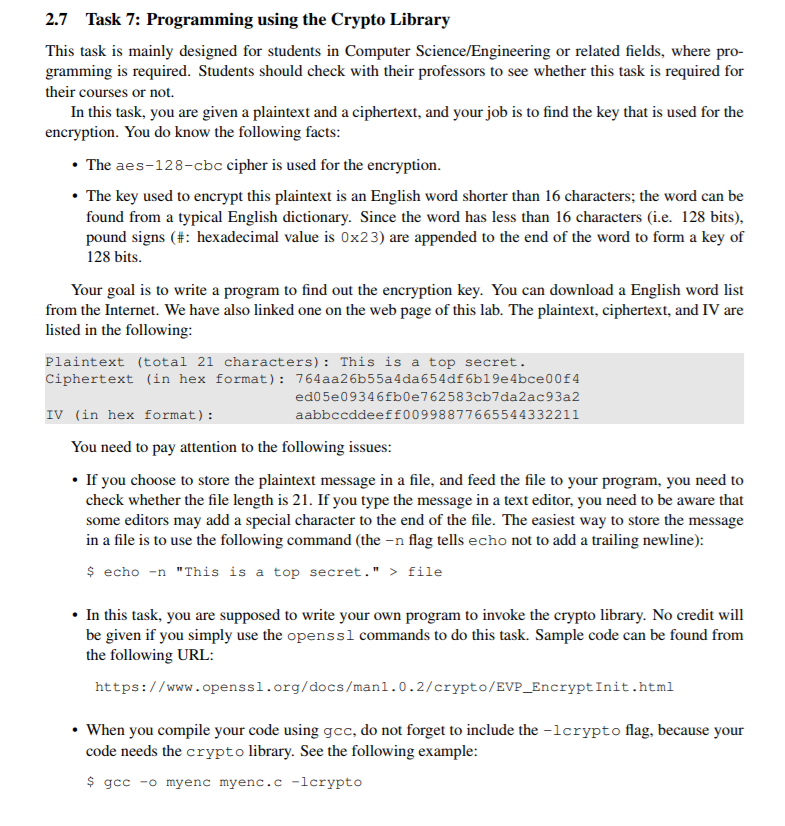
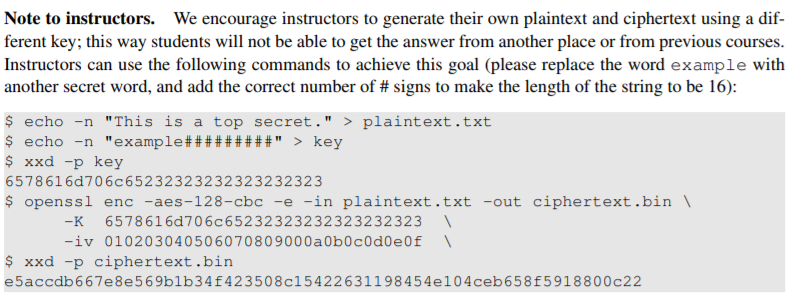
2.7 Task 7: Programming using the Crypto Library This task is mainly designed for students in Computer Science/Engineering or related fields, where pro- gramming is required. Students should check with their professors to see whether this task is required for their courses or not. In this task, you are given a plaintext and a ciphertext, and your job is to find the key that is used for the encryption. You do know the following facts The aes-128-cbc cipher is used for the encryption. The key used to encrypt this plaintext is an English word shorter than 16 characters; the word can be found from a typical English dictionary. Since the word has less than 16 characters (i.e. 128 bits) pound signs (#: hexadecimal value is 0x23) are appended to the end of the word to form a key of 128 bits Your goal is to write a program to find out the encryption key. You can download a English word list from the Internet. We have also linked one on the web page of this lab. The plaintext, ciphertext, and IV are listed in the following: Plaintext (total 21 characters): This is a top secret. Ciphertext (in hex format): 764aa26b55a4da654df 6b19e4bce00f4 ed05e09346fb0e762583cb7da2ac93a2 aabbccddeeff00998877665544332211 IV (in hex format) You need to pay attention to the following issues If you choose to store the plaintext message in a file, and feed the file to your program, you need to check whether the file length is 21. If you type the message in a text editor, you need to be aware that some editors may add a special character to the end of the file. The easiest way to store the message in a file is to use the following command (the n flag tells echo not to add a trailing newline) $ echo -n "This is a top secret."> file In this task, you are supposed to write your own program to invoke the crypto library. No credit will be given if you simply use the openssl commands to do this task. Sample code can be found from the following URL: https://www.openssl.org/docs/man1.0.2/crypto/EVP_EncryptInit.html When you compile your code using gcc, do not forget to include the -lcrypto flag, because your code needs the crypto library. See the following example gcc-o myenc myenc.c -lcrypto Note to instructors. We encourage instructors to generate their own plaintext and ciphertext using a dif- ferent key; this way students will not be able to get the answer from another place or from previous courses. Instructors can use the following commands to achieve this goal (please replace the word example with echo-n "This is a top secret." >plaintext.txt xxd -p key 6578616d7 0 6 c 6 5 2 3 2 3 2 3 2 3 2 32 32 32 323 s openssl enc -aes-128-cbc-e-in plaintext.txt-out ciphertext.bin -K 6578616d706c65232323232323232323 -iv 010203040506070809000a0b0cod0e0f xxd -p ciphertext.bin e5accdb667e8e569blb34f423508c15422631198454e104ceb 658f5918800c22 2.7 Task 7: Programming using the Crypto Library This task is mainly designed for students in Computer Science/Engineering or related fields, where pro- gramming is required. Students should check with their professors to see whether this task is required for their courses or not. In this task, you are given a plaintext and a ciphertext, and your job is to find the key that is used for the encryption. You do know the following facts The aes-128-cbc cipher is used for the encryption. The key used to encrypt this plaintext is an English word shorter than 16 characters; the word can be found from a typical English dictionary. Since the word has less than 16 characters (i.e. 128 bits) pound signs (#: hexadecimal value is 0x23) are appended to the end of the word to form a key of 128 bits Your goal is to write a program to find out the encryption key. You can download a English word list from the Internet. We have also linked one on the web page of this lab. The plaintext, ciphertext, and IV are listed in the following: Plaintext (total 21 characters): This is a top secret. Ciphertext (in hex format): 764aa26b55a4da654df 6b19e4bce00f4 ed05e09346fb0e762583cb7da2ac93a2 aabbccddeeff00998877665544332211 IV (in hex format) You need to pay attention to the following issues If you choose to store the plaintext message in a file, and feed the file to your program, you need to check whether the file length is 21. If you type the message in a text editor, you need to be aware that some editors may add a special character to the end of the file. The easiest way to store the message in a file is to use the following command (the n flag tells echo not to add a trailing newline) $ echo -n "This is a top secret."> file In this task, you are supposed to write your own program to invoke the crypto library. No credit will be given if you simply use the openssl commands to do this task. Sample code can be found from the following URL: https://www.openssl.org/docs/man1.0.2/crypto/EVP_EncryptInit.html When you compile your code using gcc, do not forget to include the -lcrypto flag, because your code needs the crypto library. See the following example gcc-o myenc myenc.c -lcrypto Note to instructors. We encourage instructors to generate their own plaintext and ciphertext using a dif- ferent key; this way students will not be able to get the answer from another place or from previous courses. Instructors can use the following commands to achieve this goal (please replace the word example with echo-n "This is a top secret." >plaintext.txt xxd -p key 6578616d7 0 6 c 6 5 2 3 2 3 2 3 2 3 2 32 32 32 323 s openssl enc -aes-128-cbc-e-in plaintext.txt-out ciphertext.bin -K 6578616d706c65232323232323232323 -iv 010203040506070809000a0b0cod0e0f xxd -p ciphertext.bin e5accdb667e8e569blb34f423508c15422631198454e104ceb 658f5918800c22
Step by Step Solution
There are 3 Steps involved in it

Get step-by-step solutions from verified subject matter experts
 Study Help