







Question: -- Below is the code provided -- #include #include #include #include using namespace std; const int SIZE = 100; // Function Prototypes int InputGrades(ifstream& inData,

-- Below is the code provided --
#include
const int SIZE = 100;
// Function Prototypes
int InputGrades(ifstream& inData, int grades[], const int size); void SortGrades(int grades[], const int listLength);
// file name constants // A has 18 scores, with duplicates, includes 0 and 100 // B has 22 scores, with duplicatess, includes 0 and 100's const string FILE_A = "TestScoresA.txt"; const string FILE_B = "TestScoresB.txt"; const string FILE_AB = "TestScoresMergeAB.txt";
// other test data sets...
// A1 has 10 scores, 1-10 // B1 has 10 scores, 11-20 const string FILE_A1 = "TestScoresA1.txt"; const string FILE_B1 = "TestScoresB1.txt"; const string FILE_AB1 = "TestScoresMergeAB1.txt";
// A2 has 10 scores, odds 1-19 // B2 has 10 scores, evens 2-20 const string FILE_A2 = "TestScoresA2.txt"; const string FILE_B2 = "TestScoresB2.txt"; const string FILE_AB2 = "TestScoresMergeAB2.txt";
// A3 has 5 scores, 1-5 // B3 has 10 scores, 6-15 const string FILE_A3 = "TestScoresA3.txt"; const string FILE_B3 = "TestScoresB3.txt"; const string FILE_AB3 = "TestScoresMergeAB3.txt";
// A4 has 5 scores, 1-5 // B4 has 10 scores, 1-10 const string FILE_A4 = "TestScoresA4.txt"; const string FILE_B4 = "TestScoresB4.txt"; const string FILE_AB4 = "TestScoresMergeAB4.txt";
//------------------------------------------------------------------------------
int main() { int gradesA[SIZE]; // A list of grades int gradesB[SIZE]; // A list of grades
// Declare and open files ifstream inDataA; ifstream inDataB; ofstream outData;
cout
inDataA.open(FILE_A); // open input file A inDataB.open(FILE_B); // open input file B outData.open(FILE_AB); // open output file AB
if ( !inDataA || !inDataB || !outData ) { cout
cout
// Read unsorted file data into lists const int LENGTH_A = InputGrades(inDataA, gradesA, SIZE); // read file A into list A const int LENGTH_B = InputGrades(inDataB, gradesB, SIZE); // read file B into list B
cout
inDataA.close(); // close input files inDataB.close();
// Sort each list separtely SortGrades(gradesA, LENGTH_A); SortGrades(gradesB, LENGTH_B);
// Prepare loop counters int countA = 0; // set list A counter int countB = 0; // set list B counter
// Merge sorted lists into sorted output file
cout
// NOTE: Assumes both files are NOT empty
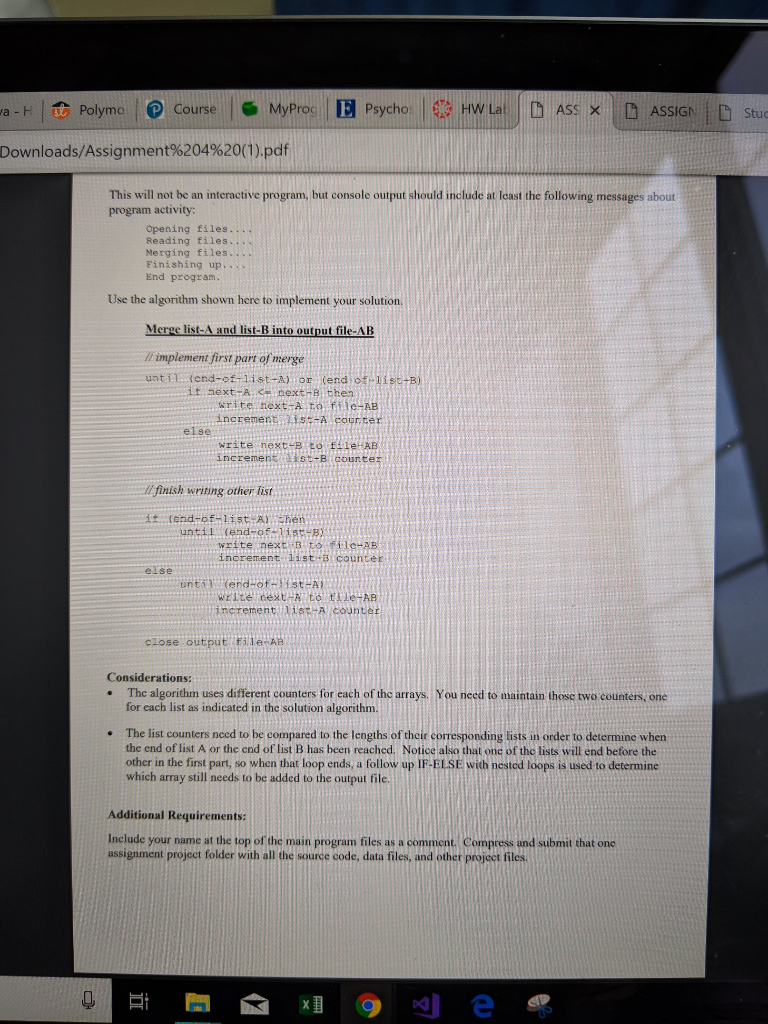
// *** TODO: implement first part of merge ***
cout
// *** TODO: finish writing other list ***
cout
// *** TODO print sorted lists of input data side-by-side
cout
cout
return 0; }
//*****************************************************************
// InputGrades function... // Grades are input from file inData and inserted into grades. // Precondition: // File is open and not empty // Postcondition: // Each grade in the file has been inserted into list of grades
int InputGrades(ifstream& inData, int grades[], const int size) // Input file { int nextGrade;
// Read first grade inData >> nextGrade;
int i = 0; while (inData && i
inData >> nextGrade; // read next grade or EOF }
return i; }
//*****************************************************************
void SortGrades(int grades[], const int listLength) // Selection Sort { int startScan, minIndex, minValue;
for (startScan = 0; startScan
for (int index = startScan + 1; index
grades[minIndex] = grades[startScan]; grades[startScan] = minValue; } }
/* Screen and file interaction
Opening files.... Reading input files into sorted lists.... Closing input files.... Merging sorted lists into output file.... Finishing up merge.... Closing merged output file....
Printing sorted lists to standard output...
ListA ListB ----- ----- 0 0 34 15 44 34 55 35 56 44 66 55 75 66 75 67 78 75 80 75 80 80 87 80 87 83 88 87 88 88 90 90 99 90 100 91 98 99 100 100
End program. Press any key to continue . . .
Java- Polymo l D course , MyProc l Psycho O HVV Lai [h Ass D ASSIGN 1 D studen co/Downloads/Assignment%204%20(1).pdf main objective of this assignment 1s to demonstrate your understanding nle input and output, and to implement an algorithm to merge two unsorted data files into one sorted data file, TEPT Objectives to be met Demonstrate how to merge two sorted lists into one sorted output file Demonstrate how to implement the given algorithm to solve the merge problem. 2 Use the start-up source code file MergeSort.cpp provided to complete this assignment Start by creating a nevw "empty" project and then copy the source code (epp) file and data .txt files into the project folder. Then right- click the Source node in Solution Explorer to Add Existing item into your project's solution. Be sure you can compile, load and run the program to make sure that much works, which should print some messages to the screen and create an output file that initially will be empty you will be merging two sorted lists into on sorted output file. Complete the TODO comments where indicated in the source code file and as outlined in the required merge algorithm. Given input files A and B read into two arrays and then sorted separately, the program will use those two lists and the algorithm that follows to write the merged output file AB (Note: TestScoresMergcA B fitle should contain just one column): TestScoresMergeAB 87 67 80 56 75 90 80 100 87 87 80 80 98 87 34 100 87 75 34 15 90 75 75 78 80 100 100 100 100 83 Requirements I Do not modify the input data files. 2 Do not define additional arrays in your program solution. 3 The two existing arrays, already sorted, must be merged externally into the required output file. 4 Use the algorithm that follows as the basis of your solution, After the merged output file is closed, reset the counters and write a loop to print both lists side- 5 by-side to the standard output sereen; it should similar to the first two columns on the first page sa ristias nreth adh a ide of these instructions. Hint: you will need a decision about how to use setw to finish up.ll
Step by Step Solution
There are 3 Steps involved in it

Get step-by-step solutions from verified subject matter experts
 Study Help