







Question: bELOW IS THE CODE PROVIDED #include #include #include stdafx.h /* TROUBLESHOOT */ // 1. If you get an error; cannot open include file: 'stdafx.h': No
bELOW IS THE CODE PROVIDED
#include
/* TROUBLESHOOT */ // 1. If you get an error; cannot open include file: 'stdafx.h': No such file or directory, // follow this instructions: https://stackoverflow.com/questions/39845899/error-c1083-cannot-open-include-file-stdafx-h-no-such-file-or-directory // a. Enable precompiled headers in all configurations for all *.cpp files. // It can be done on the "Precompiled Header" tab: // Set the value "Use (/Yu)" for the "Precompiled Header" option. // Set "stdafx.h" for the "Precompiled Header File" option. // Set "$(IntDir)$(TargetName).pch" for the "Precompiled Header Output File" option. // b. Create an stdafx.h file, and add it into the project. // c. Create an stdafx.cpp file, and add it into the project. // This file has only one line: #include "stdafx.h". // d. Change the settings for the stdafx.cpp file in all configurations; // set the value "Create (/Yc)" for the "Precompiled Header" option. // // 2. If you get an error; syntax error : identifier '_TCHAR', the error can be eliminated by uncommenting below: //#include "tchar.h" //
#define ARRAY_MIN (1024) /* 1/4 smallest cache */ #define ARRAY_MAX (4096*4096) /* 1/4 largest cache */ int x[ARRAY_MAX]; /* array going to stride through */
double get_seconds() { /* routine to read time in seconds */ __time64_t ltime; _time64( <ime ); return (double) ltime; } int label(int i) {/* generate text labels */ if (i
int _tmain(int argc, _TCHAR* argv[]) { int register nextstep, i, index, stride; int csize; double steps, tsteps; double loadtime, lastsec, sec0, sec1, sec; /* timing variables */
/* Initialize output */ printf(" ,"); for (stride=1; stride
/* Main loop for each configuration */ for (csize=ARRAY_MIN; csize
/* Wait for timer to roll over */ lastsec = get_seconds(); do sec0 = get_seconds(); while (sec0 == lastsec);
/* Walk through path in array for twenty seconds */ /* This gives 5% accuracy with second resolution */ steps = 0.0; /* number of steps taken */ nextstep = 0; /* start at beginning of path */ sec0 = get_seconds(); /* start timer */ do { /* repeat until collect 20 seconds */ for (i=stride;i!=0;i=i-1) { /* keep samples same */ nextstep = 0; do nextstep = x[nextstep]; /* dependency */ while (nextstep != 0); } steps = steps + 1.0; /* count loop iterations */ sec1 = get_seconds(); /* end timer */ } while ((sec1 - sec0)
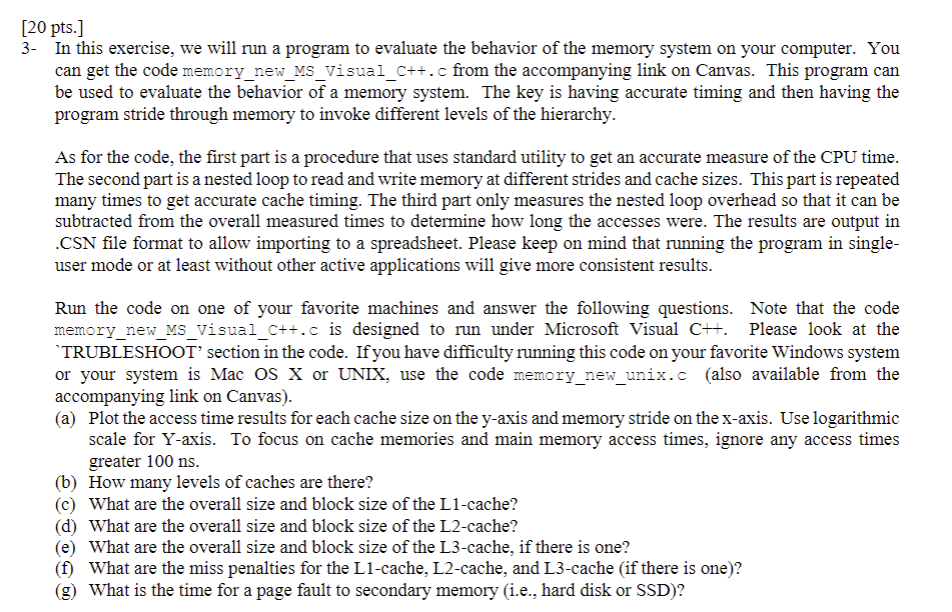
/* Repeat empty loop to loop subtract overhead */ tsteps = 0.0; /* used to match no. while iterations */ sec0 = get_seconds(); /* start timer */ do { /* repeat until same no. iterations as above */ for (i=stride;i!=0;i=i-1) { /* keep samples same */ index = 0; do index = index + stride; while (index [20 pts. ] 3- In this exercise, we will run a program to evaluate the behavior of the memory system on your computer. You can get the code memory_new_MS_Visual_C++.c from the accompanying link on Canvas. This program can be used to evaluate the behavior of a memory system. The key is having accurate timing and then having the program stride through memory to invoke different levels of the hierarchy. As for the code, the first part is a procedure that uses standard utility to get an accurate measure of the CPU time. The second part is a nested loop to read and write memory at different strides and cache sizes. This part is repeated many times to get accurate cache timing. The third part only measures the nested loop overhead so that it can be subtracted from the overall measured times to determine how long the accesses were. The results are output in .CSN file format to allow importing to a spreadsheet. Please keep on mind that running the program in singleuser mode or at least without other active applications will give more consistent results. Run the code on one of your favorite machines and answer the following questions. Note that the code memory_new_MS_Visual_C++.c is designed to run under Microsoft Visual C++. Please look at the 'TRUBLESHOO T ' section in the code. If you have difficulty running this code on your favorite Windows system or your system is Mac OS X or UNIX, use the code memory_new unix.c (also available from the accompanying link on Canvas). (a) Plot the access time results for each cache size on the y-axis and memory stride on the x-axis. Use logarithmic scale for Y-axis. To focus on cache memories and main memory access times, ignore any access times greater 100 ns. (b) How many levels of caches are there? (c) What are the overall size and block size of the L1-cache? (d) What are the overall size and block size of the L2-cache? (e) What are the overall size and block size of the L3-cache, if there is one? (f) What are the miss penalties for the L1-cache, L2-cache, and L3-cache (if there is one)? (g) What is the time for a page fault to secondary memory (i.e., hard disk or SSD)
Step by Step Solution
There are 3 Steps involved in it

Get step-by-step solutions from verified subject matter experts
 Study Help