Question: Below is the model A03B Starter.zip model class. XML files are too large and I cant paste them here. package Model; import java.beans.XMLDecoder; import java.io.BufferedInputStream;
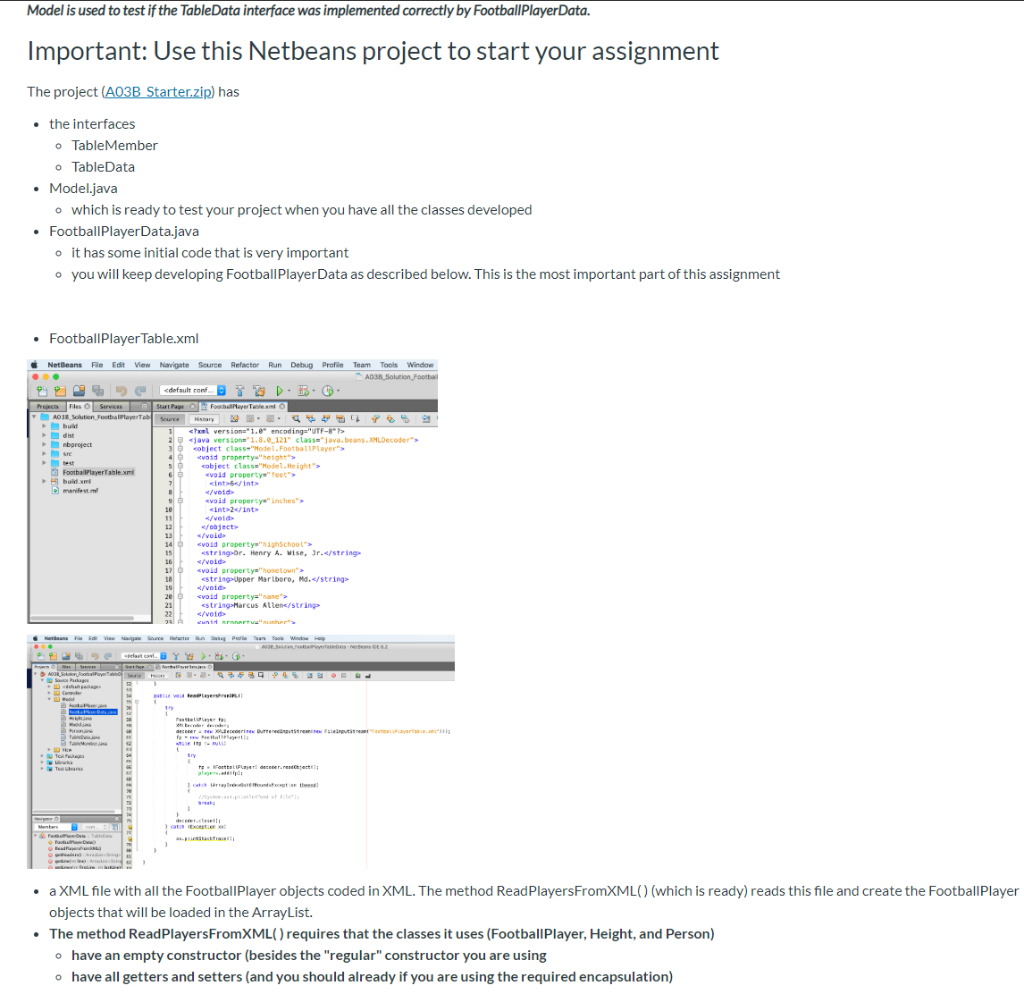
Below is the model A03B Starter.zip model class. XML files are too large and I cant paste them here.
package Model;
import java.beans.XMLDecoder; import java.io.BufferedInputStream; import java.io.FileInputStream; import java.util.ArrayList;
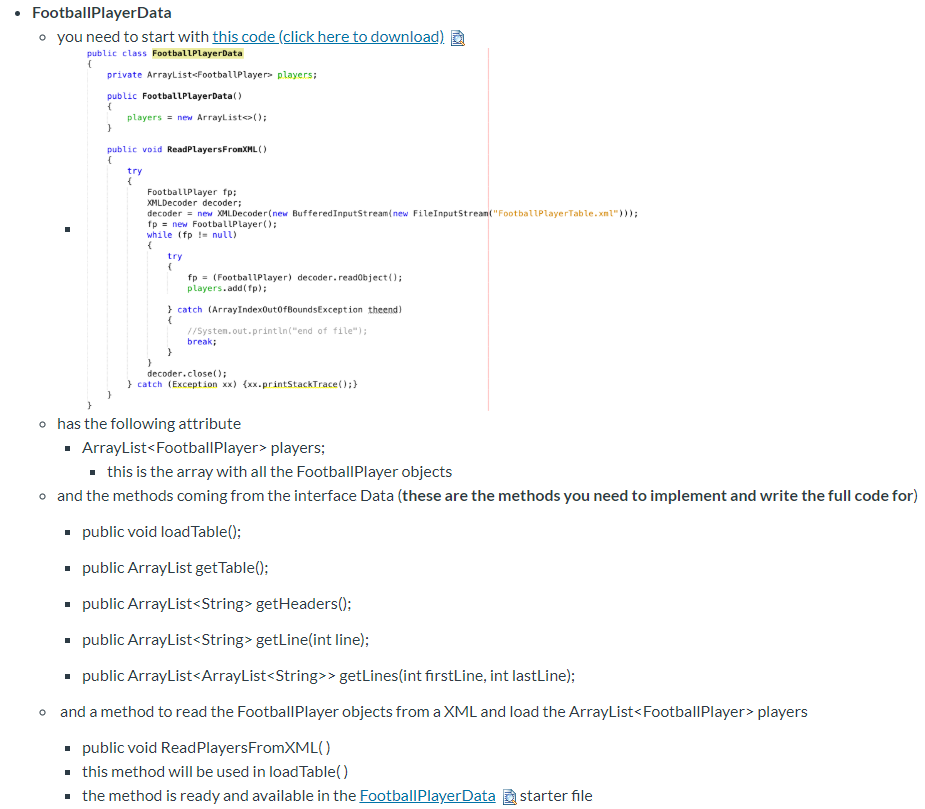
public class FootballPlayerData { private ArrayList players;
public FootballPlayerData() { players = new ArrayList(); }
public void ReadPlayersFromXML() { try { FootballPlayer fp; XMLDecoder decoder; decoder = new XMLDecoder(new BufferedInputStream(new FileInputStream("FootballPlayerTable.xml"))); fp = new FootballPlayer(); while (fp != null) { try { fp = (FootballPlayer) decoder.readObject(); players.add(fp);
} catch (ArrayIndexOutOfBoundsException theend) { //System.out.println("end of file"); break; } } decoder.close(); } catch (Exception xx) {xx.printStackTrace();} } }
package Model;
import java.util.ArrayList;
public class Model {
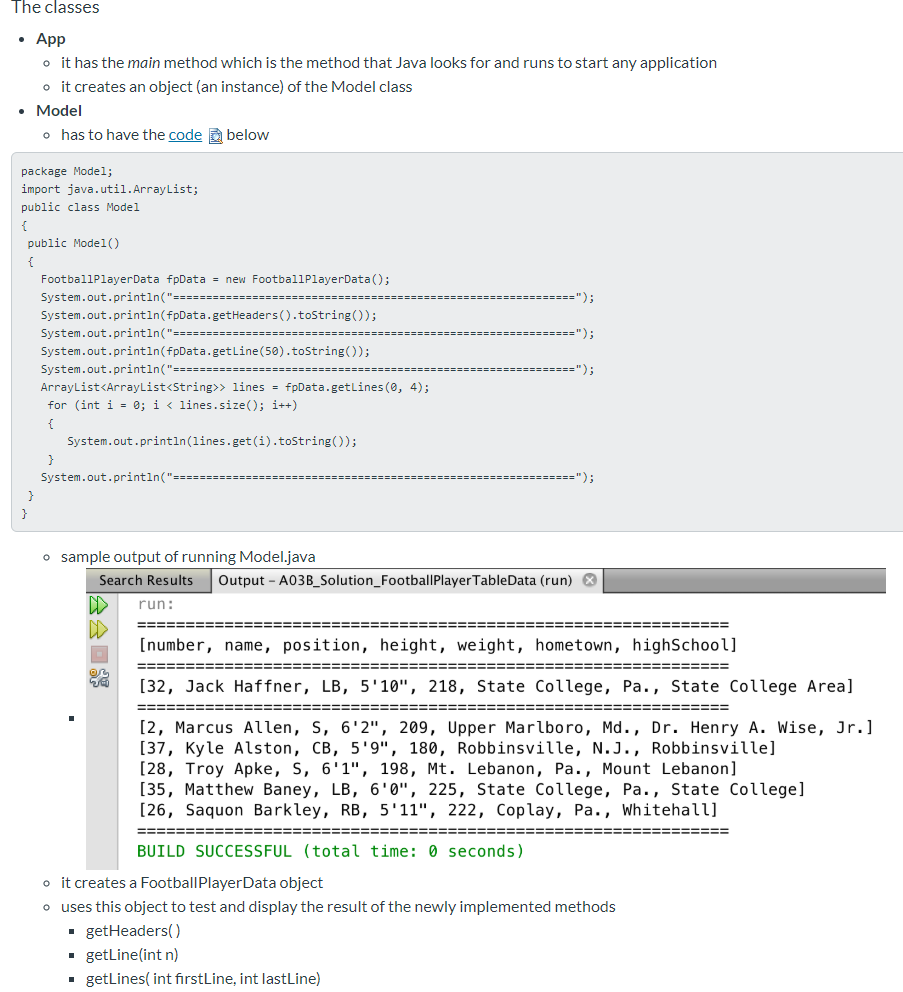
public Model() { FootballPlayerData fpData = new FootballPlayerData(); System.out.println("============================================================="); System.out.println(fpData.getHeaders().toString()); System.out.println("============================================================="); System.out.println(fpData.getLine(50).toString()); System.out.println("============================================================="); ArrayList> lines = fpData.getLines(0, 4); for (int i = 0; i
package Model;
import java.util.ArrayList;
public interface TableData {
public void loadTable();
public ArrayList getTable();
public ArrayList getHeaders();
public ArrayList getLine(int line);
public ArrayList> getLines(int firstLine, int lastLine);
}
package Model;
import java.util.ArrayList;
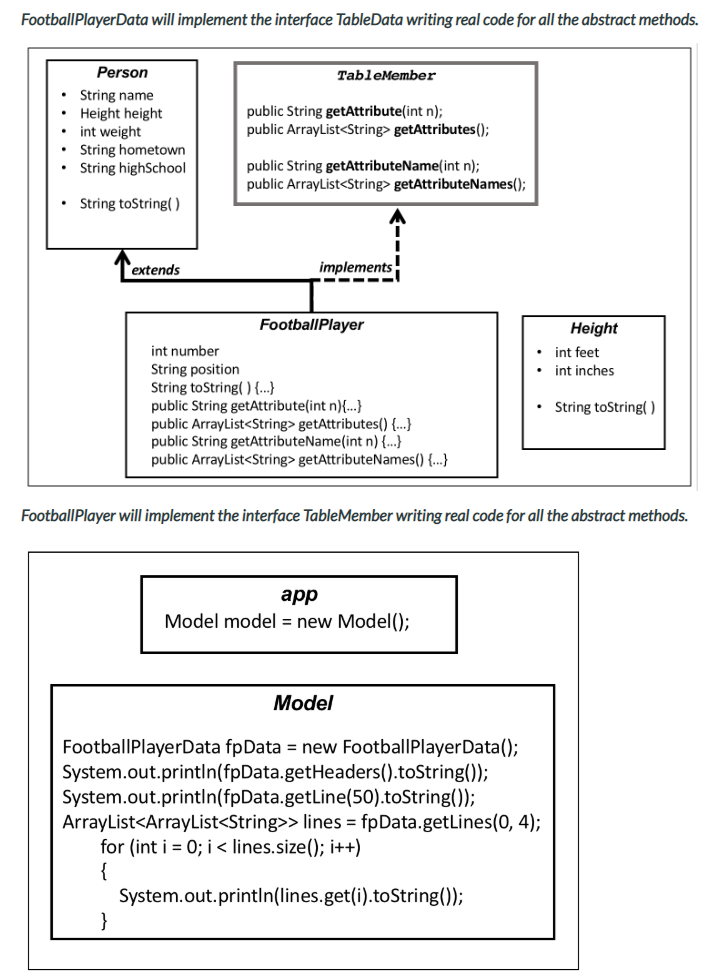
public interface TableMember {
public String getAttribute(int n);
public ArrayList getAttributes();
public String getAttributeName(int n);
public ArrayList getAttributeNames(); }
The Interface
- it is an interface
- remember the interface definition
-
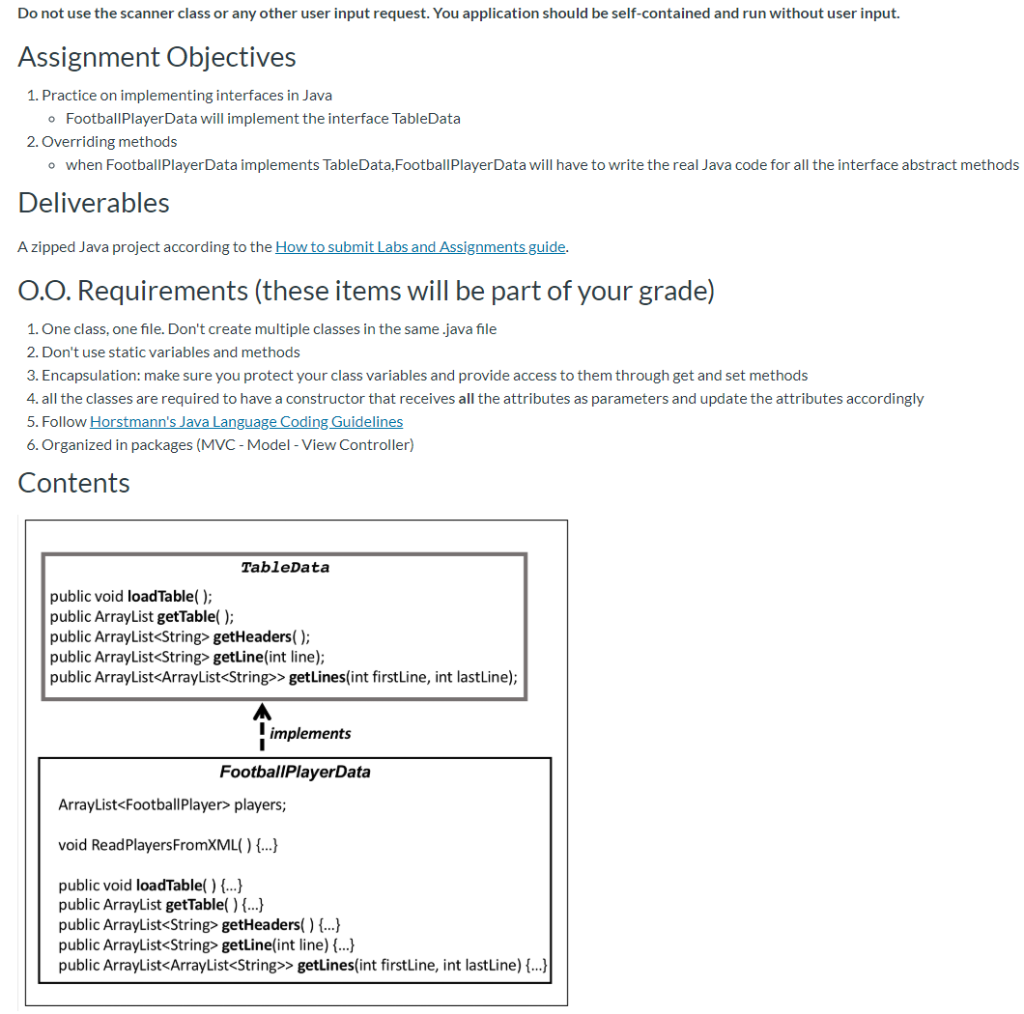
Interfaces are often compared to a contract, to a promise to implement the methods described in the interface. An interface in Java does not have any real code for implementation of its methods, it has only the skeleton of the methods. When a class decides to implement an interface, it has to contain the real code for each method in the interface.
- These are the five methods that FootballPlayerData has to implementf
-
public void loadTable(); It needs to be called in the constructor to make the table ready and available right away. It loads real data into the array list. The FootballPlayerData starter class has a method that help with this task. The method ReadPlayersFromXML( ) read the FootballPlayer objects from an XML file and load them into the players ArrayList.
-
public ArrayList getTable(); Returns the full table of data. Although right now is not required, soon you will need this method to return a specific ArrayList instead of a generic ArrayList.
-
public ArrayList getHeaders(); The method will return an ArrayList of Strings with the names of the FootballPlayer fields (the "headers").
-
public ArrayList getLine(int line); The method will return an ArrayList of Strings with the values of the FootballPlayer object in a chosen line "n" in the table.
-
public ArrayList> getLines(int firstLine, int lastLine); This methods used the getLine( ) method. It gets a set of lines (each one of them an array of Strings) from getLine( int n) and adds them to an array of arrays. It returns this array of arrays.
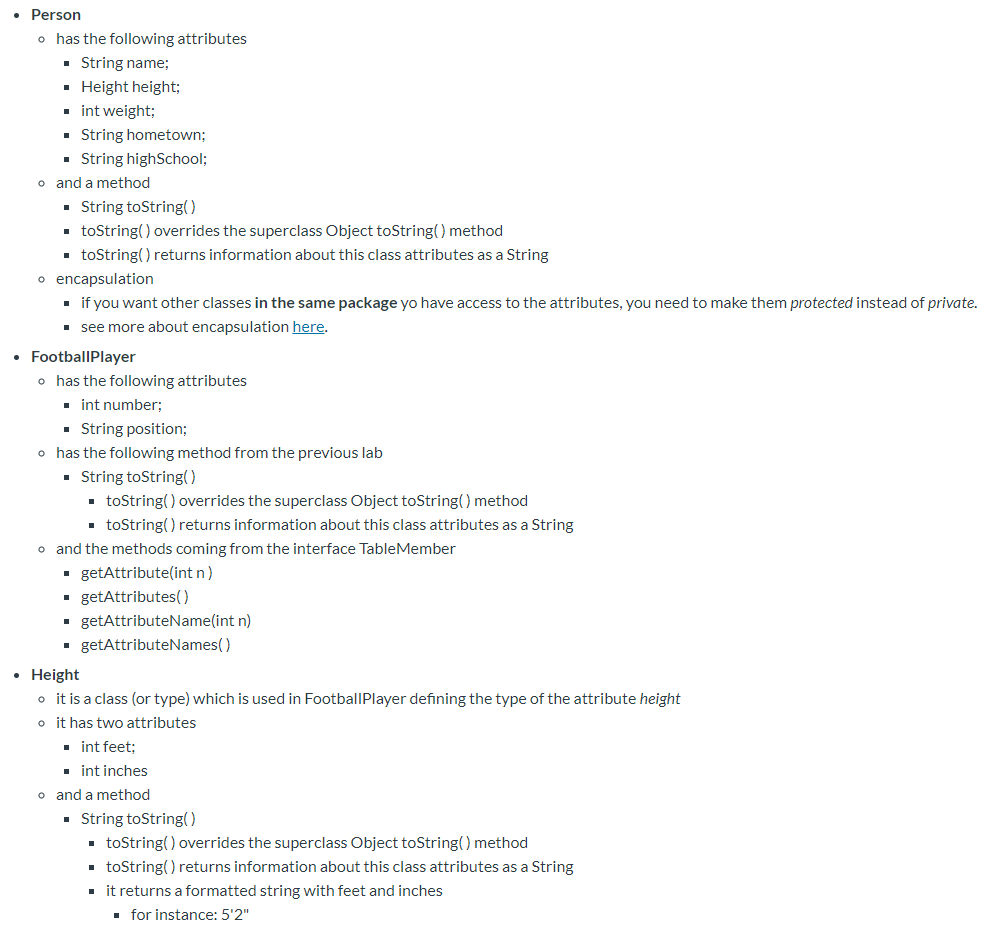
Do not use the scanner class or any other user input request. You application should be self-contained and run without user input. Assignment Objectives 1. Practice on implementing interfaces in Java o Football Player Data will implement the interface TableData 2. Overriding methods o when Football Player Data implements TableData, Football Player Data will have to write the real Java code for all the interface abstract methods Deliverables A zipped Java project according to the How to submit Labs and Assignments guide. O.O. Requirements (these items will be part of your grade) 1. One class, one file. Don't create multiple classes in the same.java file 2. Don't use static variables and methods 3. Encapsulation: make sure you protect your class variables and provide access to them through get and set methods 4. all the classes are required to have a constructor that receives all the attributes as parameters and update the attributes accordingly 5. Follow Horstmann's Java Language Coding Guidelines 6. Organized in packages (MVC - Model - View Controller) Contents TableData public void load Table(); public ArrayList getTable(); public ArrayList getHeaders(); public ArrayListgetLine(int line); public ArrayList>getLines(int firstLine, int lastline); A implements FootballPlayerData ArrayList players; void Read Players FromXML() {...} public void loadTable() {...} public ArrayList getTable() {...} public ArrayList getHeaders() {...} public ArrayListgetLine(int line) {...} public ArrayList>getLines(int firstLine, int lastline) {...}| Football Player Data will implement the interface TableData writing real code for all the abstract methods. TableMember Person String name Height height int weight String hometown String highSchool public String getAttribute(int n); public ArrayListgetAttributes(); public String getAttributeName(int n); public ArrayListgetAttributeNames(); String toString() extends implements Height int feet int inches Football Player int number String position String toString() {...} public String getAttribute(int n){...} public ArrayListgetAttributes() {...} public String getAttributeName(int n) {...} public ArrayListgetAttributeNames() {...} String toString() Football Player will implement the interface TableMember writing real code for all the abstract methods. app Model model = new Model(); Model FootballPlayerData fpData = new Football PlayerData(); System.out.println(fpData.getHeaders().toString()); System.out.println(fpData.getLine(50).toString()); ArrayList> lines = fpData.getLines(0, 4); for (int i = 0; i java version 1.0.0 121" classejava beans. object class Model. Football Player vod property" height cobject classe Hotel Height"> void property intint FootbalPlayerTable.xml vaid property voice void property School string Or. Henry A. Wise, Jr./string void propertyasane Marcus Allen st dator > Teenuste trottlaer decorrente The the a XML file with all the Football Player objects coded in XML. The method Read Players FromXML (which is ready) reads this file and create the Football Player objects that will be loaded in the ArrayList. The method ReadPlayersFromXML() requires that the classes it uses (Football Player, Height, and Person) o have an empty constructor (besides the "regular" constructor you are using o have all getters and setters (and you should already if you are using the required encapsulation) The classes App o it has the main method which is the method that Java looks for and runs to start any application o it creates an object (an instance) of the Model class . Model o has to have the code below package Model; import java.util.ArrayList; public class Model public Model() ==="); FootballPlayerData fpData = new FootballPlayerData(); System.out.println("============================== System.out.println(fpData.getHeaders().toString(); System.out.println(" =========== = = = ===== System.out.println(fpData.getLine(50).toString(); System.out.println("========= ArrayList> lines = fpData.getLines (@, 4); for (int i = 0; i players; . this is the array with all the Football Player objects o and the methods coming from the interface Data (these are the methods you need to implement and write the full code for) public void load Table(); public ArrayList getTable(); public ArrayList getHeaders(); public ArrayListgetLine(int line); . public ArrayList>getLines(int firstLine, int lastLine); o and a method to read the Football Player objects from a XML and load the ArrayList players public void Read PlayersFromXMLC) this method will be used in load Table() the method is ready and available in the Football Player Data starter file Do not use the scanner class or any other user input request. You application should be self-contained and run without user input. Assignment Objectives 1. Practice on implementing interfaces in Java o Football Player Data will implement the interface TableData 2. Overriding methods o when Football Player Data implements TableData, Football Player Data will have to write the real Java code for all the interface abstract methods Deliverables A zipped Java project according to the How to submit Labs and Assignments guide. O.O. Requirements (these items will be part of your grade) 1. One class, one file. Don't create multiple classes in the same.java file 2. Don't use static variables and methods 3. Encapsulation: make sure you protect your class variables and provide access to them through get and set methods 4. all the classes are required to have a constructor that receives all the attributes as parameters and update the attributes accordingly 5. Follow Horstmann's Java Language Coding Guidelines 6. Organized in packages (MVC - Model - View Controller) Contents TableData public void load Table(); public ArrayList getTable(); public ArrayList getHeaders(); public ArrayListgetLine(int line); public ArrayList>getLines(int firstLine, int lastline); A implements FootballPlayerData ArrayList players; void Read Players FromXML() {...} public void loadTable() {...} public ArrayList getTable() {...} public ArrayList getHeaders() {...} public ArrayListgetLine(int line) {...} public ArrayList>getLines(int firstLine, int lastline) {...}| Football Player Data will implement the interface TableData writing real code for all the abstract methods. TableMember Person String name Height height int weight String hometown String highSchool public String getAttribute(int n); public ArrayListgetAttributes(); public String getAttributeName(int n); public ArrayListgetAttributeNames(); String toString() extends implements Height int feet int inches Football Player int number String position String toString() {...} public String getAttribute(int n){...} public ArrayListgetAttributes() {...} public String getAttributeName(int n) {...} public ArrayListgetAttributeNames() {...} String toString() Football Player will implement the interface TableMember writing real code for all the abstract methods. app Model model = new Model(); Model FootballPlayerData fpData = new Football PlayerData(); System.out.println(fpData.getHeaders().toString()); System.out.println(fpData.getLine(50).toString()); ArrayList> lines = fpData.getLines(0, 4); for (int i = 0; i java version 1.0.0 121" classejava beans. object class Model. Football Player vod property" height cobject classe Hotel Height"> void property intint FootbalPlayerTable.xml vaid property voice void property School string Or. Henry A. Wise, Jr./string void propertyasane Marcus Allen st dator > Teenuste trottlaer decorrente The the a XML file with all the Football Player objects coded in XML. The method Read Players FromXML (which is ready) reads this file and create the Football Player objects that will be loaded in the ArrayList. The method ReadPlayersFromXML() requires that the classes it uses (Football Player, Height, and Person) o have an empty constructor (besides the "regular" constructor you are using o have all getters and setters (and you should already if you are using the required encapsulation) The classes App o it has the main method which is the method that Java looks for and runs to start any application o it creates an object (an instance) of the Model class . Model o has to have the code below package Model; import java.util.ArrayList; public class Model public Model() ==="); FootballPlayerData fpData = new FootballPlayerData(); System.out.println("============================== System.out.println(fpData.getHeaders().toString(); System.out.println(" =========== = = = ===== System.out.println(fpData.getLine(50).toString(); System.out.println("========= ArrayList> lines = fpData.getLines (@, 4); for (int i = 0; i players; . this is the array with all the Football Player objects o and the methods coming from the interface Data (these are the methods you need to implement and write the full code for) public void load Table(); public ArrayList getTable(); public ArrayList getHeaders(); public ArrayListgetLine(int line); . public ArrayList>getLines(int firstLine, int lastLine); o and a method to read the Football Player objects from a XML and load the ArrayList players public void Read PlayersFromXMLC) this method will be used in load Table() the method is ready and available in the Football Player Data starter file









 Study Help